

Twovio: Dual Camera Video
进轩 赵 Photo & Video iPhoneiPadiPod touch
Twovio: Dual Camera Video is a free Photo & Video app for iPhone and iPad by 进轩 赵. Rated 4.0/5 from 2 ratings. Requires iOS 26.0. Updated November 16, 2026.
- Rating
- 4.0
- 2 ratings
- Price
- Free
- on the App Store
- Size
- 11 MB
- Age 4+
- Updated
- Nov 16
- 2026 · v1.2
Screenshots



About Twovio: Dual Camera Video
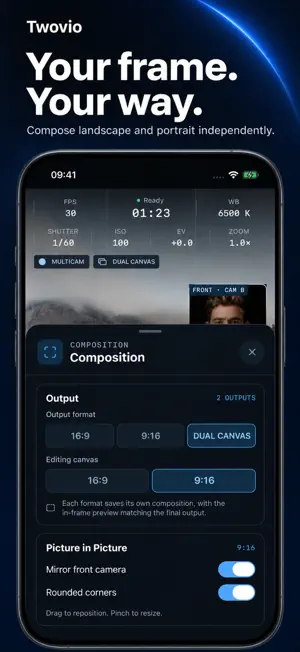
Capture the moment—and your side of the story. Twovio is an iPhone video camera for creators who want more than one view and more than one format. ONE TAKE, TWO FORMATS Record landscape 16:9, portrait 9:16, or both together. Give each format its own picture-in-picture composition so your story fits the way you share it. FRONT AND REAR, TOGETHER On compatible iPhones, record with the front and rear cameras at the same time. Show what you see and how you react. Single-camera recording is also available. MAKE THE FRAME YOURS Drag and pinch the picture-in-picture window to adjust its position and size. Swap the main and inset views, adjust mirroring, and check the alternate format while you shoot. FIND YOUR LOOK Choose from 20 built-in looks, including the natural look, and adjust their intensity. Preview a look while filming and choose whether to apply it to your output. Exposure, white balance, zoom and recording options depend on your device. KEEP YOUR FOOTAGE CLOSE Review recordings in the local library, save finished videos to Photos, export to Files, or share using the iOS share sheet. Media processing stays on your iPhone. No account is required, and there are no ads, tracking or automatic media uploads. TRIAL AND LIFETIME PRO Activate a 10-day free trial through Apple's purchase confirmation to try all features. The trial does not renew or charge automatically. After the trial, recording and new exports require the one-time Lifetime Pro in-app purchase. Existing videos remain available to play and save. Restore eligible purchases in Settings. Requires iOS 26 or later. Dual-camera capture requires a compatible iPhone. Available lenses, recording settings and manual controls vary by hardware and system conditions. Support: https://twovio-support.pages.dev/en/support.html Privacy: https://twovio-support.pages.dev/en/privacy.html Terms: https://www.apple.com/legal/internet-services/itunes/dev/stdeula/
What’s new
Version 1.2 · Updated November 16, 2026
Meet the new Twovio introduction. • See how front and rear cameras record together on supported iPhones. • Discover landscape and portrait recording from one take. • Get started in English, Simplified Chinese or Traditional Chinese. Skip the introduction anytime, or revisit it in Settings.
App privacy
The developer, 进轩 赵, reported these privacy practices to Apple.
Data Not Collected
The developer does not collect any data from this app.
Alternatives to Twovio: Dual Camera Video
Looking for apps like Twovio: Dual Camera Video? Here are 6 similar apps on the App Store. The highest rated is StackShot: Photo Video Cleaner (5.0/5), and 5 of the 6 are free to download.
-
 StackShot: Photo Video Cleaner
5.0
-
 GPS Photo Camera: Map Location
5.0
-
 StampCam - Site Camera
-
 AaronSynth
5.0
-
 Video Diary-Daily Vlog Clip
-
 FaceVeil-Blur in Photo & Video
5.0
| App | Rating | Price | Last updated | Compare |
|---|---|---|---|---|
| Twovio: Dual Camera Video | 4.0 / 5 (2 ratings) | Free | November 16, 2026 | |
| StackShot: Photo Video Cleaner | 5.0 / 5 (1) | Free | Nov 16, 2026 | Compare |
| GPS Photo Camera: Map Location | 5.0 / 5 (6) | Free | Nov 16, 2026 | Compare |
| StampCam - Site Camera | – | Free | Oct 26, 2026 | Compare |
| AaronSynth | 5.0 / 5 (1) | Free | Nov 14, 2026 | Compare |
| Video Diary-Daily Vlog Clip | – | 1.99 USD | Jul 14, 2026 | Compare |
| FaceVeil-Blur in Photo & Video | 5.0 / 5 (1) | Free | Nov 10, 2026 | Compare |