

Clipstack: Video Editor
Ryan Tag Photo & Video iPhoneiPadiPod touch
Clipstack: Video Editor is a free Photo & Video app for iPhone and iPad by Ryan Tag. Rated 5.0/5 from 4 ratings. Requires iOS 26.0.
- Rating
- 5.0
- 4 ratings
- Price
- Free
- on the App Store
- Size
- 8 MB
- Age 4+
- Updated
- Nov 16
- 2026 · v1.1
Screenshots
Save to Pinterest
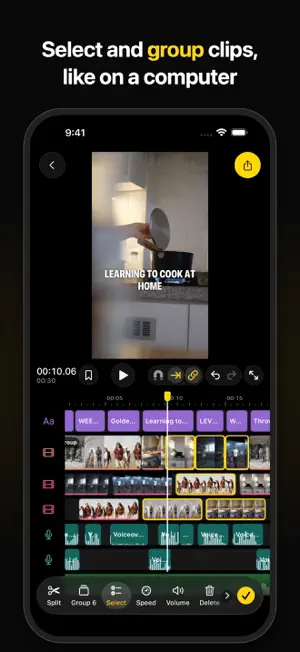
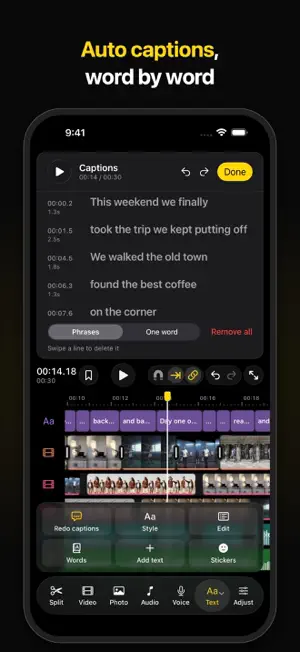

About Clipstack: Video Editor
Edit like you're on a computer, right on your phone. Clipstack gives you a real multi-track timeline, auto captions and a voiceover-first workflow, with no account, no watermark and no subscription. A REAL TIMELINE • Stack video, photos, titles, voiceover and music on as many rows as you need • Select clips across rows and group them into one, like on a computer • Split, trim, slip and reorder with a magnetic timeline and gentle snapping • Undo anything, and save versions of an edit to come back to MADE FOR IPHONE DUO • Open it up: preview, tools and timeline side by side • Fold it into a laptop: timeline on top, a real trackpad and keys below • Drag clips, trim edges and move keyframes with the pointer • On every other iPhone, the same tools in a layout made for one hand VOICEOVER FIRST • Record over your video with a count-in; it splits itself at your pauses • Pick the right shot for each line from everything you filmed • Clean up and level your voice, and duck the music under it AUTO CAPTIONS • Made on your iPhone, word by word, with the spoken word highlighted • Teach it the names and brands you say so they're spelled right • Pick a style, or restyle and edit any line TITLES, EFFECTS AND MORE • 30 title templates, speech bubbles, 3D and retro text • Animate text in, out and on a loop • Effects with live previews: blur, pixelate, glow, VHS, glitch, zoom blur and more • Masks you can keyframe, so a blur follows a face • Colour and filters, speed curves, slow zoom, transitions, green screen and cut-outs PRIVATE BY DESIGN • Your videos, voice and captions never leave your iPhone unless you share them • Export up to 4K, with loudness matched for TikTok, Reels and Shorts
What’s new
Version 1.1 · Updated November 16, 2026
New in 1.1: • HDR export: keep the bright highlights your iPhone filmed. • Import LUTs: add your own .cube files and set how strong they are. • Follow: text and stickers can stick to something moving in your video. • Zoom the timeline out until the whole project fits. • Faster position, mask and Slow Zoom controls, with snap guides. • Smoother Mask and Transform, plus fixes.
App privacy
The developer, Ryan Tag, reported these privacy practices to Apple.
Data Not Collected
The developer does not collect any data from this app.
Alternatives to Clipstack: Video Editor
Looking for apps like Clipstack: Video Editor? Here are 6 similar apps on the App Store. The highest rated is OneShot Record · Studio · Ship (5.0/5), and all 6 are free to download.
-
 Montavo: Video Editor
-
 OneShot Record · Studio · Ship
5.0
-
 CarterCanvas: Photo Editor
1.0
-
 Reels Video Editor · Reelsmith
-
 Edit Text on Photos: Glyphswap
5.0
-
 AI Subtitle Maker & Translator
5.0
| App | Rating | Price | Last updated | Compare |
|---|---|---|---|---|
| Clipstack: Video Editor | 5.0 / 5 (4 ratings) | Free | November 16, 2026 | |
| Montavo: Video Editor | – | Free | Nov 24, 2026 | Compare |
| OneShot Record · Studio · Ship | 5.0 / 5 (1) | Free | Apr 29, 2026 | Compare |
| CarterCanvas: Photo Editor | 1.0 / 5 (1) | Free | Nov 11, 2026 | Compare |
| Reels Video Editor · Reelsmith | – | Free | Nov 14, 2026 | Compare |
| Edit Text on Photos: Glyphswap | 5.0 / 5 (1) | Free | Nov 24, 2026 | Compare |
| AI Subtitle Maker & Translator | 5.0 / 5 (1) | Free | Nov 23, 2026 | Compare |