

Useful Shortcut Templates
Varsha Jadhav Productivity iPhoneiPadiPod touch
Useful Shortcut Templates is a free Productivity app for iPhone and iPad by Varsha Jadhav. Requires iOS 27.0. Updated November 20, 2026.
- Price
- Free
- on the App Store
- Size
- 14 MB
- Age 4+
- Updated
- Nov 20
- 2026 · v1.0
Screenshots
Save to Pinterest


About Useful Shortcut Templates
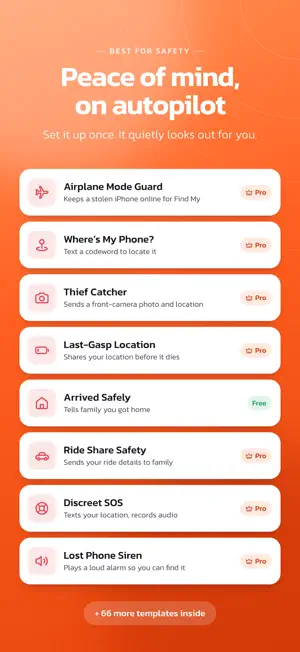
Get more out of your iPhone without learning how to build shortcuts. Useful Shortcut Templates gives you 74 ready-made shortcuts and automations. Pick one, check a few pre-filled details, and it's added to the Shortcuts app in about 30 seconds. HOW IT WORKS 1. Pick a template. Each one says in plain words what starts it and what it does. 2. Make it yours. Choose who gets a text, a battery level or a codeword. Everything is pre-filled, so you can just tap Looks good. 3. Add it to Shortcuts. The app opens Shortcuts and guides you through every tap. Automations then run by themselves. SAFETY AND ANTI-THEFT • Airplane Mode Guard: if a thief turns on Airplane Mode, your iPhone locks and stays online so Find My can still track it. • Where's My Phone?: text a secret codeword to your iPhone and your trusted contacts get its location. • Thief Catcher: your codeword makes the phone take a front-camera photo and send it with its location. • Last-Gasp Location: when the battery runs low, your location goes to family before the phone dies. • Also Arrived Safely, Ride Share Safety, Discreet SOS, Lost Phone Siren, Good-Morning Ping and more. BATTERY • Low Power Mode at the level you pick, turned on for you automatically. • Charging Announcer says your battery level when you plug in. • Unplug at 80% reminds you to unplug for better battery health. EVERYDAY AND TOOLS • Water Eject plays a low tone that pushes water out of your speaker. • Guest Wi-Fi QR shows a code your guests scan to join your Wi-Fi. • Copy Text from Image, Image Converter, Photos to PDF and Clean Link. • Escape Call, Parking Spot Saver, Tip & Split Bill, Currency Converter, Speak & Translate and more. FOCUS, HEALTH AND MONEY • Focus Sprint, Doomscroll Brake, Bedtime Wind-Down and Driving Auto-Text. • Medicine Check-In, Habit Tracker, Water Log and Workout Mode. • Auto Expense Tracker and Receipt Scanner. APPLE INTELLIGENCE • Summarize Anything, Lecture & Meeting Notes, Anything to Tasks, Private AI Chat, Recipe Saver, AI Morning Briefing and more. WHY YOU'LL LIKE IT • No coding and no jargon. Every step is written in plain words. • Every setting comes pre-filled with sensible defaults. • Run your shortcuts from Siri, widgets, the Action Button or Back Tap. • My Shortcuts shows everything you've added, what's running and anything that still needs you. • Your contacts, places and codeword stay on your iPhone. FREE AND PRO 31 templates are free. Pro unlocks all 43 Pro templates with a single one-time purchase. No subscription and no ads. Future templates are included, and Pro works with Family Sharing. GOOD TO KNOW • Requires iOS 27 and Apple's free Shortcuts app. • iOS asks you to switch each automation on once, so nothing runs without your OK. • Apple Intelligence templates need an iPhone that supports Apple Intelligence (iPhone 15 Pro or newer). • Some shortcuts ask for access, such as Location or Contacts, the first time they run. • Every template lists what it can and can't do, so there are no surprises. Privacy Policy: https://radical-website.onrender.com/privacy-policy.html Terms of Use: https://radical-website.onrender.com/terms-of-use.html
App privacy
The developer, Varsha Jadhav, reported these privacy practices to Apple.
Data Linked to You
The following data, which may be collected and linked to your identity, may be used for the following purposes:
- Purchases: Purchase History
Used for: Analytics, App Functionality
Alternatives to Useful Shortcut Templates
Looking for apps like Useful Shortcut Templates? Here are 6 similar apps on the App Store. The highest rated is Swipe To Wipe Emails - WypeBox (5.0/5), and 5 of the 6 are free to download.
-
 Diamond Keyboard
-
 Routine Run: Guided Checklists
-
 Voice Expense Tracker - Murmur
-
 Backlit!
1.0
-
 Swipe To Wipe Emails - WypeBox
5.0
-
 LockIn: App Launcher & Blocker
| App | Rating | Price | Last updated | Compare |
|---|---|---|---|---|
| Useful Shortcut Templates | – | Free | November 20, 2026 | |
| Diamond Keyboard | – | Free | Oct 31, 2026 | Compare |
| Routine Run: Guided Checklists | – | Free | Nov 19, 2026 | Compare |
| Voice Expense Tracker - Murmur | – | Free | Jul 22, 2026 | Compare |
| Backlit! | 1.0 / 5 (1) | 1.99 USD | Oct 24, 2025 | Compare |
| Swipe To Wipe Emails - WypeBox | 5.0 / 5 (1) | Free | Jun 6, 2026 | Compare |
| LockIn: App Launcher & Blocker | – | Free | Nov 1, 2026 | Compare |