

Routine Run: Guided Checklists
Denys Korolkov Productivity iPhoneiPadiPod touchApple Watch
Routine Run: Guided Checklists is a free Productivity app for iPhone and iPad by Denys Korolkov. Requires iOS 26.1. Updated November 19, 2026.
- Price
- Free
- on the App Store
- Size
- 176 MB
- Age 4+
- Updated
- Nov 19
- 2026 · v1.4
Screenshots
Save to Pinterest

About Routine Run: Guided Checklists
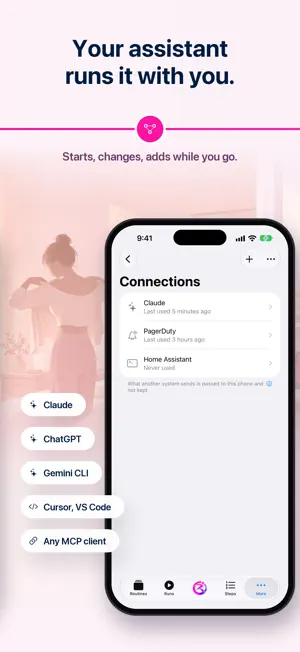
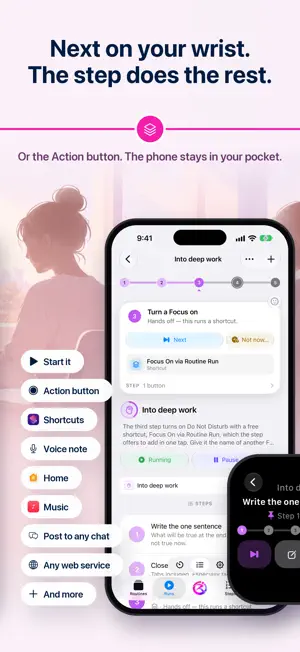
GET IT OUT OF YOUR HEAD. GET IT DONE. PASS IT ON. Every day brings things to remember, steps to follow, people to coordinate, and competing demands on your attention. Keeping it all in your head takes energy. Routine Run takes that weight off your mind. Turn tasks or processes into clear, step-by-step routines. Follow it yourself, let the app handle some actions, or share it with someone else. MORE THAN A TO-DO LIST A list reminds you what needs doing. Routine Run helps you move through the whole process, from start to finish. It keeps steps in order, shows what's next, and lets you pick up where you left off. It does what it can and asks when the decision should be yours. CREATE IT. RUN IT. SHARE IT. Create routines for yourself or others, as simple or detailed as you need. • Busy lives: Keep mornings and everyday responsibilities from piling up. • Travel: Plan trips, pack, navigate travel days, and remember what to do before leaving or returning. • Families: Help children follow familiar routines independently, organize chores, and share instructions with loved ones. • Older adults: Make everyday activities easier to understand and follow. Stay confident with familiar routines and maintain independence without remembering every step. • Work and business: Manage recurring workflows, client follow-ups, handoffs, and clear procedures to share with colleagues or teams. • Creators and influencers: Plan posts and short videos, manage production steps and client work. • Care and support: Caregivers and families can create step-by-step routines for people they support, helping them follow everyday activities at their own pace. One routine can help you organize your day. Another can give someone else more confidence and independence. Create a process once instead of explaining it again and again. Share by link, QR code, or an NFC tag on the kitchen wall. It opens even on a phone without the app. START SIMPLE. GO FURTHER WHEN YOU NEED TO. No technical knowledge needed. Choose from 51 ready-made routines, build your own, or describe what you do to get a draft. You can also paste a list or a chat with an AI assistant you already use. Start with a morning routine. Add automated actions when you need them. You don't have to learn everything at once. Routine Run adapts as your needs grow. ONE STEP AT A TIME See your current step on the iPhone Lock Screen, in Dynamic Island, or on Apple Watch. Move forward with a tap or Siri, and get reminders or check-ins when something needs your attention. Keep going while using other apps. WHEN PLANS CHANGE, YOUR ROUTINE CAN TOO Life doesn't always go according to plan. Move a step to later, postpone a routine, or carry unfinished steps into another day. Change steps as you go, then choose what to keep for next time. Questions and postponed actions wait in one place. Search past runs, notes, and answers whenever you need them. LET TECHNOLOGY DO MORE FOR YOU • Start routines by time, location, Focus, QR codes, or NFC tags. Calendar events and app notifications can also trigger runs through Shortcuts automation on iOS 27. • Let steps run Apple Shortcuts, work with Calendar and Reminders, control smart home scenes, or connect to compatible services. • Connect ChatGPT, Claude, and other compatible AI assistants through MCP to create, edit, and start routines. You control when approval is required. Some features need setup, permissions, or compatible devices. YOUR ROUTINES. YOUR CONTROL. No account, no analytics, no ads, no tracking. Routines stay on your device by default, with optional iCloud sync. You choose which external services to connect. Supports larger text, Reduce Motion, and Assistive Access. START FREE All features included. 3 routines free forever. Pro: unlimited routines. Start with what matters today. Go further whenever you need to. Terms of Use: https://www.apple.com/legal/internet-services/itunes/dev/stdeula/ Privacy Policy: https://routinerun.com/privacy
What’s new
Version 1.4 · Updated November 19, 2026
Moments that happen. A date can now be "Happens": back from the walk, out of the door. Mark it with Now, from In hand, on your Apple Watch, or let a place, a Focus, a workout or a Shortcuts automation mark it. Whatever is counted after it comes again each time it happens. Dates counted from dates. The return a week after the departure moves when the departure does. Every date can say what it is, and the action Mark a date gives any date its day — now, or six months from now. Values kept across runs. A number on a routine carries on from run to run: Posts goes up by one each time a post is finished. In hand offers a routine to start only for a reason it can name — due soon, at a place, in a Focus, after a moment, or when you said so with Suggest when. Focus rules are Focuses now, and you can delete one from the switcher. A button on a step can put the step aside, give it a deadline, or ask you again later. A run held by a status such as Blocked shows Resume on the Lock Screen. Current Step on the Home Screen is the Lock Screen's card. A finished run offers to archive its routine. Send how it went. A run, finished or still going, can go back to whoever wrote the routine, and they keep it under the routine. Turn the card to another step and its first row takes you back to the one in hand. Start from here begins the walk again at that step. Five new starters: after a release, between sessions, a session agenda, a manager's daily round and handing the shift over. History's rows open what they are about again. And it is quicker: switching tabs, opening a run, the filter, importing and the first launch.
App privacy
The developer, Denys Korolkov, reported these privacy practices to Apple.
Data Linked to You
The following data, which may be collected and linked to your identity, may be used for the following purposes:
- User Content: Other User Content
- Identifiers: User ID, Device ID
Used for: App Functionality
Alternatives to Routine Run: Guided Checklists
Looking for apps like Routine Run: Guided Checklists? Here are 6 similar apps on the App Store. The highest rated is Day Dial - Year Progress Bar (5.0/5), and all 6 are free to download.
-
 Useful Shortcut Templates
-
 Pastronaut: Clipboard History
-
 CopyPasta - Clipboard History
-
 Day Dial - Year Progress Bar
5.0
-
 Metanote-notes,docs,agenda
4.3
-
 Spiffy Mobile App
| App | Rating | Price | Last updated | Compare |
|---|---|---|---|---|
| Routine Run: Guided Checklists | – | Free | November 19, 2026 | |
| Useful Shortcut Templates | – | Free | Nov 20, 2026 | Compare |
| Pastronaut: Clipboard History | – | Free | Oct 28, 2026 | Compare |
| CopyPasta - Clipboard History | – | Free | Mar 26, 2026 | Compare |
| Day Dial - Year Progress Bar | 5.0 / 5 (6) | Free | Apr 8, 2025 | Compare |
| Metanote-notes,docs,agenda | 4.3 / 5 (15) | Free | Jul 16, 2025 | Compare |
| Spiffy Mobile App | – | Free | Oct 2, 2026 | Compare |