

Pastronaut: Clipboard History
Berk Akbay Productivity iPhoneiPadiPod touchMac
Pastronaut: Clipboard History is a free Productivity app for iPhone and iPad by Berk Akbay. Requires iOS 17.0. Updated October 28, 2026.
- Price
- Free
- on the App Store
- Size
- 14 MB
- Age 4+
- Updated
- Oct 28
- 2026 · v1.3
Screenshots
Save to Pinterest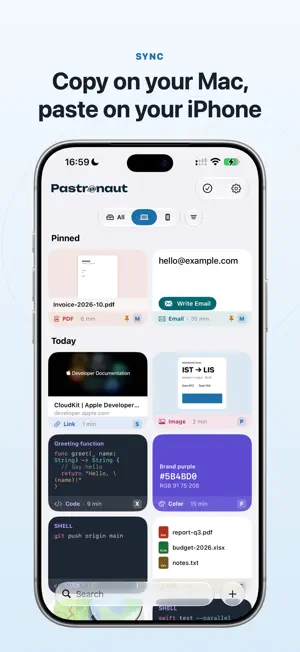


About Pastronaut: Clipboard History
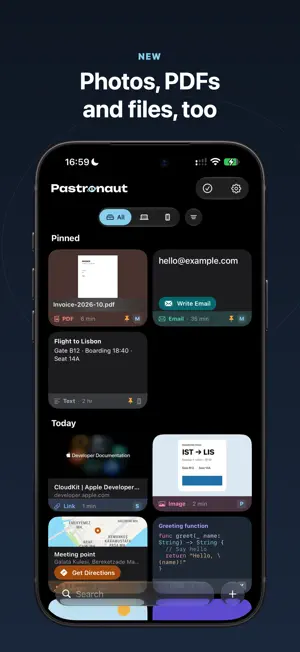
Everything you copy on iPhone and Mac — text, links, photos, PDFs and files — in one private history, with a keyboard that pastes any of it in any app. No account. No subscription. No tracking. ONE CLIPBOARD, TWO DEVICES – Copy on your Mac, find it on your iPhone a moment later, and the other way round – Screenshots, photos, PDFs and files travel too, not just text – It all syncs through your own iCloud; there are no Pastronaut servers – Great on its own as well: Pastronaut for Mac is optional PASTE ANYTHING, IN ANY APP – The Pastronaut keyboard shows your clips as tidy thumbnails, newest first, with the latest copy from your Mac on top – Tap a clip to type it; with Full Access, tap a photo or file to put it on the clipboard – Paste a list in order: start a queue, and every tap types the next one PHOTOS, PDFS AND FILES – Screenshots and photos show as pictures, PDFs show their first page, files show their name and size – The words inside images and PDFs are searchable: type "invoice", find the invoice – Select text with Live Text, mark up a copy, save to Photos or Files, or share it – You choose the largest item and how much iCloud space they may use FIND IT IN SECONDS – Search text, titles and the words inside pictures – Filter by source (All, Mac, iPhone), by kind (links, code, addresses, images, PDFs and more) and by collection, all at once – Give any clip a title so it's easy to spot SAVE IN ONE TAP iPhone lets only the app on screen read the clipboard, so Pastronaut makes saving a single tap: – Open the app (Save Clipboard on Opening), or tap + and then Paste – Share text, links, photos and files to Pastronaut, or tap "Save to Pastronaut" in the share sheet – Use the Control Center button, Back Tap or the Action button – Scan text or a document with the camera EVERY KIND, ITS OWN CARD – Addresses with a map and directions, links with a page preview, code in color, colors as swatches – Call and Write Email buttons, and the icon of the Mac app a copy came from PIN, COLLECT, ORGANIZE – Pin what you reuse; keep addresses, snippets or a project's links in collections – Combine clips into one, export a collection, undo a delete – Keep History for a day, a week, a month, a year or forever WIDGETS, CONTROLS AND SHORTCUTS – Recent clips on the Home Screen, the latest on the Lock Screen – Control Center: save the clipboard, or pause saving for a while – Shortcuts: get, copy and save clips, and add them to a collection PRIVATE BY DESIGN – No account, no servers, no analytics, no ads – Text, titles and files are encrypted on your device before they reach iCloud, end-to-end with Advanced Data Protection – One-time codes, card numbers and IBANs are never saved automatically, and one switch keeps them off iCloud on every device – Optional Face ID lock; your clips are covered while the screen is recorded FREE AND OPEN SOURCE No subscription, no in-app purchases, and the source code is public. Pastronaut for Mac is free on the Mac App Store.
What’s new
Version 1.3 · Updated October 28, 2026
Pastronaut 1.3: your clipboard learned to carry pictures. • Photos, screenshots, PDFs and files now travel between your Mac and your iPhone. Copy a screenshot on the Mac, and it's on your iPhone before your coffee cools. • The words inside images and PDFs are searchable. Type "invoice", find the invoice. Revolutionary, we know. • Open a picture to select its text with Live Text, mark up a copy, save it to Photos or Files, or share it. • The keyboard fetches a picture or PDF from your Mac by itself, even if you haven't opened the app since. File names come along too. • A new filter bar: All, Mac and iPhone in one glass capsule you can slide your finger along, and a filter button for every kind (PDFs included) and your collections. Mix them freely. • The + button now holds Paste, Type a Clip, Scan Text and Scan Document. Paste shows up only when there's something to paste. • Settings has a new Images & Files page: the largest item, how much iCloud space to use, and image quality. • Privacy switches are now shared with your Mac. Set them once, enjoy them twice. • Cards from your Mac show the icon of the app they came from. • Keep History: let old clips go after a day, a week, a month or a year. Pinned clips and collections stay. • The setup guide was rebuilt: one task at a time, one big button, no scrolling treasure hunt. Paste permission takes three short steps (try, allow, verify), and it checks each one by itself. • Sync got sturdier, thanks to a very picky test that tossed copies between two devices for hours.
App privacy
The developer, Berk Akbay, reported these privacy practices to Apple.
Data Not Collected
The developer does not collect any data from this app.
Alternatives to Pastronaut: Clipboard History
Looking for apps like Pastronaut: Clipboard History? Here are 6 similar apps on the App Store. The highest rated is Inksightful: Journal archive (5.0/5), and all 6 are free to download.
-
 Useful Shortcut Templates
-
 Family Atlas
-
 pano-srm
-
 PixelPomo
-
 SilicIA - Private AI Assistant
-
 Inksightful: Journal archive
5.0
| App | Rating | Price | Last updated | Compare |
|---|---|---|---|---|
| Pastronaut: Clipboard History | – | Free | October 28, 2026 | |
| Useful Shortcut Templates | – | Free | Nov 20, 2026 | Compare |
| Family Atlas | – | Free | Nov 25, 2026 | Compare |
| pano-srm | – | Free | Nov 6, 2026 | Compare |
| PixelPomo | – | Free | Sep 1, 2025 | Compare |
| SilicIA - Private AI Assistant | – | Free | Nov 12, 2026 | Compare |
| Inksightful: Journal archive | 5.0 / 5 (1) | Free | Jun 15, 2026 | Compare |