

Doodlepad Whiteboard
Ersin Ucar Productivity iPhoneiPadiPod touch
Doodlepad Whiteboard is a free Productivity app for iPhone and iPad by Ersin Ucar. Requires iOS 17.0. Updated November 26, 2026.
- Price
- Free
- on the App Store
- Size
- 11 MB
- Age 4+
- Updated
- Nov 26
- 2026 · v2.0
Screenshots
Save to Pinterest


About Doodlepad Whiteboard
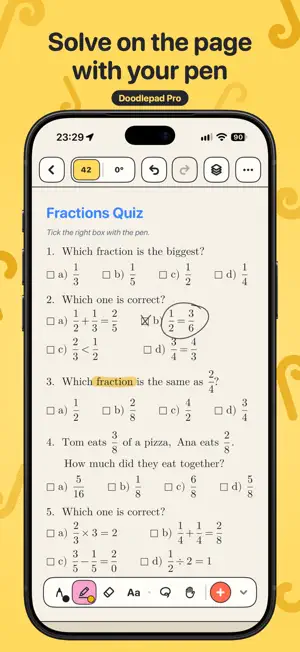
Doodlepad is a whiteboard for your ideas. Draw, write by hand and plan on a board with no edges, or on paper sheets. It works with Apple Pencil and with your finger. DRAW AND WRITE • Fine, ballpoint, fountain and pencil tips, with Apple Pencil pressure • A marker for highlighting, and an eraser for ink • Hold at the end of a line to make it straight, or a rough box or circle neat • A ruler for straight lines that shows their length • The board moves along while you write ADD TO YOUR BOARD • Sticky notes and text • Shapes, lines, arrows and mind maps • Photos and camera pictures, with background removal • AI images with Image Playground, on devices that have it • Math formulas (Pro) PAPER • Endless boards, or A4, A5, Letter, 16:9 and card sheets • Dots, grid, lines or plain paper in light colors • Start a board from a PDF and write on its pages (Pro) • Save a board as a picture or a PDF ORGANIZE • Folders, search and sorting • Layers you can hide and lock (more than one with Pro) • Select, move, resize, rotate, group and lock anything • Recently Deleted keeps boards for 30 days PRIVATE No account, no ads, no tracking. Your boards stay on your device. DOODLEPAD PRO 3 boards are free. Pro gives you unlimited boards, PDF boards, more than one layer and math formulas. Pro is a subscription, yearly with a free first week or monthly. It renews until you cancel in your Apple Account settings. If you bought Pro in version 1, you keep it. Terms of Use: https://www.apple.com/legal/internet-services/itunes/dev/stdeula/ Privacy: https://ucrers.github.io/doodlepad-site/privacy.html
What’s new
Version 2.0 · Updated November 26, 2026
Doodlepad 2.0 has a new drawing engine, built from scratch. Lines are smoother, and big boards open fast. Pro is now a subscription, yearly with a free first week or monthly. If you bought Pro before, you keep it. Boards made in version 1 don't open in 2.0. Sorry if you had work there. Write to us from the support page and we'll help.
App privacy
The developer, Ersin Ucar, reported these privacy practices to Apple.
Data Not Collected
The developer does not collect any data from this app.
Alternatives to Doodlepad Whiteboard
Looking for apps like Doodlepad Whiteboard? Here are 6 similar apps on the App Store. The highest rated is NoteM: AI Notes, PDF & Lessons (5.0/5), and all 6 are free to download.
-
 SketchCalc: Bill Split & Math
-
 Kami — Quick Notes
-
 UCNotes
-
 Noterat: STEM & AI Notes
-
 OpenPage: Markdown Reader
-
 NoteM: AI Notes, PDF & Lessons
5.0
| App | Rating | Price | Last updated | Compare |
|---|---|---|---|---|
| Doodlepad Whiteboard | – | Free | November 26, 2026 | |
| SketchCalc: Bill Split & Math | – | Free | Nov 23, 2026 | Compare |
| Kami — Quick Notes | – | Free | Oct 20, 2026 | Compare |
| UCNotes | – | Free | Nov 18, 2026 | Compare |
| Noterat: STEM & AI Notes | – | Free | Nov 5, 2026 | Compare |
| OpenPage: Markdown Reader | – | Free | Nov 6, 2026 | Compare |
| NoteM: AI Notes, PDF & Lessons | 5.0 / 5 (1) | Free | Nov 26, 2026 | Compare |