

Noterat: STEM & AI Notes
Westin Digital AB Productivity iPhoneiPadiPod touch
Noterat: STEM & AI Notes is a free Productivity app for iPhone and iPad by Westin Digital AB. Requires iOS 26.0. Updated October 19, 2026.
- Price
- Free
- on the App Store
- Size
- 57 MB
- Age 4+
- Updated
- Oct 19
- 2026 · v1.14
Screenshots



About Noterat: STEM & AI Notes
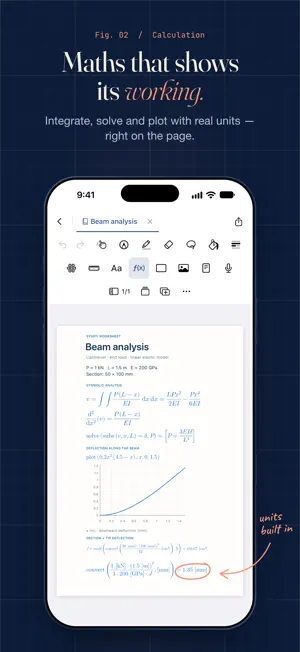
Bring your notes, drawings, and calculations together with Noterat—a workspace for engineers, students, and anyone who thinks on paper. Capture ideas by hand, work with DXF drawings, extrude a closed drawn profile into 3D, and explore mathematics with SymPy. Keep your reasoning next to your sketches and results, from the first idea to the finished solution. • Handwritten notes Write and sketch naturally with Apple Pencil. Use pens, highlighters, shapes, and text to explain your ideas, and lay a strip of tape over a line of text. Scribble back and forth over ink to erase it—the strokes you cross go with the scribble, in one undo step. Import PDFs to annotate, add images, and organise your work into notebooks. • Shapes and lines Freehand right triangles snap to exactly 90 degrees, and nearly level squares, rectangles, triangles, and ellipses straighten fully. Bend a straight stroke into a parabola, or hang it as a rope of a given length. • DXF drawings Create, import, edit, and export 2D CAD drawings. Work with coordinates, snapping, and layers, then place drawings in your notes at a chosen scale. Share your work in DXF format for use in other CAD software. • 3D from a drawn profile Lasso a closed ink profile—a circle, a tube, an I-beam—and extrude it into a 3D body. Turn it, zoom, and set the depth in the ruler's unit. It is drawn as vector art on screen and in PDF export, and moves, scales and recolours like any other object. • Colour and fill Work from a preset palette—Classic, Nordic, Botanical, Terracotta, Twilight—or save your own, mix a colour, or pick one with the eyedropper. Fill a closed area with flat colour or a pattern, or drag a colour onto it. • Calculations with SymPy Calculate directly on the page with an embedded SymPy engine. Solve equations and systems, work with matrices, evaluate derivatives and integrals, and plot functions. Use exact expressions or numerical results, with supported unit calculations and conversions. Copy cells as LaTeX and pull LaTeX in from Markdown. Calculations run locally on your device. • Page headers and courses Put a header on the sheet with your own text, name, date, course name and course code. It repeats on every page and exports as selectable text in PDF. Mark a folder as a course, and the documents in it can use those fields. • The area around the paper An optional theme colours the area around the paper: twelve pastel shades, or a dark desk with flickering drawn candles. Paper and exports are untouched. • A connected workspace Open notebooks, Markdown notes, and DXF drawings in tabs. View documents side by side on iPad, organise them with folders and tags, and search across handwriting, typed text, and imported content. Share a notebook or export it as PDF from the document row or a pane header. • Noterat Pro An optional subscription, monthly or yearly, with a free first week for new subscribers. It adds the features that run through Noterat's server: Share as link, a read-only web link to a notebook; Share live, to write in a notebook together with up to four others, who don't need Pro; and the Claude/ChatGPT MCP, which lets your own Claude or ChatGPT read your notebooks and add text, images, calculations, trusses, drawings and flashcards. Everything else in Noterat is free. The subscription renews automatically until you cancel it in your Apple Account settings. Whether you are working through a lecture, developing a design, or documenting a technical project, Noterat gives your ideas room to take shape. Terms of Use (EULA): https://www.apple.com/legal/internet-services/itunes/dev/stdeula/
What’s new
Version 1.14 · Updated October 19, 2026
Calculation cells • Sliders: drag a number in a cell, such as b = 200[mm], and the whole notebook recalculates as you go. • Long formulas and answers wrap within the page instead of running off the edge, and a cell that grows pushes what is below it down. • New functions: round(x, n), concat to join lists, and N(x) for a decimal value. Conditions • Select an object or your handwriting with the lasso and give it a condition from your calculations, such as η ≤ 1. It turns green or red, or shows and hides, depending on whether the condition holds. A dot in the margin marks it. Canvas • Import your course material from Canvas: add your access token under Settings → Canvas, and each course becomes a folder named with its course code. Fetching again only brings in new files. Also new • Your connected AI can import PDFs, create subfolders, move notebooks and folders to the trash and back, and erase pen strokes. Its edits are faster, and the notebook shows "AI is editing the notebook…" while it works. • Fixes and polish.
App privacy
The developer, Westin Digital AB, reported these privacy practices to Apple.
Data Linked to You
The following data, which may be collected and linked to your identity, may be used for the following purposes:
- User Content: Other User Content
- Identifiers: User ID, Device ID
Used for: App Functionality
Alternatives to Noterat: STEM & AI Notes
Looking for apps like Noterat: STEM & AI Notes? Here are 6 similar apps on the App Store. The highest rated is Gravity – Minimal Notes (5.0/5), and 4 of the 6 are free to download.
-
 ThinQspace
-
 Modexe
-
 Deflection Pro
4.7
Deflection Pro
4.7
-
 Gravity – Minimal Notes
5.0
Gravity – Minimal Notes
5.0
-
 GenieNote: Notes & Calculator
-
 Handwritten Digital Notes
| App | Rating | Price | Last updated | Compare |
|---|---|---|---|---|
| Noterat: STEM & AI Notes | – | Free | October 19, 2026 | |
| ThinQspace | – | Free | Aug 5, 2026 | Compare |
| Modexe | – | Free | Aug 22, 2026 | Compare |
| Deflection Pro | 4.7 / 5 (16) | 19.99 USD | Jun 16, 2025 | Compare |
| Gravity – Minimal Notes | 5.0 / 5 (9) | 9.99 USD | Oct 8, 2026 | Compare |
| GenieNote: Notes & Calculator | – | Free | Aug 11, 2026 | Compare |
| Handwritten Digital Notes | – | Free | Oct 24, 2026 | Compare |