

Gravity – Minimal Notes
Tristan Manchester Productivity iPhoneiPadiPod touch
Gravity – Minimal Notes is a paid Productivity app for iPhone and iPad by Tristan Manchester. Rated 5.0/5 from 9 ratings. Requires iOS 17.0.
- Rating
- 5.0
- 9 ratings
- Price
- 9.99 USD
- on the App Store
- Size
- 36 MB
- Age 4+
- Updated
- Oct 8
- 2026 · v2.0.6
Screenshots



About Gravity – Minimal Notes
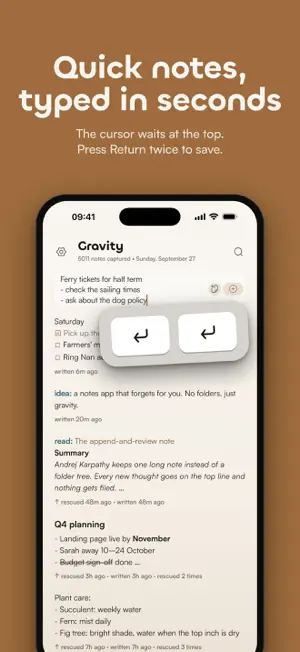
Gravity keeps all your notes in one stream, with the newest at the top. As you add more, older notes sink down the list. When one of them still matters, swipe it right and it comes back to the top. The idea comes from Andrej Karpathy's append-and-review note: write everything in one place, read back through it now and then, and move up whatever you still care about. Gravity has no folders, so there's nothing to file. Writing The cursor is waiting at the top when you open the app. Type your note and press Return twice, or tap the add button. A half-written draft stays where you left it. Rescuing and tidying Swipe right on a note to rescue it. Swipe left to archive, delete, share or copy. Archived notes have a page of their own, and deleted notes stay in Deleted Notes until you restore them or clear them out. Markdown and checklists Headings, bold, italics, lists, links and quotes show formatted in the stream. Start a line with "- [ ]" to make a checklist, then tick items off without opening the note. In the editor the formatting appears as you type, and a small bar above the keyboard adds headings, bold, lists and checklists. Everything is saved as plain Markdown text. Tags Start a note with todo:, idea:, read: or any word followed by a colon, and it gets a colour of its own. Type todo: into search to see only those notes. There's no tag manager to look after. Search Search covers every note on your phone, archived ones too, and works offline. It matches parts of words and ignores accents. Getting notes in The Home Screen widget starts a new note or pastes in whatever you last copied. You can also share text or a link from another app, and it becomes a new note at the top of the stream. Privacy Your notes are stored on your iPhone. Gravity has no accounts and no analytics, and it doesn't collect any data. If you want your notes on your other Apple devices, turn on iCloud sync; it also works with Gravity for Mac, which is sold separately. You can export everything as JSON or Markdown at any time. Looks Choose light, dark or OLED black, or follow the system, and pick from three text sizes. There's a stats page too, worked out on your phone, of course. Price You pay once. There's no subscription, no in-app purchases and no ads. Privacy policy: https://www.gravitynotes.app/privacy-policy
Ratings & reviews
5.0
9 ratings
What’s new
Version 2.0.6 · Updated October 8, 2026
Export your notes, with more reliable editing and sync. • Export all your notes as Markdown or plain text in a ZIP file. • Right-to-left notes display correctly, and Hebrew lettered lists continue as you type. • Replacing notes during import now includes a backup first, with safer handling of changes across devices. • Improved conflict handling helps preserve edits when the same note changes on different devices. • Search results refresh after edits and undo. Undo and draft handling better preserve your latest text. • Sharing, exports and file pickers open more reliably after closing a panel.
App privacy
The developer, Tristan Manchester, reported these privacy practices to Apple.
Data Not Collected
The developer does not collect any data from this app.
Alternatives to Gravity – Minimal Notes
Looking for apps like Gravity – Minimal Notes? Here are 6 similar apps on the App Store. The highest rated is Prazo: Calendar & To-Do List (5.0/5), and all 6 are free to download.
-
 Prism Notes
4.9
-
 Dialed: Radial Day Planner
-
 HabitBook - Habit Tracker
4.2
-
 RIFT NOTES + Voice Memos
4.7
-
 Prazo: Calendar & To-Do List
5.0
-
 Kosshi Outliner
5.0
| App | Rating | Price | Last updated | Compare |
|---|---|---|---|---|
| Gravity – Minimal Notes | 5.0 / 5 (9 ratings) | 9.99 USD | October 8, 2026 | |
| Prism Notes | 4.9 / 5 (38) | Free | Oct 22, 2026 | Compare |
| Dialed: Radial Day Planner | – | Free | Aug 26, 2026 | Compare |
| HabitBook - Habit Tracker | 4.2 / 5 (5) | Free | Aug 18, 2025 | Compare |
| RIFT NOTES + Voice Memos | 4.7 / 5 (9) | Free | Jul 17, 2026 | Compare |
| Prazo: Calendar & To-Do List | 5.0 / 5 (1) | Free | Oct 19, 2026 | Compare |
| Kosshi Outliner | 5.0 / 5 (4) | Free | Oct 15, 2026 | Compare |