

GenieNote: Notes & Calculator
Leo Rivas-Micoud Productivity iPhoneiPadiPod touch
GenieNote: Notes & Calculator is a free Productivity app for iPhone and iPad by Leo Rivas-Micoud. Requires iOS 17.6. Updated August 11, 2026.
- Price
- Free
- on the App Store
- Size
- 7 MB
- Age 4+
- Updated
- Aug 11
- 2026 · v1.0.6
Screenshots


About GenieNote: Notes & Calculator
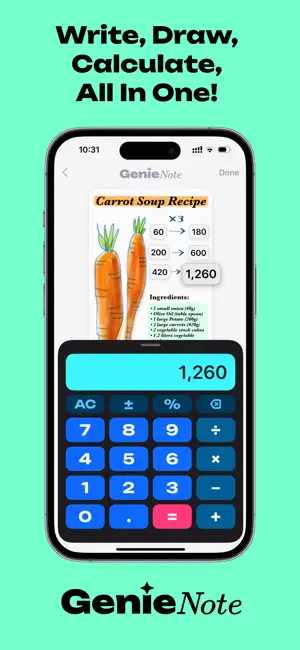
Scribble Smarter!! Write, sketch, and calculate — all on one canvas. GenieNote turns your iPhone and iPad into a freeform workspace where handwritten notes, a smart calculator, photo stickers, and sticky labels live together on the same page. HANDWRITE & SKETCH FREELY • Natural ink with Apple Pencil or your finger • Smart canvas: pinch to zoom, pan, and resize freely • Quick-access pen, highlighter, eraser, and color presets BUILT-IN CALCULATOR • Basic arithmetic with ± and % (more functions coming soon) • Drag results onto the page as floating number stickers • Double-tap any saved number to label it ("budget", "total"…) • Drag any number back into the calculator to reuse it • Pro tip: tap an operator (like +), then tap any number on the canvas for instant copy & paste STICKY MEMO LABELS • Place anywhere, resize from any corner • Choose background color, text color, size, and font PHOTO COLLAGES & STICKERS • Add photos from your library or camera • Automatic background removal turns photos into stickers • Fine-tune cutouts by hand with the eraser • Mix photos with sketches for one-of-a-kind pages MADE FOR REAL LIFE • Class notes: formulas, diagrams, and instant math — great for STEM and test prep • Budgets & expenses: shopping lists, travel costs, and running totals without leaving the page • Recipes: ingredients, steps, portions, and conversions in one place • Events & projects: plan parties, track tasks and costs, brainstorm freely • Fitness & meals: log workouts, calories, and goals • Journaling: mind maps, story layouts, and visual goal boards • DIY: sketch plans, note measurements, and estimate materials • Travel & daily planning: itineraries, checklists, and daily budgets WHY GENIENOTE? • Visual memory: keep key figures right next to your sketches • Zero context switching: no more jumping between a notes app and a calculator • For students, planners, engineers, designers — anyone who thinks in words AND numbers Universal app: runs great on iPhone and iPad, optimized for Apple Pencil.
What’s new
Version 1.0.6 · Updated August 11, 2026
This update makes GenieNote dramatically lighter and faster: • Major storage cleanup: the app now automatically removes gigabytes of leftover data that older versions could accumulate — many users will see its storage footprint shrink dramatically • Deleting a note now frees up space immediately • Saving is faster and more reliable, especially in notes with many photos • Fixed: cut-out photo stickers losing their transparent background after reopening a note • Notes trapped by older versions may automatically reappear in your list — welcome back! (If you had deleted them, deleting them again now sticks.) Thanks for using GenieNote — questions or ideas? We'd love to hear from you.
App privacy
The developer, Leo Rivas-Micoud, reported these privacy practices to Apple.
Data Not Linked to You
The following data, which may be collected but is not linked to your identity, may be used for the following purposes:
- Location: Coarse Location
- Identifiers: Device ID
- Usage Data: Product Interaction, Advertising Data
- Diagnostics: Crash Data, Performance Data, Other Diagnostic Data
Used for: Third-Party Advertising, Analytics
Alternatives to GenieNote: Notes & Calculator
Looking for apps like GenieNote: Notes & Calculator? Here are 6 similar apps on the App Store. The highest rated is Notelit (5.0/5), and 5 of the 6 are free to download.
-
 CalcDraw
4.8
CalcDraw
4.8
-
 メモ電卓: メモ付き電卓で計算をもっと便利に
-
 Notelit
5.0
Notelit
5.0
-
 Memo-Only Memopad
-
 Plana - Handwriting Planner
3.0
Plana - Handwriting Planner
3.0
-
 WriteTex - Math OCR & LaTeX
3.0
WriteTex - Math OCR & LaTeX
3.0
| App | Rating | Price | Last updated | Compare |
|---|---|---|---|---|
| GenieNote: Notes & Calculator | – | Free | August 11, 2026 | |
| CalcDraw | 4.8 / 5 (4) | Free | Oct 2, 2026 | Compare |
| メモ電卓: メモ付き電卓で計算をもっと便利に | – | Free | Oct 25, 2023 | Compare |
| Notelit | 5.0 / 5 (1) | Free | Oct 15, 2026 | Compare |
| Memo-Only Memopad | – | 0.49 USD | Jun 23, 2025 | Compare |
| Plana - Handwriting Planner | 3.0 / 5 (2) | Free | Oct 21, 2026 | Compare |
| WriteTex - Math OCR & LaTeX | 3.0 / 5 (2) | Free | Jan 12, 2026 | Compare |