

Memo-Only Memopad
GIGABIT GAME LAB Productivity iPhoneiPadiPod touch
Memo-Only Memopad is a paid Productivity app for iPhone and iPad by GIGABIT GAME LAB. Requires iOS 12.0. Updated June 23, 2025.
- Price
- 0.49 USD
- on the App Store
- Size
- 25 MB
- Age 4+
- Updated
- Jun 23
- 2025 · v1.0.6
Screenshots
About Memo-Only Memopad
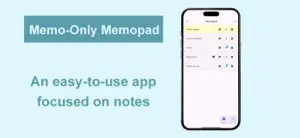
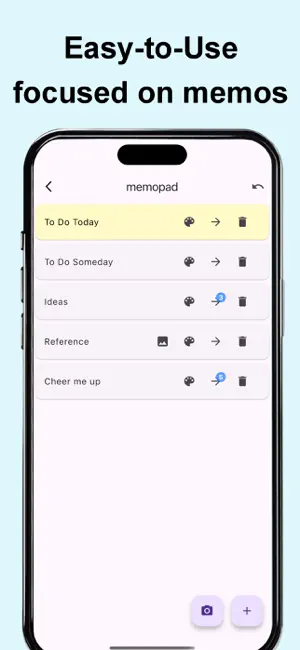
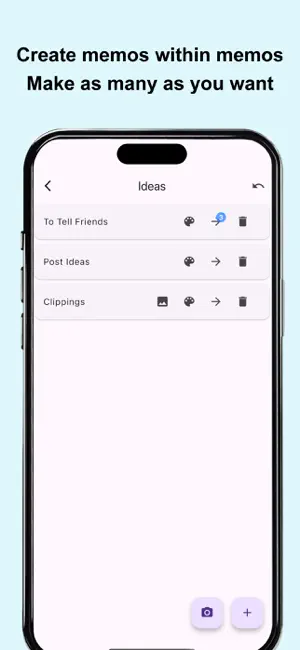
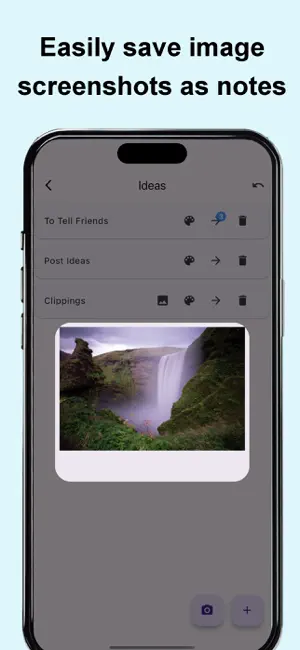
This simple note app for person who wanted an app focused solely on making note-taking as easy as possible. The key point is its instant clarity and simple usability at a glance, yet it still includes all the essential features you’d expect from a memo app. ■ Memo-Only Memo App Features -Folder-in-folder organization: create memos within child folders, with automatic display of the number of child memos -Undo function: return to your previous action with a single tap -Easily reorder memos by long-pressing and dragging -Create image memos (use the camera or select from your photo library) -Color-code your memos -Autosave -Works offline—even without an internet connection -Supports eye-friendly, popular dark mode (automatically applies if your device is set to dark mode) -Lightweight app for fast startup -One-time purchase: no subscriptions or ads ■ Recommended Uses -Quickly jot down your ideas as soon as they come to mind! Use text or camera photos. Categorize freely for easy searching! -Shopping list memos: color-code items as you buy them! -To-do lists: create today’s or this week’s to-dos, easily categorize by type! Mark completed tasks with colors! -Save screenshots of news you see while browsing on your phone! -List memorable quotes by person for quick reference and motivation! -Draft notes for essays or novels—easy to reorder and organize! -Brainstorm ideas like sticking sticky notes—perfect for planning sessions! -Create separate memo folders for each person you interact with—use as a topic notebook for friends or family! -Perfect as a flashcard app for students or professionals: write the question on the memo, the answer in a child memo, and color memos as you master them for a sense of achievement! -Daily ranking check: record as text or screenshot! ■ How to Use ▶ Creating Memos -Tap the + icon at the bottom right to create a text memo. -Tap the camera icon at the bottom right to take a photo or select one from your album to create an image memo. ▶ Operating Memos -Tap memo text to edit. -Use the icons on the right to “Change color,” “Move to child folder,” or “Delete.” -For image memos, an image icon will appear—tap it to view the saved image. -The number of child memos is shown as a number on the arrow to the child folder. ▶ Undo Action -Use the Undo button at the top right to return to your previous action—rest easy, even if you delete something by mistake!
What’s new
Version 1.0.6 · Updated June 23, 2025
-fixed some bugs.
App privacy
The developer, GIGABIT GAME LAB, reported these privacy practices to Apple.
Data Not Collected
The developer does not collect any data from this app.
Alternatives to Memo-Only Memopad
Looking for apps like Memo-Only Memopad? Here are 6 similar apps on the App Store. The highest rated is Vertical Calendar. (4.0/5), and 2 of the 6 are free to download.



| App | Rating | Price | Last updated | Compare |
|---|---|---|---|---|
| Memo-Only Memopad | – | 0.49 USD | June 23, 2025 | |
| Doit - ひとつのタスクに集中するためのアプリ | – | 0.49 USD | Jun 26, 2025 | Compare |
| 計算用紙 | – | 1.99 USD | Oct 27, 2026 | Compare |
| Vertical Calendar. | 4.0 / 5 (6) | 1.99 USD | Oct 14, 2026 | Compare |
| MultiCalendar | – | Free | Mar 20, 2026 | Compare |
| kaerumemo | – | Free | Mar 28, 2026 | Compare |
| PDF Craft - Toolkit | – | 0.99 USD | Apr 7, 2026 | Compare |
Compare Memo-Only Memopad with the top alternatives: ratings, updates, ASO score and keyword gaps →