

UCNotes
Unit Circle Math Tutoring LLC Productivity iPhoneiPadiPod touch
UCNotes is a free Productivity app for iPhone and iPad by Unit Circle Math Tutoring LLC. Requires iOS 17.0. Updated October 21, 2026.
- Price
- Free
- on the App Store
- Size
- 32 MB
- Age 4+
- Updated
- Oct 21
- 2026 · v1.7.1
Screenshots


About UCNotes
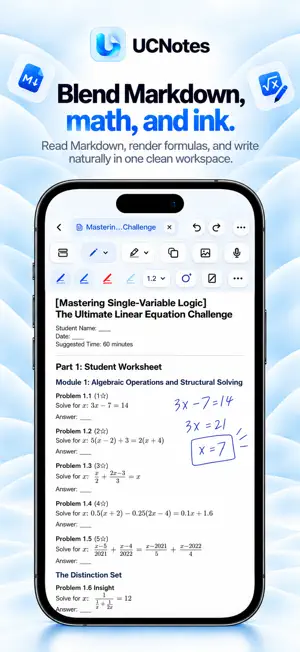
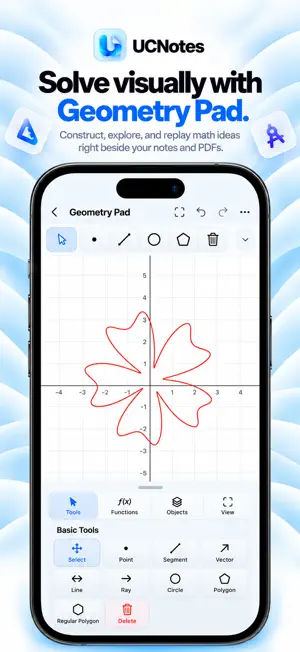
UCNotes brings handwriting, PDF annotation, editable Markdown, math tools, and sheet music into one flexible workspace for iPad and iPhone. Write, study, organize, and keep working without constantly switching apps. HANDWRITE WITH MORE ROOM • Write on notes and PDFs using Apple Pencil or touch. • Personalize pens, colors, favorites, and paper templates. • Open multiple tabs, use Facing Pages and Split Tabs, and keep reference material within reach. • Add unlimited free Sidecars when you need more space for calculations, explanations, or sketches. READ AND WORK WITH PDFS • Import, read, mark up, and export PDFs. • Use Reading Rotation to adjust the viewing angle from −15° to +15°, remember angles for individual pages, and tap the left or right side to turn pages. Your original PDF stays unchanged. • Rotate selected PDF pages and add customizable headers, footers, and page numbers. • With UCNotes Pro, split PDFs by page ranges and save the results to Files or your UCNotes Library. EDIT MARKDOWN AND EXPLORE MATH • Create and edit .md files, including content copied from other apps. • Switch between visual, source, preview, and split editing views. • Read LaTeX equations, tables, and code blocks with offline math rendering. • Save Markdown directly as a PDF in your Library. • Explore geometry construction, measurements, and mathematical diagrams. Advanced scripting and selected solver tools are available with Pro. STUDY WITH AUDIO AND VIDEO • Record lectures while taking notes and revisit audio-linked handwriting. • Play imported audio and video, with convenient playback controls and Picture in Picture where supported. READ SHEET MUSIC YOUR WAY • Choose Standard Reading, Rotation Reading, or Music Performance from one fullscreen control. • Use dual-zone score reading, Head Page Turn on compatible devices, supported English voice commands, or a compatible Bluetooth keyboard-style page turner. • Teacher / Bluetooth Remote mode keeps the score in view without active voice listening or head tracking. KEEP YOUR LIBRARY ORGANIZED • Organize notes, PDFs, and Markdown into Collections and subcollections. • Find favorites, recently opened documents, and recently deleted items. • Back up PDFs and editable notes to a folder you choose in iCloud Drive, and restore through Files. FREE AND PRO • Free includes up to 10 active Library documents in total, including notes you create and documents you import. Add more pages to your existing notes and use unlimited Sidecars. • UCNotes Pro unlocks unlimited Library documents, PDF Split, Adaptive Pen, Batch Rename, batch Images to PDF, and other advanced tools. • Annual subscription pricing and any eligible introductory trial are shown before purchase. Existing documents remain accessible if you reach the Free limit. Whether you're learning, teaching, solving problems, or practicing music, UCNotes helps keep your work together.
What’s new
Version 1.7.1 · Updated October 21, 2026
This update brings a more organized library, a comprehensive bilingual User Guide, and a more immersive PDF reading experience. • New Bilingual User Guide Explore 24 detailed topics across 7 categories, covering handwriting, geometry, PDF tools, music reading, document management, and more. Includes searchable guides in English and Simplified Chinese. • Improved Library Organization Clearer collection and folder counts make it easier to understand your document structure. Refined folder cards provide a more consistent layout. • Redesigned Move Note Experience Navigate folders visually, find your destination, and move documents with greater clarity and control. • Immersive Rotation Reading Enjoy a cleaner, full-screen PDF reading experience with automatically hiding controls. Adjust reading angles for individual pages or entire documents. • Bug Fixes and Refinements Fixed an issue where previously viewed PDF pages could appear blank when revisited. Additional interface refinements improve everyday usability. Thank you for using UCNotes!
App privacy
The developer, Unit Circle Math Tutoring LLC, reported these privacy practices to Apple.
Data Linked to You
The following data, which may be collected and linked to your identity, may be used for the following purposes:
- Location: Coarse Location
- User Content: Other User Content
- Identifiers: User ID
Used for: App Functionality
Data Not Linked to You
The following data, which may be collected but is not linked to your identity, may be used for the following purposes:
- User Content: Customer Support
Used for: App Functionality
Alternatives to UCNotes
Looking for apps like UCNotes? Here are 6 similar apps on the App Store. The highest rated is nag: Persistent Reminders (5.0/5), and all 6 are free to download.
-
 TrendTwist
-
 Focus Arc: Pomodoro Timer
-
 BindNotes
-
 nag: Persistent Reminders
5.0
nag: Persistent Reminders
5.0
-
 Notely - Notes & PDF app
4.4
Notely - Notes & PDF app
4.4
-
 Iron Will: Time & Habits
5.0
Iron Will: Time & Habits
5.0
| App | Rating | Price | Last updated | Compare |
|---|---|---|---|---|
| UCNotes | – | Free | October 21, 2026 | |
| TrendTwist | – | Free | Oct 17, 2026 | Compare |
| Focus Arc: Pomodoro Timer | – | Free | Oct 18, 2026 | Compare |
| BindNotes | – | Free | Sep 16, 2026 | Compare |
| nag: Persistent Reminders | 5.0 / 5 (1) | Free | Oct 20, 2026 | Compare |
| Notely - Notes & PDF app | 4.4 / 5 (8) | Free | Oct 17, 2026 | Compare |
| Iron Will: Time & Habits | 5.0 / 5 (4) | Free | Oct 22, 2025 | Compare |
Compare UCNotes with the top alternatives: ratings, updates, ASO score and keyword gaps →