

PhotoFlood: Duplicate Photos
Blizzard Delights LLC Photo & Video iPhoneiPadiPod touch
PhotoFlood: Duplicate Photos is a free Photo & Video app for iPhone and iPad by Blizzard Delights LLC. Requires iOS 26.0. Updated November 1, 2026.
- Price
- Free
- on the App Store
- Size
- 11 MB
- Age 4+
- Updated
- Nov 1
- 2026 · v1.1
Screenshots



About PhotoFlood: Duplicate Photos
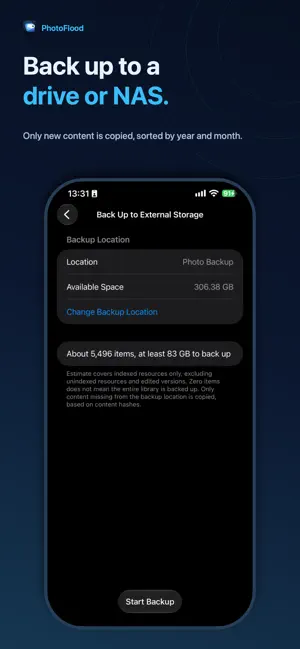
PhotoFlood copies photos and videos from archives, folders and files into your Photos library, one original file at a time, with progress you can see. IMPORT INTO PHOTOS • Pick a ZIP, RAR or 7z archive, a folder, or several media files in Files • Import straight from a camera's SD card or a USB drive: connect it, then pick its folder in Files • A pre-check shows what can be imported and what will be skipped, and why, before anything is written • Each item is saved as the original file, keeping EXIF, location and capture time • Archives are read one item at a time, so a 20 GB archive doesn't need another 20 GB of free space RESUME WHERE YOU LEFT OFF • Lock Screen continuation is supported; if the system pauses the import, you can resume it • Every step is recorded on your device; after an interruption PhotoFlood continues where it stopped without writing the same file twice • One failed file doesn't stop the rest of the batch SKIP EXACT DUPLICATES • Files are compared by SHA-256 content hash with earlier imports and with your Photos library • Only identical content counts as a duplicate, never just a name, date or size • Library status shows exactly indexed, pending verification and unavailable items CLEAN UP DUPLICATES IN YOUR LIBRARY • Find photos and videos in your library whose content is exactly the same • Choose what to remove, or clean up in one tap; each group always keeps at least one copy • Removed items go to Recently Deleted. Viewing duplicates is free; cleaning up requires the unlock Back Up to External Storage • Copy original photos and videos to a folder you choose in Files, such as an SD card, USB drive or external drive. Files are stored in PhotoFlood Backup, grouped by year/month. • Or back up straight to a NAS on your Wi‑Fi (Synology, QNAP, TrueNAS, Windows or Mac sharing): sign in and choose a folder right in the app. • Edited photos keep both the original and the edited version. Edited filenames include “ (edited)”. • Only content not yet backed up is copied, based on its content hash. Existing files are never overwritten or deleted; photos deleted from your library remain in the backup. FORMATS Photos: JPEG, PNG, HEIC, TIFF, GIF, WebP, AVIF, DNG and RAW (CR2, CR3, NEF, NRW, ARW, RAF, ORF, RW2, PEF, SRW) Videos: MOV, MP4, M4V Archives: ZIP, RAR4, RAR5, 7z (including solid) Encrypted, split and self-extracting archives are not supported. Truncated files and videos Photos can't accept are detected before writing and skipped with the reason shown. PRIVATE BY DESIGN No account, no server, no ads, no analytics. The app does not upload media, filenames or hashes to the developer. Backups are written to your selected location; its cloud provider may sync that folder. Apple’s system may download iCloud originals; this does not upload them to the developer. PRICING Your first 100 successfully imported files are free; skipped files don't count. Unlock unlimited imports and duplicate cleanup with a one-time purchase. It's not a subscription. Viewing the estimate is free. Starting a backup requires the existing lifetime unlock and does not use your free import allowance. PhotoFlood copies files into Photos. The originals stay where they are and keep using their own storage.
What’s new
Version 1.1 · Updated November 1, 2026
New: Back up to external storage or a NAS • Copy original photos and videos to a folder you choose in Files, such as an SD card, USB drive or external drive, grouped by year/month. • Or back up straight to a NAS on your Wi‑Fi (Synology, QNAP, TrueNAS, Windows or Mac sharing): sign in and choose a folder right in the app. • Only content not yet backed up is copied, based on its content hash. Existing files are never overwritten or deleted. • Starting a backup requires the existing lifetime unlock. Improvements • Library scans report progress more steadily, and if the system pauses a scan on the Lock Screen, PhotoFlood explains what happened and picks up where it stopped.
App privacy
The developer, Blizzard Delights LLC, reported these privacy practices to Apple.
Data Linked to You
The following data, which may be collected and linked to your identity, may be used for the following purposes:
- Contact Info: Email Address
- User Content: Customer Support
- Diagnostics: Other Diagnostic Data
Used for: App Functionality
Alternatives to PhotoFlood: Duplicate Photos
Looking for apps like PhotoFlood: Duplicate Photos? Here are 6 similar apps on the App Store. The highest rated is Sync Shutter: SD Card Backup (4.2/5), and 5 of the 6 are free to download.
-
 SamePic - Clear Similar Photos
-
 Shared Album Daily Photo
-
 FujiView: Recipes & SD Reader
-
 PhotoTransfer: Sync with Drive
-
 Sync Shutter: SD Card Backup
4.2
-
 Photo Album Widget
3.4
| App | Rating | Price | Last updated | Compare |
|---|---|---|---|---|
| PhotoFlood: Duplicate Photos | – | Free | November 1, 2026 | |
| SamePic - Clear Similar Photos | – | Free | Aug 25, 2026 | Compare |
| Shared Album Daily Photo | – | Free | Mar 21, 2026 | Compare |
| FujiView: Recipes & SD Reader | – | Free | Nov 14, 2026 | Compare |
| PhotoTransfer: Sync with Drive | – | Free | Nov 11, 2026 | Compare |
| Sync Shutter: SD Card Backup | 4.2 / 5 (5) | Free | Nov 14, 2026 | Compare |
| Photo Album Widget | 3.4 / 5 (16) | 1.99 USD | Oct 27, 2026 | Compare |