

FujiView: Recipes & SD Reader
Felippe-Michel Wick Photo & Video iPhoneiPadiPod touch
FujiView: Recipes & SD Reader is a free Photo & Video app for iPhone and iPad by Felippe-Michel Wick. Requires iOS 18.0. Updated November 14, 2026.
- Price
- Free
- on the App Store
- Size
- 82 MB
- Age 4+
- Updated
- Nov 14
- 2026 · v1.0.3
Screenshots


About FujiView: Recipes & SD Reader
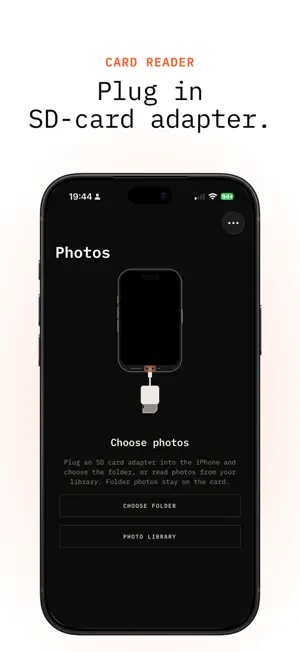
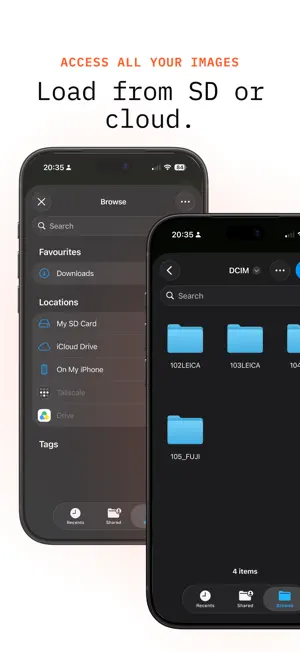
FujiView is the easy way to view and cull a full SD card on iPhone. Plug in an adapter. Browse RAW images and photos on the card, pick the keepers, export them to Photos, and post. Shot to gallery is faster than Apple's import, and faster than Fujifilm XApp. WHAT YOU CAN DO • Handle a full card of RAF, DNG, JPEG, and HEIF images, including camera subfolders • Preview and cull before anything lands in Photos • Export JPEG copies to Photos or the share sheet • Copy RAW files from a card into Photos. The file on the card stays put • Read photos already in your library, including a limited selection you choose • See when the adapter is unplugged, then pick the folder again or switch to your library YOUR FILES Photos in a folder stay on the card until you save a copy. FujiView does not require an account. PRIVACY Photo library access is used to read the photos you choose, and to save JPEG exports and RAW copies you keep. Privacy Policy: https://wickworks.dev/projects/fujiview/privacy SUBSCRIPTION FujiView Premium is an optional auto-renewable subscription that unlocks unlimited recipe transfers to the camera and unlimited collage exports. Without it, custom slots C1 and C2 accept three recipe transfers a day, and one collage can be saved or shared. Photo export stays free. About FujiView Premium: - When you purchase a FujiView Premium subscription, the payment will be charged to your Apple ID account after confirmation. - The subscription will automatically renew unless you turn off auto-renewal at least 24 hours before the end of the current period. - The cost of renewal will be identified and charged to your account within 24 hours prior to the end of the current period. - If there is any unused portion of a free trial period offered, it will be forfeited upon purchasing a subscription. - You can manage your subscriptions and turn off auto-renewal by accessing your Account Settings after purchase. Terms of Use: https://www.apple.com/legal/internet-services/itunes/dev/stdeula/ Privacy Policy: https://wickworks.dev/projects/fujiview/privacy
What’s new
Version 1.0.3 · Updated November 14, 2026
Recipes and collages. • Fixed payments. • Add a recipe from the community, a screenshot, a video, or Instagram, and send it to C1 or C2 over USB, twice a day. • Make a collage from your photos, then save or share one a day.
App privacy
The developer, Felippe-Michel Wick, reported these privacy practices to Apple.
Data Not Linked to You
The following data, which may be collected but is not linked to your identity, may be used for the following purposes:
- Usage Data: Product Interaction, Other Usage Data
- Diagnostics: Other Diagnostic Data
Used for: Analytics, App Functionality
Alternatives to FujiView: Recipes & SD Reader
Looking for apps like FujiView: Recipes & SD Reader? Here are 6 similar apps on the App Store. The highest rated is CardShuttle: SD Card Backup (5.0/5), and all 6 are free to download.
-
 Napharu Studio
-
 FreshImport: Camera & SD Card
-
 CardShuttle: SD Card Backup
5.0
-
 PhotoFlood: Duplicate Photos
-
 Photo Field Kit
-
 Folders: Photo & Video
| App | Rating | Price | Last updated | Compare |
|---|---|---|---|---|
| FujiView: Recipes & SD Reader | – | Free | November 14, 2026 | |
| Napharu Studio | – | Free | Nov 13, 2026 | Compare |
| FreshImport: Camera & SD Card | – | Free | Oct 6, 2026 | Compare |
| CardShuttle: SD Card Backup | 5.0 / 5 (1) | Free | Oct 28, 2026 | Compare |
| PhotoFlood: Duplicate Photos | – | Free | Nov 1, 2026 | Compare |
| Photo Field Kit | – | Free | Nov 10, 2026 | Compare |
| Folders: Photo & Video | – | Free | Oct 5, 2026 | Compare |