

Sync Shutter: SD Card Backup
Utkarsh Jain Photo & Video iPhoneiPadiPod touchMac
Sync Shutter: SD Card Backup is a free Photo & Video app for iPhone and iPad by Utkarsh Jain. Rated 4.2/5 from 5 ratings. Requires iOS 16.0.
- Rating
- 4.2
- 5 ratings
- Price
- Free
- on the App Store
- Size
- 14 MB
- Age 4+
- Updated
- Oct 26
- 2026 · v4.5.1
Screenshots



About Sync Shutter: SD Card Backup
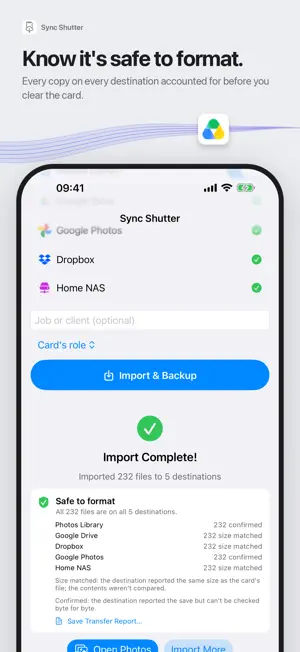
Never lose a shoot. Sync Shutter backs up your camera card the moment you insert it. Set it up once on your Mac, then plug in any card and walk away: every photo and video is copied to every destination you chose, automatically. On iPhone or iPad, plug in a card reader and import straight from the card. It was built for photographers who come home with several cards and cannot afford to lose one. WHAT HAPPENS WHEN YOU INSERT A CARD • The card is detected and the backup starts on its own. Progress lives in the menu bar; a notification tells you when it is done. • Only new files are copied. Already-backed-up shots are recognized and skipped, so the second run after a shoot takes seconds. • Copies to a folder or drive can be verified byte for byte after copying. • Files can be sorted into date folders taken from the photo's own capture date. • Cards that do not use a DCIM folder — video-first layouts from Sony, Panasonic and Canon bodies — are recognized too, and any card can be copied whole from the menu bar. • No internet where you're shooting? The card is still safe. Sync Shutter keeps its own copy and sends it to your cloud destinations on its own the moment you are back online. • A backup that cannot reach one of your destinations says so and names it. It never calls itself complete when something is missing. EVERY CARD, BY NAME • Each card gets its own name the first time it goes in, like purple-frog. Rename it, number it, give it a colour. • Say what each card was doing in a shoot: Primary, Backup slot, Second shooter or Video. • Cards lists every card with its last job and whether it is safe to format, meaning nothing on it would be lost. • Nothing is ever written to your cards. WHERE THE FILES GO Send one card to several places at once: a local folder or external drive, iCloud Drive, Google Drive, OneDrive, Dropbox, Google Photos, the Lightroom auto-import folder, or the Photos library. Turn on as many as you like; each card is copied to all of them in a single pass. CHOOSE WHAT COMES OFF THE CARD Turn on a review step and a grid of thumbnails appears before anything is copied, so you can leave the test frames behind. SYNC SHUTTER PRO — ONE PURCHASE FOR MAC, IPHONE AND IPAD • Back up to a NAS or server: any S3-compatible storage (Synology, Backblaze B2, MinIO, Amazon S3), or SFTP over SSH. • Cold storage: Amazon S3 Glacier and Deep Archive storage classes, chosen per destination, for an archive that costs cents a month. • RAW+JPEG pairs: keep both, RAW only, or JPEG only. • Import date filters: only today's shoot, the last few days, or everything since a date. • Custom file naming from the capture date, a counter and the original name. • Per-card rules on the Mac: route each card to its own destinations. • Auto-delete from the card after every destination has confirmed the copy, and low-storage alerts before a backup would fill the disk. Pro is a single purchase, not a subscription. IPHONE AND IPAD Plug in a USB-C or Lightning card reader, open Sync Shutter, and pick the card. Photos go to your Photos library, a folder in Files, your cloud drives, or an S3 NAS. A Live Activity follows the import and a widget shows your totals. PRIVATE BY DESIGN No account, no sign-up, no servers of ours in the path. Files go straight from the card to the destinations you chose. The only thing the app ever sends home is an anonymous count of backups and errors, so that problems get fixed; it is never linked to you. Works with any card your Mac or card reader can mount: SD, microSD, CFexpress, CFast, XQD.
Ratings & reviews
4.2
5 ratings
What’s new
Version 4.5.1 · Updated October 26, 2026
Insert your card and walk away. Every photo and video is copied everywhere at once, with proof of when it's safe to format. • Under-the-hood improvements.
App privacy
The developer, Utkarsh Jain, reported these privacy practices to Apple.
Data Not Linked to You
The following data, which may be collected but is not linked to your identity, may be used for the following purposes:
- Usage Data: Product Interaction
Used for: Analytics
Alternatives to Sync Shutter: SD Card Backup
Looking for apps like Sync Shutter: SD Card Backup? Here are 6 similar apps on the App Store. The highest rated is ShutterFlow (5.0/5), and 5 of the 6 are free to download.
-
 KeeperSafe: SD Card Backup
-
 ShutterFlow
5.0
-
 Fieldbox Backup
5.0
-
 Offload: Photos to SD Card
-
 CamDrop – RAW Photo Transfer
-
 AfterGlow: Event Camera
5.0
| App | Rating | Price | Last updated | Compare |
|---|---|---|---|---|
| Sync Shutter: SD Card Backup | 4.2 / 5 (5 ratings) | Free | October 26, 2026 | |
| KeeperSafe: SD Card Backup | – | 1.99 USD | Oct 18, 2026 | Compare |
| ShutterFlow | 5.0 / 5 (2) | Free | Mar 24, 2026 | Compare |
| Fieldbox Backup | 5.0 / 5 (3) | Free | Oct 21, 2026 | Compare |
| Offload: Photos to SD Card | – | Free | Oct 3, 2026 | Compare |
| CamDrop – RAW Photo Transfer | – | Free | Oct 17, 2026 | Compare |
| AfterGlow: Event Camera | 5.0 / 5 (2) | Free | Sep 24, 2026 | Compare |