

LiteSplice: Video Editor
Sean Reed Photo & Video iPhoneiPadiPod touch
LiteSplice: Video Editor is a free Photo & Video app for iPhone and iPad by Sean Reed. Rated 4.3/5 from 3 ratings. Requires iOS 17.0.
- Rating
- 4.3
- 3 ratings
- Price
- Free
- on the App Store
- Size
- 36 MB
- Age 4+
- Updated
- Nov 12
- 2026 · v0.2.0
Screenshots
Save to Pinterest

About LiteSplice: Video Editor
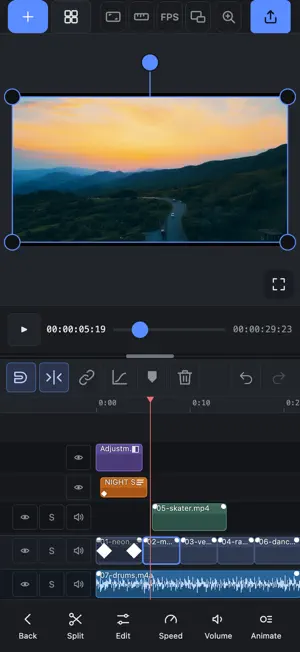
LiteSplice is a free video editor that gives you real control without making simple edits hard. Cut, layer and arrange clips on a multi-track timeline. Add text, shapes, stickers and voiceover. Then go as deep as you like: every setting can be animated with keyframes, and a graph editor lets you shape exactly how each move feels. FREE, WITH NO CATCH • No watermark on your exports • No account and no sign-in • No ads • Works offline. Your videos stay on your device EDITING • Multi-layer timeline with a magnetic main track • Split, trim, freeze frame, crop and speed changes • Speed ramps you can draw as a curve • Transitions between clips • Markers, snapping and undo for everything ANIMATION • Keyframes on every setting: position, scale, rotation, opacity, effects, masks and more • A graph editor with easing curves and presets • Ready-made animations for clips and text, including per-letter text animation LOOK • Color grading with curves and scopes • A library of effects you can stack and reorder • Masks: shapes, a pen tool, and text as a mask • Blend modes and adjustment layers • Canvas options for clips that do not fill the frame TEXT AND TITLES • Titles with outline, background box, gradient and shadow • Your own fonts • Animate whole titles or individual letters SOUND • Volume, fades and audio filters • Record a voiceover inside the app • Waveforms on the timeline EXPORT • Export up to 4K • Saves straight to your photo library • Choose resolution, frame rate and quality MADE FOR IPHONE AND IPAD • A simple one-hand layout on iPhone • A full editing layout on iPad, with the preview, timeline and properties side by side LiteSplice is also available for Mac and Windows at litesplice.com. A few tools from the desktop app are only on the desktop for now. Questions or problems? Email [email protected].
What’s new
Version 0.2.0 · Updated November 12, 2026
What's new in LiteSplice 0.2.0 • A new effects browser with categories, plus a Tools menu • New effects, including Deflicker and Time Displacement • Trimming clips on iPhone is much easier, with bigger handles • iPad: bigger buttons with a label under every icon, quick 0.5x to 4x speed buttons, new text ready to type, and your first import lands straight on the timeline • iPhone HDR videos are converted so their colors look right • Smoother dissolve transitions • Fixed exports stopping at the first frame on some videos • Lots of smaller fixes
App privacy
The developer, Sean Reed, reported these privacy practices to Apple.
Data Not Collected
The developer does not collect any data from this app.
Alternatives to LiteSplice: Video Editor
Looking for apps like LiteSplice: Video Editor? Here are 6 similar apps on the App Store. The highest rated is Saint Studios - Video Editor (5.0/5), and all 6 are free to download.
-
 Saint Studios - Video Editor
5.0
-
 Vibe Video — Video Editor
-
 Editioz: Video Editor
2.0
-
 Kwideo: Pro Video Editor
-
 RayCut Pro: Video Editor
5.0
-
 Editake: Auto Video Editor
4.0
| App | Rating | Price | Last updated | Compare |
|---|---|---|---|---|
| LiteSplice: Video Editor | 4.3 / 5 (3 ratings) | Free | November 12, 2026 | |
| Saint Studios - Video Editor | 5.0 / 5 (2) | Free | Nov 16, 2026 | Compare |
| Vibe Video — Video Editor | – | Free | Oct 31, 2026 | Compare |
| Editioz: Video Editor | 2.0 / 5 (1) | Free | Nov 19, 2026 | Compare |
| Kwideo: Pro Video Editor | – | Free | Nov 1, 2026 | Compare |
| RayCut Pro: Video Editor | 5.0 / 5 (2) | Free | Nov 12, 2026 | Compare |
| Editake: Auto Video Editor | 4.0 / 5 (6) | Free | Nov 18, 2026 | Compare |