

RayCut Pro: Video Editor
Solueman Hussain Photo & Video iPhoneiPadiPod touchMac
RayCut Pro: Video Editor is a free Photo & Video app for iPhone and iPad by Solueman Hussain. Rated 5.0/5 from 1 ratings. Requires iOS 18.6.
- Rating
- 5.0
- 1 ratings
- Price
- Free
- on the App Store
- Size
- 178 MB
- Age 4+
- Updated
- Oct 18
- 2026 · v26.4.1015
Screenshots
About RayCut Pro: Video Editor
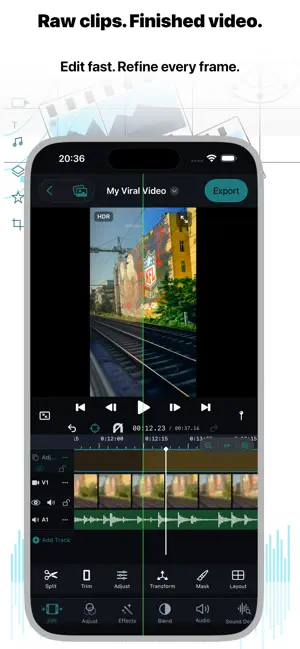
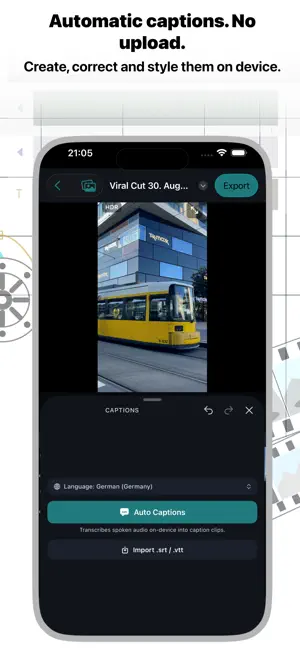
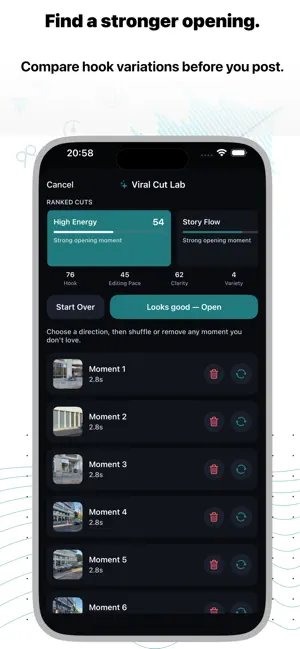
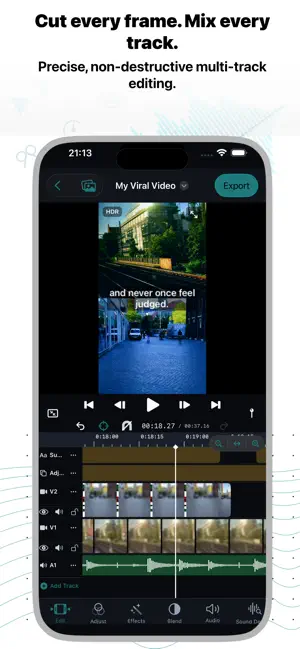
Edit like a pro on iPhone, iPad and Mac. No account. No uploads. RayCut Pro gives you a real multi-track timeline, automatic captions, cinematic color and 4K HDR export, and your footage stays on your own devices. NEW: STORY STUDIO • Movie trailers: pick one of 9 themed trailers, fill the shot list with your clips, add your title and credits. RayCut times the cuts, titles and music for you. • Storyboards: guided shot lists that tell you what to film, then assemble the edit. • Instant Movie: choose your clips and get a finished, music-timed movie you can keep editing. FINISH FASTER • Viral Cut and automatic edits that cut to the beat of your music, at the pace you choose. • Automatic captions with animated styles, word-by-word highlights and speaker labels. Search the transcript and jump to any word. • Remove silences, split long clips at every shot change, and detect beats in one tap. • Smart Reframe follows your subject so one project works vertical, square and landscape. A REAL PRO TIMELINE • Frame-accurate, multi-track and magnetic: insert, append, overwrite, connect and replace edits, In/Out ranges, ripple and roll trims, and a precision trim view. • Compound clips, multicam editing, auditions for alternate takes, markers and chapters, and a searchable timeline index. • Keyframes with smooth curves for position, scale, rotation, opacity and effects. • Speed ramps, smooth slow motion, reverse and freeze frames. MAKE IT LOOK CINEMATIC • Color wheels, curves, HSL, LUTs, Looks, Match Color and Auto Enhance. • Change the focus of iPhone Cinematic videos after you shot them. • Cut Out removes the background without a green screen. Plus chroma key, shape masks, object tracking with pinned titles and stickers, and stabilization. • Animated titles with neon, glitch and wave effects, 3D transitions and animated backgrounds. SOUND THAT HOLDS UP • Voice Isolation and Voice Enhance for clean dialogue, EQ and voice effects. • Music that follows your edit, a built-in sound library, auto-ducking under voice, voiceover recording and text-to-speech narration. • Dialogue, music and effects roles with per-role mute and stem export. IPHONE, IPAD AND MAC • Projects sync through your own iCloud. Start on iPhone, continue on Mac with Handoff. • On Mac: familiar pro keyboard shortcuts, skimming, and a full-screen viewer on a second display. • Export FCPXML to keep editing in Final Cut Pro. PRIVATE BY DESIGN • No RayCut account, no tracking, no RayCut cloud. • Captions, cutouts, reframing and beat analysis run on your device by default. • Sync uses your own iCloud, and you decide when and where a video is shared. EXPORT WITH CONFIDENCE • Up to 4K with HDR on supported media and devices, up to 60 fps. • Chapters in the exported movie, plus ready-to-paste YouTube chapter timestamps. • Save to Photos, AirDrop, Files or the share sheet. Long exports pause and resume safely. PLANS RayCut Pro is free to download and edit with. Exports from the free version end with a short RayCut Pro card; remove it once with Remove Watermark. Pro and Max subscriptions (monthly or yearly) unlock the advanced tools. Payment is charged to your Apple Account when you confirm the purchase. Subscriptions renew automatically unless cancelled at least 24 hours before the end of the current period. Manage or cancel them in your Apple Account settings. Terms of Use / EULA https://www.apple.com/legal/internet-services/itunes/dev/stdeula/
What’s new
Version 26.4.1015 · Updated October 18, 2026
A big step toward pro editing on every device. • Magnetic timeline: clips snap together, storylines, gap clips, connection lines and a Position tool. • Transitions sit centered on the cut and use extra footage, like in pro editors. Add them to several clips at once. • Select several clips at once: Select mode, hold one clip and tap others, or ⌘/⇧-click. • Smart Conform: switch to vertical or square and every clip reframes around its subject. Duplicate a project in another shape in one tap. • Edit by text: transcribe the speech, then cut words, filler words and long pauses from the transcript — no captions needed. • iPad: pro layout with a tool dock beside the viewer, audio meters, keyboard shortcuts, mouse and trackpad support. • Film looks with grain and halation, plus face reshape and face stickers. • Cut Out: remove the background and replace it with a color or an animated background. • Audio Unit effects, a master limiter and loudness to your target level. • Story Studio: fill a trailer with your best moments automatically, make a vertical version and save your own templates. • Speed a moment, smooth slow motion, J/L cuts, Match Cut, Clone and Magnify. • Export GIFs, save full-resolution frames and share projects with all their media. • Faster, smoother editing on iPad and many fixes.
App privacy
The developer, Solueman Hussain, reported these privacy practices to Apple.
Data Not Collected
The developer does not collect any data from this app.
Alternatives to RayCut Pro: Video Editor
Looking for apps like RayCut Pro: Video Editor? Here are 6 similar apps on the App Store. The highest rated is Verbatim: Video Editor (5.0/5), and all 6 are free to download.
-
 Verbatim: Video Editor
5.0
Verbatim: Video Editor
5.0
-
 Clixo
Clixo
-
 Kwideo: Pro Video Editor
-
 TheEditor photo editor
-
 Mayax: Video Editor
2.0
Mayax: Video Editor
2.0
-
 Add Watermark: Photos & Videos
| App | Rating | Price | Last updated | Compare |
|---|---|---|---|---|
| RayCut Pro: Video Editor | 5.0 / 5 (1 rating) | Free | October 18, 2026 | |
| Verbatim: Video Editor | 5.0 / 5 (11) | Free | Jul 27, 2026 | Compare |
| Clixo | – | Free | Jun 27, 2026 | Compare |
| Kwideo: Pro Video Editor | – | Free | Oct 21, 2026 | Compare |
| TheEditor photo editor | – | Free | Sep 14, 2026 | Compare |
| Mayax: Video Editor | 2.0 / 5 (1) | Free | Mar 25, 2026 | Compare |
| Add Watermark: Photos & Videos | – | Free | Apr 21, 2026 | Compare |