

Editioz: Video Editor
IOZ LIMITED LIABILITY COMPANY Photo & Video iPhoneiPadiPod touch
Editioz: Video Editor is a free Photo & Video app for iPhone and iPad by IOZ LIMITED LIABILITY COMPANY. Requires iOS 15.0. Updated October 4, 2026.
- Price
- Free
- on the App Store
- Size
- 56 MB
- Age 4+
- Updated
- Oct 4
- 2026 · v1.0
Screenshots

About Editioz: Video Editor
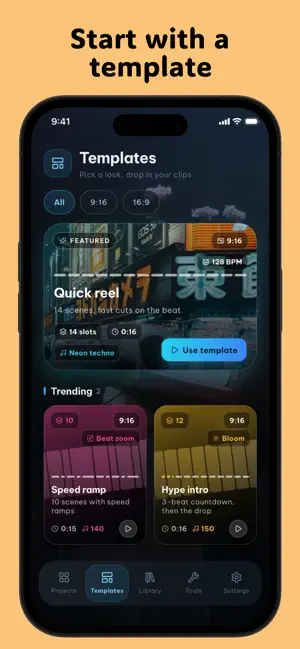
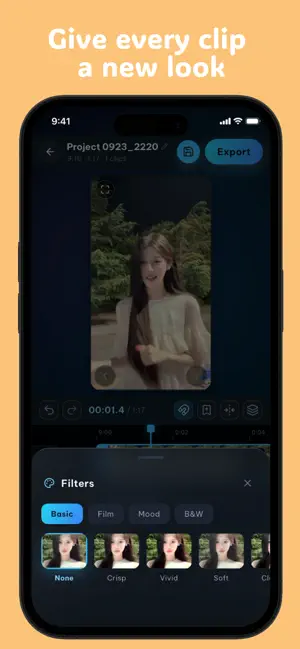
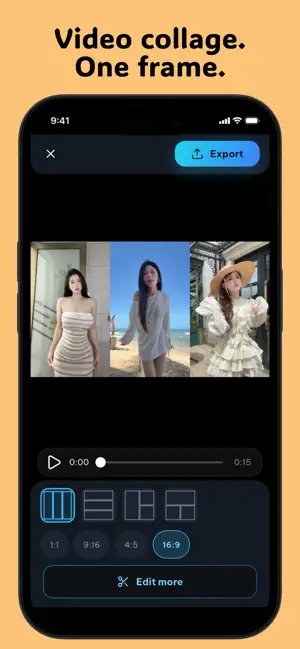
Create and edit videos offline with Editioz. Work with clips saved on your device, build your story on a layered timeline, and export without uploading your media for processing. No account required. No ads, subscriptions, or in-app purchases. EDIT YOUR WAY • Trim, split, combine, and rearrange videos and photos. • Adjust playback speed and create speed curves. • Reverse clips or turn a moment into a freeze frame. • Crop, rotate, flip, and change your project's aspect ratio. • Undo and redo edits as you work. BUILD YOUR LOOK • Layer videos, photos, text, and stickers. • Apply filters and adjust brightness, contrast, and color. • Add transitions, visual effects, and text animations. • Fine-tune your composition with masks, chroma key, and keyframes. MAKE IT SOUND RIGHT • Import audio and record voiceovers. • Adjust volume, mute clips, or detach audio from video. • Add sound effects and fade audio in or out. • Lower background audio around voiceovers. START QUICKLY • Create a project from a template. • Combine clips or split a video into equal parts. • Extract a video frame as a photo. • Save projects and return to them later. EXPORT ON YOUR DEVICE • Export MP4 videos, GIFs, PNG sequences, or audio. • Choose resolution, frame rate, and quality. • Export without a required watermark. • Save your finished work and share when you're ready. OFFLINE EDITING Use media stored on your device and the included fonts to edit offline. Additional fonts require an internet connection to download before offline use. Media stored only in the cloud must first be downloaded to your device.
App privacy
The developer, IOZ LIMITED LIABILITY COMPANY, reported these privacy practices to Apple.
Data Not Linked to You
The following data, which may be collected but is not linked to your identity, may be used for the following purposes:
- Identifiers: Device ID
- Usage Data: Product Interaction
- Diagnostics: Crash Data
Used for: Analytics, App Functionality
Alternatives to Editioz: Video Editor
Looking for apps like Editioz: Video Editor? Here are 6 similar apps on the App Store. The highest rated is Polola: simple photo editor (5.0/5), and 5 of the 6 are free to download.
-
 Iriora
-
 PIM CAM: Instant Film Camera
-
 Clydris – Video & Photo Blur
-
 HEIC Photo Converter Pro
-
 Aire Subtitle
-
 Polola: simple photo editor
5.0
Polola: simple photo editor
5.0
| App | Rating | Price | Last updated | Compare |
|---|---|---|---|---|
| Editioz: Video Editor | – | Free | October 4, 2026 | |
| Iriora | – | Free | Sep 14, 2026 | Compare |
| PIM CAM: Instant Film Camera | – | Free | Oct 6, 2026 | Compare |
| Clydris – Video & Photo Blur | – | 2.99 USD | Oct 13, 2026 | Compare |
| HEIC Photo Converter Pro | – | Free | Oct 11, 2026 | Compare |
| Aire Subtitle | – | Free | Oct 5, 2026 | Compare |
| Polola: simple photo editor | 5.0 / 5 (1) | Free | Oct 2, 2026 | Compare |