

PIM CAM: Instant Film Camera
勇翔 张 Photo & Video iPhoneiPadiPod touch
PIM CAM: Instant Film Camera is a free Photo & Video app for iPhone and iPad by 勇翔 张. Requires iOS 18.0. Updated October 6, 2026.
- Price
- Free
- on the App Store
- Size
- 10 MB
- Age 4+
- Updated
- Oct 6
- 2026 · v1.0.3
Screenshots



About PIM CAM: Instant Film Camera
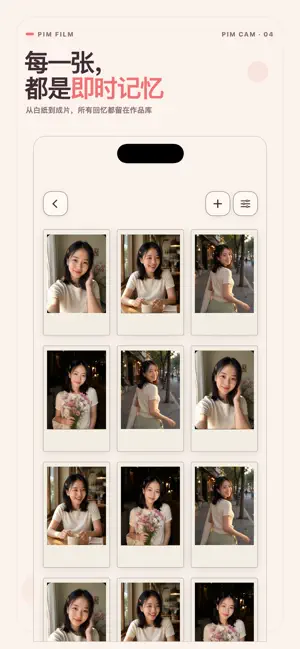
PIM CAM is an instant-film camera designed for iPhone. From composing your shot and pressing the shutter to watching a print emerge and slowly develop, PIM CAM recreates the complete instant-camera experience. There are no complicated controls or lengthy editing steps—just capture the moment and enjoy the anticipation of seeing it appear. #Shoot Like an Instant Camera - Compose every photo through a live 3:4 viewfinder. - Tap to focus, switch between the front and rear cameras, and use the rear flash or front screen light. - Take photos with the volume buttons or Camera Control on supported iPhone models. - Give every shot a warm, softly muted instant-film look. - Choose whether to save an additional, unedited original photo. #Slow Development, Worth the Wait - Watch the print emerge from the camera through an approximately three-second ejection animation. - Each photo develops gradually over approximately 90 seconds. - Shake your iPhone to speed up a print while it is developing. - Enjoy the complete ritual, from pressing the shutter to revealing the finished image. #PIM FILM, Your Print Collection - Browse your prints in a clean grid or switch to an animated, scattered photo wall. - Pan and zoom around the photo wall to explore your collection. - Import photos from your library and turn them into consistent instant-film prints. - Imported images keep their complete composition, with softly extended edges filling the fixed 3:4 frame. - Swipe horizontally through your prints, swipe down to return, or share through the system share sheet. - Long-press to select, organize, and delete multiple prints. #Thoughtful Controls and Privacy - Decide whether to keep an additional unedited original. - Optionally record where a new photo was taken and display its address below the date. - Location is accessed only after you enable it, and GPS coordinates are not written into exported JPEG files. - All photo processing happens locally on your device. PIM CAM makes photography simple, tactile, and worth waiting for. Press the shutter, watch the image develop, and turn everyday moments into instant prints you will want to keep.
What’s new
Version 1.0.3 · Updated October 6, 2026
Discover new filter options: Natural, Instant, and 35mm Negative. Switch between them to give your photos a different look.
App privacy
The developer, 勇翔 张, reported these privacy practices to Apple.
Data Not Collected
The developer does not collect any data from this app.
Alternatives to PIM CAM: Instant Film Camera
Looking for apps like PIM CAM: Instant Film Camera? Here are 6 similar apps on the App Store. The highest rated is Polola: simple photo editor (5.0/5), and all 6 are free to download.
-
 Iriora
-
 HEIC Photo Converter Pro
-
 Aire Subtitle
-
 Polola: simple photo editor
5.0
Polola: simple photo editor
5.0
-
 ChirpCam - Pet & Baby Camera
-
 Editioz: Video Editor
| App | Rating | Price | Last updated | Compare |
|---|---|---|---|---|
| PIM CAM: Instant Film Camera | – | Free | October 6, 2026 | |
| Iriora | – | Free | Sep 14, 2026 | Compare |
| HEIC Photo Converter Pro | – | Free | Oct 11, 2026 | Compare |
| Aire Subtitle | – | Free | Oct 5, 2026 | Compare |
| Polola: simple photo editor | 5.0 / 5 (1) | Free | Oct 2, 2026 | Compare |
| ChirpCam - Pet & Baby Camera | – | Free | Aug 20, 2026 | Compare |
| Editioz: Video Editor | – | Free | Oct 4, 2026 | Compare |