

Task Control Tower
Yuichi Ono Productivity iPhoneiPadiPod touch
Task Control Tower is a free Productivity app for iPhone and iPad by Yuichi Ono. Requires iOS 17.0. Updated October 20, 2026.
- Price
- Free
- on the App Store
- Size
- 15 MB
- Age 4+
- Updated
- Oct 20
- 2026 · v1.1.0(110.1)
Screenshots


About Task Control Tower
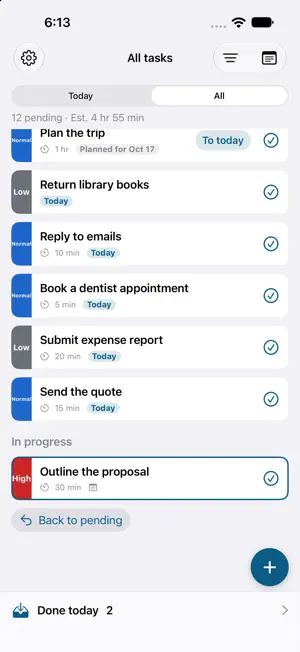
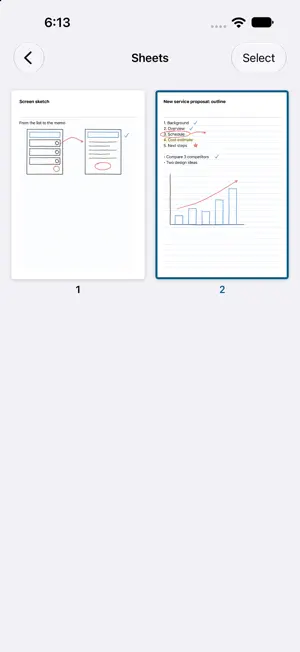
Line up today's work as strips, focus on the one you're working on, and slide it right into the tray when it's done. Task Control Tower borrows the flight strips air traffic controllers use to handle planes one at a time, and pairs them with handwritten notes. ■ Focus on today • Put today's tasks in the pending queue and reorder them with a long press • Only one task is in progress at a time, so you can stay on it • Slide a strip right to finish it and drop it into the tray. Undo right away if it was a mistake • What you didn't finish stays as "carried over" the next day • Priorities (high, normal, low) shown in color and words, plus due dates and time estimates • Switch between the Today and All views ■ Handwritten notes • Keep notes in books of A4 sheets, by hand with Apple Pencil or your finger, or as text • Link notes to tasks and open them while you work • Export as PDF or images to share or print • On iPad, keep your tasks and notes side by side ■ Calendar events • Today's events from your iPhone's calendar appear in the same column as your tasks • Slide finished events to mark them done and leave a note on the event • Create new events from the app ■ Private and dependable • No account needed. Your data stays on your device and works offline • Sync between devices is encrypted on your device before it's sent, so not even we can read it • Move your data to another device with a backup file • Works with VoiceOver, larger text and Reduce Motion ■ Pricing The basic features are free, with ads. • Free plan: up to 10 pending strips shown, 5 active note books, and 7 days of history • Remove Ads (one-time purchase): no more ads • Premium (auto-renewing monthly subscription): no limit on pending strips or books, full history, sync between devices, and backup export. No ads while subscribed, and ads stay off even after you cancel Premium renews automatically unless you cancel at least 24 hours before the end of the current period. You can cancel in your App Store account settings under Subscriptions. Terms of Use: https://todo.otsi.jp/en/terms/ Privacy Policy: https://todo.otsi.jp/en/privacy/ Contact: https://todo.otsi.jp/en/contact/
What’s new
Version 1.1.0(110.1) · Updated October 20, 2026
• Tasks and calendar events now share one list, and events can be reordered by long press too. New tasks and events slot in by date, and the order stays as you set it • The views are now Today, Tomorrow and All; the app opens in All • Events are read up to three months ahead and show their date outside Today • In Tomorrow and All, a future task can be brought to today with "To today"
App privacy
The developer, Yuichi Ono, reported these privacy practices to Apple.
Data Used to Track You
The following data may be used to track you across apps and websites owned by other companies:
- Identifiers: Device ID
Data Linked to You
The following data, which may be collected and linked to your identity, may be used for the following purposes:
- Identifiers: Device ID, User ID
- Purchases: Purchase History
- Contact Info: Email Address
- User Content: Other User Content
Used for: Third-Party Advertising, App Functionality
Data Not Linked to You
The following data, which may be collected but is not linked to your identity, may be used for the following purposes:
- Location: Coarse Location
- Usage Data: Product Interaction, Advertising Data
- Diagnostics: Crash Data, Performance Data
Used for: Third-Party Advertising, Analytics
Alternatives to Task Control Tower
Looking for apps like Task Control Tower? Here are 6 similar apps on the App Store. The highest rated is Tempus: ADHD Daily Planner (4.7/5), and all 6 are free to download.
-
 Target Setting Machine
-
 Cloud Outliner - Nested Lists
4.5
-
 XeOS: External Display Desktop
4.2
-
 Vertical Planner:Calendar,Todo
4.4
-
 GroupCom - Walkie-Talkie App
3.4
-
 Tempus: ADHD Daily Planner
4.7
| App | Rating | Price | Last updated | Compare |
|---|---|---|---|---|
| Task Control Tower | – | Free | October 20, 2026 | |
| Target Setting Machine | – | Free | Nov 6, 2025 | Compare |
| Cloud Outliner - Nested Lists | 4.5 / 5 (756) | Free | Nov 18, 2025 | Compare |
| XeOS: External Display Desktop | 4.2 / 5 (24) | Free | Nov 4, 2026 | Compare |
| Vertical Planner:Calendar,Todo | 4.4 / 5 (16) | Free | Oct 24, 2025 | Compare |
| GroupCom - Walkie-Talkie App | 3.4 / 5 (8) | Free | Nov 4, 2026 | Compare |
| Tempus: ADHD Daily Planner | 4.7 / 5 (61) | Free | Nov 5, 2026 | Compare |
Compare Task Control Tower with the top alternatives: ratings, updates, ASO score and keyword gaps →