

Tempus: ADHD Daily Planner
Anh Nguyen Productivity iPhoneiPadiPod touchMacApple Watch
Tempus: ADHD Daily Planner is a free Productivity app for iPhone and iPad by Anh Nguyen. Rated 4.7/5 from 61 ratings. Requires iOS 26.2.
- Rating
- 4.7
- 61 ratings
- Price
- Free
- on the App Store
- Size
- 131 MB
- Age 4+
- Updated
- Oct 26
- 2026 · v2.1.4
Screenshots



About Tempus: ADHD Daily Planner
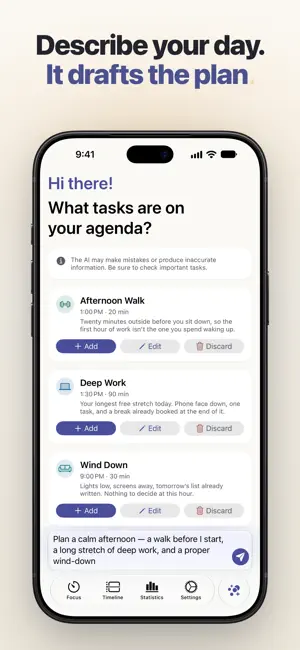
Tempus is a calm daily planner built for ADHD brains — one clear timeline for your day, real app blocking for your focus, streaks that forgive, and a Siri that finally understands what you mean. MADE FOR REAL ADHD CHALLENGES Most planners assume your brain cooperates. Tempus is designed for the days it doesn't: • Time blindness — see time as space on a visual timeline • Task paralysis — describe your day and let Apple Intelligence draft the plan; you review it before anything is saved • Forgetfulness — alarms, smart reminders and Live Activities that meet you where you are • Overwhelm — one signal per state, one accent per screen. Nothing shouts. • Broken routines — streaks that forgive a day off, because coming back is the win PLAN — DESCRIBE YOUR DAY, THEN DECIDE • Say or type what needs to happen: "deep work this morning, gym after lunch, call the clinic" • Tempus turns it into tasks with a duration, a priority and an energy level, and fits them around what's already on your calendar • Watch the plan take shape on the timeline as it's written. Fix a title, drop what you don't want, then add it to your day. Nothing lands until you say so. • Plan today or tomorrow — from the app, or by asking Siri • Tasks, habits, routines, Apple Calendar (including the Google and Outlook accounts on your iPhone) and Reminders on one timeline • Inbox to capture thoughts now and sort them later ASK SIRI — IN YOUR OWN WORDS • "Plan my day in Tempus", "What's next in Tempus", "Start focus in Tempus" — ten Siri shortcuts, most of them without opening the app • On iOS 27, Apple Intelligence understands Tempus like a calendar: "Create a dentist appointment in Tempus tomorrow at 3pm" just works, with no phrase to memorize • Siri answers with cards you can act on — mark the next task done or start a focus session right from the card • Find any task in Spotlight and open it directly • With a task on screen, "Start focus in Tempus" starts on that one • Shortcuts for Prepare Tomorrow, Reschedule Task, Move Unfinished Tasks (with undo) and Review Day PROTECT — FOCUS THAT CAN'T BE STOLEN • Focus Mode blocks distracting apps with one tap, using Apple's Screen Time technology • The world dims until you're done — Live Activities keep the session on your Lock Screen • Timers, interactive widgets and Apple Watch support FORGIVE — PROGRESS WITHOUT PUNISHMENT • Streaks that forgive: a day with nothing planned never breaks your streak • Quiet statistics by week, month or year that celebrate coming back, not output • No confetti. No guilt. Just a calm acknowledgment and your next step. PRIVATE BY DESIGN • No account required. Your tasks live on your device and in your own iCloud. • With Apple Intelligence, planning runs on Apple silicon — where neither Apple nor Tempus can read your request • Where Apple Intelligence isn't available, Tempus's own planning service drafts the plan, and you still review everything before it's saved ALSO IN TEMPUS • iCloud sync across iPhone, iPad and Mac • Works offline • Home Screen and Lock Screen widgets, Live Activities, an Apple Watch app and complications • A native Liquid Glass interface, with a proper split view on iPad PERFECT FOR • Adults with ADHD or executive function challenges • Students managing classes, deadlines and revision • Professionals who need deep work without distractions • Anyone overwhelmed by traditional productivity apps Tempus is free to download. Tempus Pro unlocks the full experience, available monthly, yearly, or as a one-time lifetime purchase — stated once, no countdown timers. Requires iOS 26.2 or later. Planning with Apple Intelligence needs a supported device with Apple Intelligence turned on. Siri in your own words needs iOS 27. Privacy Policy: https://www.gettempus.app/privacy-policy Terms of Use: https://www.gettempus.app/terms-of-service
Ratings & reviews
4.7
61 ratings
What’s new
Version 2.1.4 · Updated October 26, 2026
PLAN, A CARD OVER YOUR DAY Hold iPhone Duo open sideways, and Plan floats as a glass card over your day, the way a card floats over the map in Maps. Your day stays in view beside it, and the box where you type sits at the foot of the card. EVERY TAB READY AS YOU OPEN IT Open iPhone Duo on any tab, and the screen is ready straight away: the Begin button stays at the bottom of Focus, and the round Plan button settles into place. SMALLER TOUCHES ON IPHONE DUO A task you open beside the timeline now runs to the bottom of its page, under its two buttons. Hold iPhone Duo open upright, and Settings shows the setting you picked, with a sidebar button to bring back the list, as Apple's Settings app does. Setting names no longer break in the middle of a word. BETTER ON IPAD Focus always has a way back: the sidebar button when you've hidden the sidebar, and a back button when a narrow window shows one column. On a large iPad, Focus and Statistics keep to a comfortable column instead of stretching across the screen. The sidebar shows each section on one line, and it comes back by itself when you widen a narrow window. And Statistics no longer shows a close button it didn't need. Behind the scenes, a few smaller fixes make Tempus a little more dependable.
App privacy
The developer, Anh Nguyen, reported these privacy practices to Apple.
Data Not Linked to You
The following data, which may be collected but is not linked to your identity, may be used for the following purposes:
- Identifiers: Device ID
- Usage Data: Product Interaction
- Diagnostics: Crash Data, Performance Data, Other Diagnostic Data
Used for: Analytics, App Functionality
Alternatives to Tempus: ADHD Daily Planner
Looking for apps like Tempus: ADHD Daily Planner? Here are 6 similar apps on the App Store. The highest rated is Notes for Dynamic Notch Island (4.8/5), and all 6 are free to download.
-
 Kutu: Bookmark Manager
4.7
-
 Mangonote: AI Note Taker
4.7
-
 Notes for Dynamic Notch Island
4.8
-
 To Do List & Reminders: OhWait
4.6
-
 WakeMinder - Popup Reminders
4.5
-
 Puzzle Alarm Clock: Svegliare
4.5
| App | Rating | Price | Last updated | Compare |
|---|---|---|---|---|
| Tempus: ADHD Daily Planner | 4.7 / 5 (61 ratings) | Free | October 26, 2026 | |
| Kutu: Bookmark Manager | 4.7 / 5 (58) | Free | Oct 26, 2026 | Compare |
| Mangonote: AI Note Taker | 4.7 / 5 (41) | Free | Oct 5, 2026 | Compare |
| Notes for Dynamic Notch Island | 4.8 / 5 (72) | Free | Sep 28, 2026 | Compare |
| To Do List & Reminders: OhWait | 4.6 / 5 (22) | Free | Sep 21, 2026 | Compare |
| WakeMinder - Popup Reminders | 4.5 / 5 (22) | Free | Oct 30, 2026 | Compare |
| Puzzle Alarm Clock: Svegliare | 4.5 / 5 (84) | Free | Oct 23, 2026 | Compare |