

WakeMinder - Popup Reminders
Omar Sherif Productivity iPhoneiPadiPod touchMacApple Watch
WakeMinder - Popup Reminders is a free Productivity app for iPhone and iPad by Omar Sherif. Rated 4.5/5 from 22 ratings. Requires iOS 17.0.
- Rating
- 4.5
- 22 ratings
- Price
- Free
- on the App Store
- Size
- 18 MB
- Age 4+
- Updated
- Oct 30
- 2026 · v4.3
Screenshots
About WakeMinder - Popup Reminders
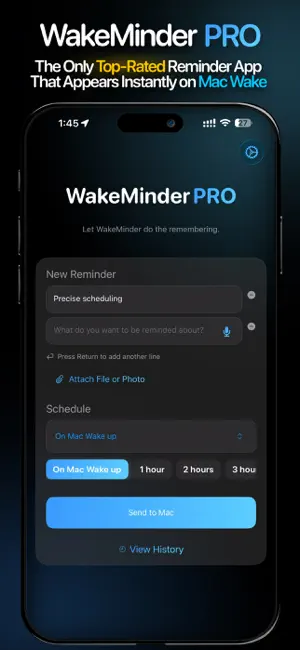
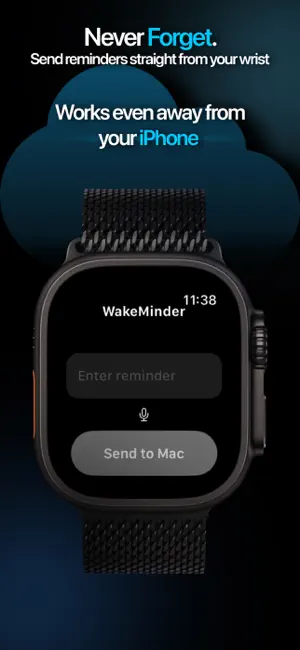
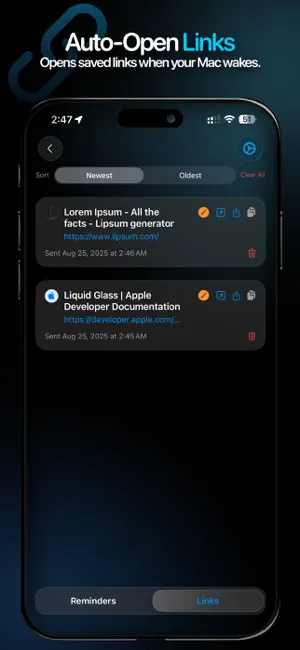
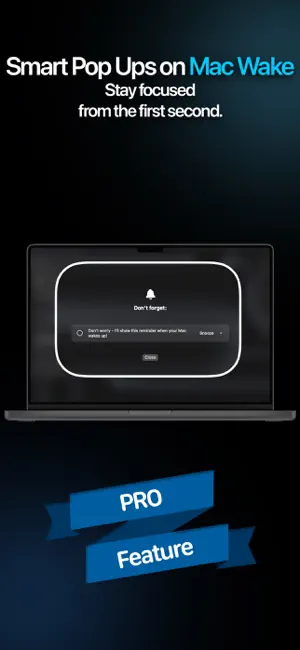
Ever write a reminder in your notebook, then forget to check it? Or open your Mac with a clear intention, only to forget what it was by the time your screen lights up? WakeMinder is the reminder app that solves this forever. It shows you exactly why you opened your Mac the moment it wakes - automatically, no manual checking needed. Built for ADHD brains and busy professionals who need instant clarity. THE PROBLEM IT SOLVES You open your Mac with a clear intention - check that email, finish that design, pay that bill. But by the time your screen lights up, you've forgotten. You get lost in tabs, notifications, and distractions. Hours later, you're wondering: "What was I supposed to do?" WakeMinder fixes this. Open the app on iPhone or Apple Watch, type your reminder, and it appears automatically when your Mac wakes - no remembering to check reminders, no lost productivity. HOW IT WORKS • Capture instantly: Open the app on iPhone or Apple Watch, type your reminder, and it's waiting for you the moment you lift your Mac's lid. Dictate reminders hands-free on Apple Watch or use the complication on your watch face for quick inputs. Use the Share Sheet on iPhone to send links, tasks, or quick notes in seconds. • Appears automatically: The moment your Mac wakes from sleep, your reminder floats front and center. No opening apps, no checking lists - it's just there. • Auto-opens links: Share a link from Safari or any app on iPhone, and it automatically opens in your browser when your Mac wakes. No copying, no pasting - just lift the lid. • Stays visible: Floating reminder windows keep your current task always visible while you work. Jump between apps and tabs without losing your focus. • Syncs everywhere: iCloud keeps everything synced across Mac, iPhone, and Apple Watch. Start on Apple Watch or iPhone, see it on Mac. PERFECT FOR YOUR WORKFLOW While jogging: Dictate a reminder on Apple Watch. It appears instantly when your Mac wakes. During commute: Send reminders from iPhone. They're waiting on your Mac when you arrive. At work: Stay focused on what matters. WakeMinder prevents context switching and keeps your workflow smooth. While browsing: Share links from Safari or Notes on iPhone. They automatically open in your browser the moment you lift your Mac lid. WAKEMINDER PRO FEATURES • Instant Wake Alerts – Reminders appear the moment your Mac wakes, no action needed • Apple Reminders Integration – Create, edit, and sync seamlessly across Mac, iPhone, and Apple Watch • Flexible Scheduling – Set reminders for On Wake, After 1–3 Hours, Tomorrow, or Custom Date and Time • Apple Watch Support – Dictate reminders hands-free, even when your phone isn't nearby • iCloud Sync – Automatic sync keeps reminders, notes, and tasks updated across all Apple devices • Quick Links and Notes – Share directly from Safari, Notes, or any app to WakeMinder. Links automatically open in your browser when your Mac wakes • Reminder History – View, edit, and reschedule reminders anytime • Focus-Driven Design – Built specifically for productivity, attention management, and workflow clarity WHO IT'S FOR • Professionals who need instant clarity when starting work on their Mac • Creatives managing multiple projects and jumping between tasks • People with ADHD or focus challenges who need automatic, not manual reminders • Anyone who values intentional, distraction-free productivity • Knowledge workers who lose context switching between apps and tabs • Students who want to stay on track while researching and studying WakeMinder is the productivity app that actually works with your brain, not against it. No complex setup, no overwhelming dashboards - just clear reminders that appear exactly when you need them. Requires WakeMinder PRO subscription. By using this app, you agree to Apple's Standard EULA: https://www.apple.com/legal/internet-services/itunes/dev/stdeula
Ratings & reviews
4.5
22 ratings
What’s new
Version 4.3 · Updated October 30, 2026
• Fixed critical Instagram, TikTok, YouTube, and X sharing. • Prevented notifications for files deleted on Mac.
App privacy
The developer, Omar Sherif, reported these privacy practices to Apple.
Data Not Collected
The developer does not collect any data from this app.
Alternatives to WakeMinder - Popup Reminders
Looking for apps like WakeMinder - Popup Reminders? Here are 6 similar apps on the App Store. The highest rated is PDFForge - PDF Scanner & Edit (5.0/5), and all 6 are free to download.
-
 PDFForge - PDF Scanner & Edit
5.0
PDFForge - PDF Scanner & Edit
5.0
-
 Daily Life Planner: Prostir
4.8
Daily Life Planner: Prostir
4.8
-
 SonicScript: Text to Speech
4.8
SonicScript: Text to Speech
4.8
-
 Tempus: ADHD Daily Planner
4.7
Tempus: ADHD Daily Planner
4.7
-
 Kutu: Bookmark Manager
4.7
Kutu: Bookmark Manager
4.7
-
 Daily Planner: Planelle
4.7
Daily Planner: Planelle
4.7
| App | Rating | Price | Last updated | Compare |
|---|---|---|---|---|
| WakeMinder - Popup Reminders | 4.5 / 5 (22 ratings) | Free | October 30, 2026 | |
| PDFForge - PDF Scanner & Edit | 5.0 / 5 (16) | Free | Sep 4, 2025 | Compare |
| Daily Life Planner: Prostir | 4.8 / 5 (48) | Free | Mar 10, 2026 | Compare |
| SonicScript: Text to Speech | 4.8 / 5 (21) | Free | May 16, 2026 | Compare |
| Tempus: ADHD Daily Planner | 4.7 / 5 (61) | Free | Oct 26, 2026 | Compare |
| Kutu: Bookmark Manager | 4.7 / 5 (58) | Free | Oct 26, 2026 | Compare |
| Daily Planner: Planelle | 4.7 / 5 (106) | Free | Oct 15, 2026 | Compare |