

Workout Timer: Plans & History
小宇 李 Health & Fitness iPhoneiPadiPod touch
Workout Timer: Plans & History is a free Health & Fitness app for iPhone and iPad by 小宇 李. Requires iOS 26.0. Updated October 15, 2026.
- Price
- Free
- on the App Store
- Size
- 26 MB
- Age 4+
- Updated
- Oct 15
- 2026 · v1.0.0
Screenshots


About Workout Timer: Plans & History
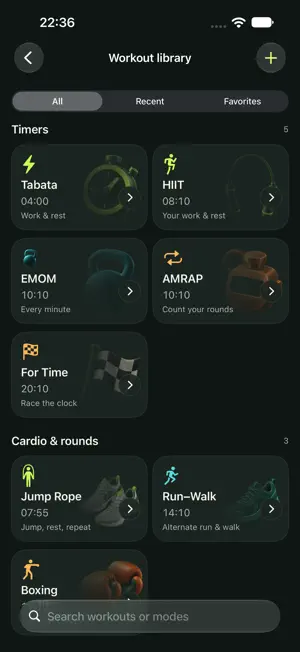
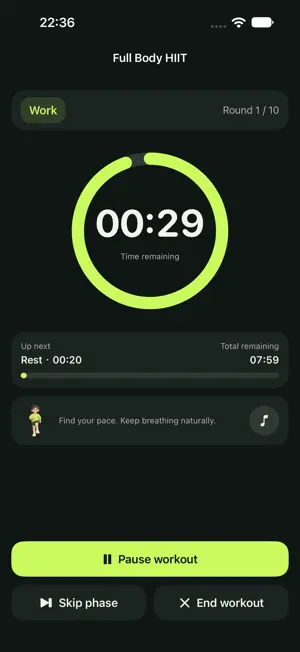
Make time to move, with a clear rhythm for preparation, work and rest. 12 workout templates, 5 timer modes Start with HIIT, Tabata, strength circuits, EMOM, AMRAP, For Time, jump rope, core, run/walk, boxing, stretching or Pilates. Templates use Intervals, Tabata, EMOM, AMRAP or For Time with adjustable settings. The app does not detect movements or provide exercise videos. Your workouts and weekly cycles Save, copy, edit and favorite workouts. Set preparation, work, rest, rounds, sets and time caps. Build a 1–12 week cycle with training and rest days, start today's workout, and let completed records update your progress. Clear workout controls Large digits, phase colors and a progress ring. Pause, resume, skip supported phases or end early. Foreground cues include sound, haptics, phase speech and the final three-second countdown. Keep the screen awake if you prefer. Count AMRAP rounds manually. For Time results exclude preparation and paused time. Background and Lock Screen timing Live Activities support the Lock Screen and Dynamic Island on compatible iPhones. While the app is in the foreground or playing background music, preparation has its own countdown; training shows the current phase, rounds where applicable, phase countdown and whole-workout time remaining. Without background music, the activity shows the whole-workout countdown and planned rounds where applicable. Open the app to sync an expired phase status. Optional notifications announce completion or the time cap, without a banner every round. Presentation and delivery depend on system settings, notification permission and system scheduling. Speech plays in the foreground. Music and recovery Choose from 7 built-in tracks, follow workout phases, or play sequentially or randomly. Import your own audio from Files. Music stops when you pause or finish. Connect your workout with a warmup, weekly goal and one minute of relaxed breathing. Local history and manual backup Explore trends, a workout calendar and personal bests, then repeat a workout from history. Plans, cycles, history and preferences stay in a local database, without iCloud sync or automatic system backup. Export a backup using the share sheet and choose where to save it. Preview imports, merge data and undo the last import. Optionally include imported audio. No account, ads, subscriptions or in-app purchases. All current features are included. Training, plans and history work offline and are not automatically uploaded to the developer. A completed timer or manual round count does not verify physical exercise. Available in Simplified Chinese and English for iPhone with iOS 26 or later. Support: [email protected]
App privacy
The developer, 小宇 李, reported these privacy practices to Apple.
Data Linked to You
The following data, which may be collected and linked to your identity, may be used for the following purposes:
- Contact Info: Email Address
- User Content: Customer Support
- Diagnostics: Other Diagnostic Data
Used for: App Functionality
Alternatives to Workout Timer: Plans & History
Looking for apps like Workout Timer: Plans & History? Here are 6 similar apps on the App Store. The highest rated is HIIT Timer Pro – Intervals (5.0/5), and all 6 are free to download.
-
 练序 - 自定义语音控制训练计时器
-
 随声练 - 定义你的训练节奏,让每一秒都有力
-
 Rounds – Interval Timer
-
 Tabata Timer: Train & Rest
-
 BeatNow
-
 HIIT Timer Pro – Intervals
5.0
HIIT Timer Pro – Intervals
5.0
| App | Rating | Price | Last updated | Compare |
|---|---|---|---|---|
| Workout Timer: Plans & History | – | Free | October 15, 2026 | |
| 练序 - 自定义语音控制训练计时器 | – | Free | Sep 6, 2026 | Compare |
| 随声练 - 定义你的训练节奏,让每一秒都有力 | – | Free | Jan 28, 2026 | Compare |
| Rounds – Interval Timer | – | Free | Oct 19, 2026 | Compare |
| Tabata Timer: Train & Rest | – | Free | Sep 9, 2026 | Compare |
| BeatNow | – | Free | Sep 30, 2026 | Compare |
| HIIT Timer Pro – Intervals | 5.0 / 5 (1) | Free | Jun 14, 2026 | Compare |