

CPianoS
Miyauchi Isao Music iPhoneiPadiPod touch
CPianoS is a free Music app for iPhone and iPad by Miyauchi Isao. Requires iOS 26.0. Updated October 27, 2026.
- Price
- Free
- on the App Store
- Size
- 93 MB
- Age 4+
- Updated
- Oct 27
- 2026 · v1.4.0
Screenshots


About CPianoS
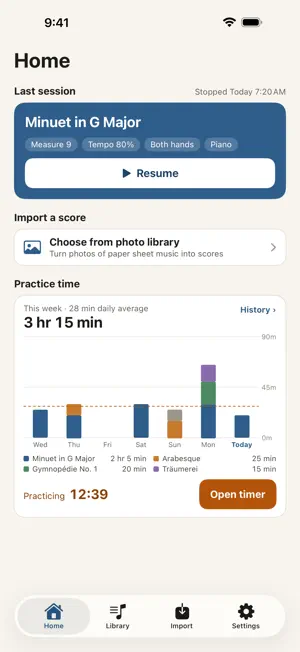
Learning piano on your own? Photograph printed sheet music and the app reads the score on your device (no account, no upload). See every note name, hear the notes read aloud, or listen on a piano. IMPORT YOUR MUSIC - Scan with the camera (perspective correction, multiple pages), pick from your photo library, or open PDFs and images from Files - Printed piano scores (grand staff) become playable music on your device - Dynamics, hairpins, pedal marks, and the printed tempo (M.M. = 120, Allegro...) are read too - Re-read earlier scores with the latest model (touch and hold a score in the Library) REVIEW AND FIX THE RESULTS - Turn on Settings → Review recognition results to check uncertain notes one by one beside the original image - Fix pitches and durations, add or remove notes, and save your review to finish later - After importing, use Edit to fix notes, rests, chords, measures, key, and time signature, measure by measure - Tap the original image for full screen, zoomed in on the selected note READ MUSIC FASTER - Note names on every note (C D E, Do Re Mi, or Japanese note names) - Read aloud with a different voice for each hand; chords are read from the lowest note up - Choose voices, speaking speed, and the app language (20 languages) in Settings HEAR HOW IT GOES - Start at the score's own tempo (100%), then slow down or speed up, with dynamics and pedal - Download a grand piano or concert grand piano sound besides the built-in upright - Play one hand only, loop a passage from A to B (saved per score), and follow the position on the score COMPARE WITH YOUR PLAYING - Play a video of your own playing (keys and hands) beside the score; videos from your photo library work too - Match one spot in the video to the score, and the score follows the video. The score's sound can play along - Videos are stored only on this device LIBRARY AND PRACTICE TIME - Keep your scores on a bookshelf with covers; search by title and sort. Jump back to where you left off from Home - Time your practice; the timer shows on the Lock Screen and in the Dynamic Island - Add practice time manually, and look back with weekly, monthly, and yearly charts by score FREE TO USE, WITH ADS - CPianoS is free, with ads in the Library and on the Import screen - 1 in 5 times you open a score, a short ad appears that you can close right away - Import up to 3 pages at a time without ads; from the 4th page, each ad you watch reads 2 more pages (internet required) PREMIUM (AUTO-RENEWING SUBSCRIPTION) - No ads at all, unlimited pages per import, and unlimited saved loops - Monthly and yearly plans. Prices are shown on the purchase page in the app - Payment is charged to your Apple ID when you confirm the purchase. It renews automatically unless canceled at least 24 hours before the current period ends - Manage or cancel in iPhone Settings → your Apple ID → Subscriptions - Terms of Use: https://giorrr.github.io/cpianos/terms_en.html - Privacy Policy: https://giorrr.github.io/cpianos/privacy_en.html PRIVACY - No account required - Score images, recognition results, practice history, and performance videos stay on your device and are never sent to the developer - Recognition and read-aloud run on your device - Premium shows no ads. Ads come from Google AdMob, which may use device identifiers and your interactions with ads. Your advertising identifier is used only if you allow tracking; every feature works either way - In the EEA, the UK, and some other regions, change your ad consent anytime in Settings → Privacy Settings GOOD TO KNOW - Only printed piano scores (grand staff) are supported, not handwriting or other instruments - Notes may be misread depending on print quality, lighting, and complexity. Review and fix them before you practice - Use imported scores for your own practice and respect the copyright of sheet music - Read-aloud uses the voices installed on your device
What’s new
Version 1.4.0 · Updated October 27, 2026
Premium is here - Subscribe to remove all ads, import any number of pages, and save unlimited loops - Monthly and yearly plans are available. Subscribe and manage it in Settings → Premium. Without a subscription, the app stays free to use as before - See what each plan includes in Settings → Free vs. Premium Compare your playing with the score - From Performance video in the viewer, play a video of your own playing (filmed over the keys and your hands) side by side with the score. You can also pick a video from your photo library - Use Start here to match the video to the score, and the score follows the video. The score's sound can play along - Videos are stored only on this device No more locked scores - Scores open any time. You no longer need to watch an ad to unlock them - Only 1 in 5 times you open a score, a short ad appears that you can close right away 2 pages per import ad - Up to 3 pages per import are read without ads. From the 4th page, each ad you watch reads 2 pages (previously 1 page) A cleaner viewer - Playback & hands, tempo & loop, and comparison settings are now on cards you swipe sideways Simpler importing - The Review results step after reading is now hidden by default. Turn it on in Settings → Review recognition results. You can still fix the score later with Edit - When the tempo is read from the score, the Song info screen no longer asks for it Bug fixes - Fixed a rare issue where the app could quit right after launch
App privacy
The developer, Miyauchi Isao, reported these privacy practices to Apple.
Data Used to Track You
The following data may be used to track you across apps and websites owned by other companies:
- Identifiers: Device ID
- Usage Data: Advertising Data
Data Not Linked to You
The following data, which may be collected but is not linked to your identity, may be used for the following purposes:
- Location: Coarse Location
- Identifiers: Device ID
- Usage Data: Product Interaction, Advertising Data
- Diagnostics: Crash Data, Performance Data, Other Diagnostic Data
Used for: Third-Party Advertising, Analytics
Alternatives to CPianoS
Looking for apps like CPianoS? Here are 6 similar apps on the App Store. The highest rated is ScoreLens: Sheet Music Scanner (5.0/5), and all 6 are free to download.
-
 Music Banana: Sheet Scanner
-
 Lumenote: Music Theory
-
 Pink Treble: Sheet Music Maker
-
 Lala Note: Sheet Music Editor
-
 Note Names: Sheet Music Scan
-
 ScoreLens: Sheet Music Scanner
5.0
| App | Rating | Price | Last updated | Compare |
|---|---|---|---|---|
| CPianoS | – | Free | October 27, 2026 | |
| Music Banana: Sheet Scanner | – | Free | Oct 15, 2026 | Compare |
| Lumenote: Music Theory | – | Free | Oct 23, 2026 | Compare |
| Pink Treble: Sheet Music Maker | – | Free | Oct 27, 2026 | Compare |
| Lala Note: Sheet Music Editor | – | Free | Oct 22, 2026 | Compare |
| Note Names: Sheet Music Scan | – | Free | Oct 30, 2026 | Compare |
| ScoreLens: Sheet Music Scanner | 5.0 / 5 (2) | Free | Oct 29, 2026 | Compare |
Compare CPianoS with the top alternatives: ratings, updates, ASO score and keyword gaps →