

ScoreLens: Sheet Music Scanner
Dzmitry Shaidorau Music iPhoneiPadiPod touch
ScoreLens: Sheet Music Scanner is a free Music app for iPhone and iPad by Dzmitry Shaidorau. Rated 5.0/5 from 1 ratings. Requires iOS 16.4.
- Rating
- 5.0
- 1 ratings
- Price
- Free
- on the App Store
- Size
- 108 MB
- Age 4+
- Updated
- Oct 26
- 2026 · v1.0.11
Screenshots


About ScoreLens: Sheet Music Scanner
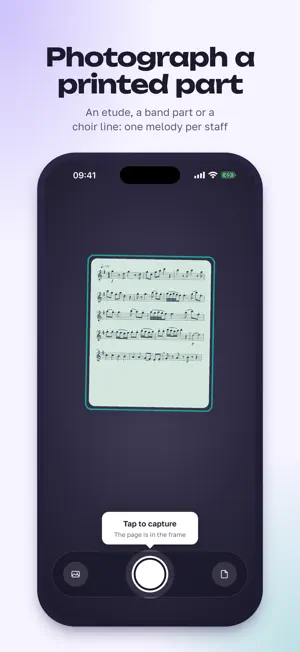
Photograph a page of printed sheet music and hear it played on your instrument. Slow it down, loop the hard bars, and move it into the key you need. ScoreLens is a sheet music scanner made for practice. It reads single-line parts: a violin etude, a clarinet part, a choir line, a page from a method book. A cursor follows the notes as it plays, so you can hear a new piece before you learn it, or check the rhythm you're not sure of. PRACTICE TOOLS, FREE • Hear the part on violin, viola, cello, flute, clarinet, alto or tenor sax, trumpet, horn, trombone, guitar, piano, or a piano guide for singers • Set the tempo in BPM or as a percentage, with a count-in and a click that follows the slower speed • Tap a measure to start there; hold and drag to loop a passage • Tempo, key, instrument and loop are remembered for each piece • Scan several pages in a row and play them as one piece TRANSPOSE AND READ IN THE NEW KEY • Move the part into another key and see it re-engraved; the key is named, so you don't count semitones • Bb, Eb and F instruments: choose written or concert pitch ("A major · sounds G") • Alto and tenor clef for viola, cello and trombone • Print the transposed part as a PDF, free HONEST ABOUT WHAT IT READ Recognition is good on clean printed parts, but it is not perfect. When a measure doesn't add up, a small dot marks it. Tap the dot to hear that bar on a loop and compare it with your photo. Where the app has other likely rhythms for the bar, it plays them one after another and you keep the one that sounds right. "Report a bad result" sends the page to me, and that is how the recognition gets better. SHARE A PART WITH STUDENTS Send a practice track: a short audio file at your tempo and key, with a link, ready for a text or WhatsApp message. Or share the whole part as a link that plays in any web browser, or opens in ScoreLens, for 30 days; stop sharing at any time. Either way you confirm you have the right to share the piece first, and only the notes go out, never your photo. Opening a shared part doesn't use the recipient's free pages. Teachers: write to us for a teacher code that gives your students 30 days of Pro. PAGES WITH SEVERAL STAVES Pick your part, make it louder than the others, or play it on its own. WHAT IT WON'T DO Better to know now than after you download it: • Two voices on one staff won't come out right. It is best on single parts; piano is read too, best on beginner and intermediate pieces. • Handwritten manuscript and tablature aren't supported • Reading a new page needs an internet connection • Check the result against the page before you learn from it FREE AND PRO Free to try: scan your first pages free, with everything above: playback, tempo, loop, count-in, click, transposition, fixing a bar by ear, sharing and the transposed PDF. Pro: unlimited pages; MIDI and MusicXML export for MuseScore, Sibelius, Dorico or your DAW; practice audio (a WAV at your tempo, in your key, with the click); a speed trainer that raises the tempo on each loop; and PDFs without the ScoreLens line. Choose Monthly; Yearly, with a 14-day free trial for new subscribers; or Lifetime, paid once. PRIVATE BY DESIGN No account and no ads. Photos are deleted from the server after reading; a page that didn't read well is kept for up to 30 days to improve recognition, then deleted. Your library stays on your phone. Anonymous usage statistics can be switched off in Settings. Questions, or a page it got wrong? [email protected] Terms of Use: https://scorelens.app/terms Privacy: https://scorelens.app/privacy
What’s new
Version 1.0.11 · Updated October 26, 2026
- A new first run: pick your instrument, hear a sample page, then scan your own. - A hint under the camera frame helps you line up the page on the first shot. - ScoreLens now speaks Italian, Polish and Brazilian Portuguese. - …plus many small improvements.
App privacy
The developer, Dzmitry Shaidorau, reported these privacy practices to Apple.
Data Linked to You
The following data, which may be collected and linked to your identity, may be used for the following purposes:
- Location: Coarse Location
- User Content: Photos or Videos, Customer Support, Other User Content
- Identifiers: User ID, Device ID
- Usage Data: Product Interaction
- Purchases: Purchase History
Used for: Analytics, App Functionality
Data Not Linked to You
The following data, which may be collected but is not linked to your identity, may be used for the following purposes:
- Purchases: Purchase History
- User Content: Customer Support, Other User Content
- Identifiers: Device ID
- Diagnostics: Crash Data, Performance Data
Used for: Analytics
Alternatives to ScoreLens: Sheet Music Scanner
Looking for apps like ScoreLens: Sheet Music Scanner? Here are 6 similar apps on the App Store. The highest rated is Music Reader -Sheet Music Note (4.5/5), and all 6 are free to download.
-
 Sheetly: Sheet Music Scanner
4.0
Sheetly: Sheet Music Scanner
4.0
-
 PlayScan: Sheet Music Scanner
2.5
PlayScan: Sheet Music Scanner
2.5
-
 Music Reader -Sheet Music Note
4.5
Music Reader -Sheet Music Note
4.5
-
 PlayScore 2
4.2
PlayScore 2
4.2
-
 Sheet Music Scanner
4.5
Sheet Music Scanner
4.5
-
 Sheet Music Reader Halbestunde
4.3
Sheet Music Reader Halbestunde
4.3
| App | Rating | Price | Last updated | Compare |
|---|---|---|---|---|
| ScoreLens: Sheet Music Scanner | 5.0 / 5 (1 rating) | Free | October 26, 2026 | |
| Sheetly: Sheet Music Scanner | 4.0 / 5 (10) | Free | Oct 26, 2026 | Compare |
| PlayScan: Sheet Music Scanner | 2.5 / 5 (2) | Free | Oct 21, 2026 | Compare |
| Music Reader -Sheet Music Note | 4.5 / 5 (192) | Free | Mar 25, 2024 | Compare |
| PlayScore 2 | 4.2 / 5 (4,767) | Free | Mar 20, 2026 | Compare |
| Sheet Music Scanner | 4.5 / 5 (6,495) | Free | Oct 1, 2026 | Compare |
| Sheet Music Reader Halbestunde | 4.3 / 5 (1,492) | Free | Oct 22, 2026 | Compare |