

MeshView: STL, 3MF, GLB Viewer
Amanuel Getachew Shiferaw Graphics & Design iPhoneiPadiPod touch
MeshView: STL, 3MF, GLB Viewer is a free Graphics & Design app for iPhone and iPad by Amanuel Getachew Shiferaw. Requires iOS 15.0.
- Price
- Free
- on the App Store
- Size
- 35 MB
- Age 4+
- Updated
- Nov 12
- 2026 · v1.5.0
Screenshots
Save to Pinterest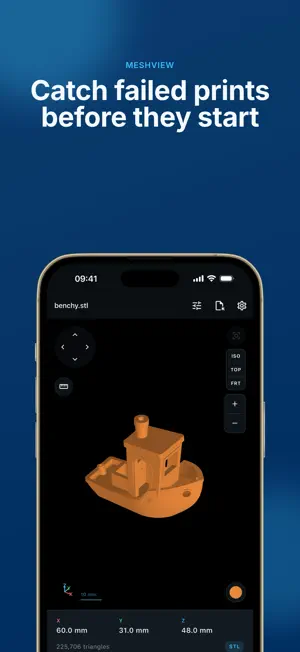


About MeshView: STL, 3MF, GLB Viewer
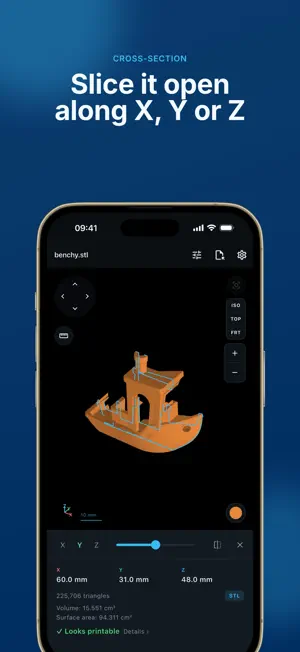
Open any STL, 3MF, GLB, OBJ, PLY or ZIP download and see it instantly. That's the whole app. No ads, ever. No account. Nothing to dismiss between you and the file you just tapped. BUILT FOR 3D PRINTING MeshView is a fast STL, 3MF, GLB, OBJ and PLY viewer for anyone who prints. Tap a file from your slicer, a model site or a ZIP download and it opens. A multi-colour 3MF shows its own colours, including the filament colours a real Bambu Studio export stores, so an eight-colour plate looks like an eight-colour plate. For STL, which has no colour field, pick a filament colour yourself. A GLB from Blender, Sketchfab or a game tool opens too, in its material colours and with correct millimetre dimensions. Textures are not drawn; MeshView tells you when a model has them. MESHVIEW PRO Check a model before you waste filament on it. One lifetime purchase or a yearly plan. Never ads, never a video to watch. • Unlimited models • Point-to-point measure — tap two points on the model • Printability check — open edges, flipped normals, non-manifold edges and degenerate faces, with the problems highlighted right on the model and a plain verdict • Wall-thickness heatmap — thin, borderline and solid areas, with an adjustable minimum wall • Cross-sections along X, Y or Z • Separate-part detection • Wireframe, points and normals display • Six standard views: top, bottom, front, back, left, right • Millimetres, centimetres or inches New Pro features are included at no extra cost. MeshView Pro is a yearly subscription or a one-time lifetime purchase. The subscription renews automatically until you cancel it in your Apple ID settings. FREE • 3 new models a month; re-opening a model you've already viewed is always free. Pro removes the limit. • Open STL, 3MF, GLB, OBJ and PLY, including multi-colour 3MF • If a GLB, OBJ or PLY looks 10× or 1000× off in size, set its units • ZIP downloads open directly; if a ZIP holds several models, you choose one • Rotate, pan and zoom — pinch and drag, or on-screen buttons when one hand is full • Isometric, top and front views, one tap each • Dimensions, triangle count, volume and surface area • Filament colours for your model • Orientation gizmo and scale bar, plus orthographic projection so what you see matches the part • Binary and ASCII STL, including files whose headers confuse other viewers OPEN FROM ANYWHERE Share a file to MeshView from Files, Mail, Safari, AirDrop or Messages — any app that can send a file. It lands straight in the viewer. YOUR FILES STAY ON YOUR DEVICE Parsing and rendering happen entirely on-device. Your models are never uploaded, never sent to a server, never shared. There is no account and no sign-in. MeshView sends anonymous usage counts (like when the app is opened, or which format a file was) and nothing else. Purchases are handled by the App Store and RevenueCat; MeshView never sees your payment details. No filenames, no file contents, no exact measurements. HONEST ABOUT LIMITS Very large models are simplified automatically so the preview stays smooth, while the readout keeps showing your file's real triangle count. If a 3MF has brush-painted colour regions, MeshView tells you so rather than quietly showing the wrong colours: it reads painted files, but does not draw the painted areas themselves. The same goes for GLB, OBJ and PLY textures and materials: models show their colours, not their textures. We would rather tell you than pretend. The file parser is written in Rust and compiled to native code, so files open quickly and the app stays small. It does one job and gets out of the way. Terms of Use: https://www.apple.com/legal/internet-services/itunes/dev/stdeula/ Privacy Policy: https://meshview3d.com/privacy
What’s new
Version 1.5.0 · Updated November 12, 2026
What's new in 1.5.0 • OBJ and PLY files now open, from a file, a share or a ZIP. Vertex colours show when the file has them. • OBJ, PLY and GLB files saved in metres or centimetres can be fixed with the new Units chip. • A PLY that is only a point cloud now says so, instead of reporting a damaged file.
App privacy
The developer, Amanuel Getachew Shiferaw, reported these privacy practices to Apple.
Data Not Linked to You
The following data, which may be collected but is not linked to your identity, may be used for the following purposes:
- Usage Data: Product Interaction
- Diagnostics: Other Diagnostic Data
- Purchases: Purchase History
Used for: Analytics, App Functionality
Alternatives to MeshView: STL, 3MF, GLB Viewer
Looking for apps like MeshView: STL, 3MF, GLB Viewer? Here are 6 similar apps on the App Store. The highest rated is 3D Quick Viewer (5.0/5), and 5 of the 6 are free to download.
-
 3D Quick Viewer
5.0
-
 Sculptor: 3D Modeling
-
 3D Scaner & Editor - LiDAR
-
 Makerlens: STL & 3MF Viewer
-
 STL 3D Model Viewer: MeshOrbit
-
 Elo: AI Coloring Book
| App | Rating | Price | Last updated | Compare |
|---|---|---|---|---|
| MeshView: STL, 3MF, GLB Viewer | – | Free | November 12, 2026 | |
| 3D Quick Viewer | 5.0 / 5 (1) | 4.99 USD | Nov 18, 2026 | Compare |
| Sculptor: 3D Modeling | – | Free | Nov 26, 2026 | Compare |
| 3D Scaner & Editor - LiDAR | – | Free | Nov 14, 2026 | Compare |
| Makerlens: STL & 3MF Viewer | – | Free | Nov 15, 2026 | Compare |
| STL 3D Model Viewer: MeshOrbit | – | Free | Nov 11, 2026 | Compare |
| Elo: AI Coloring Book | – | Free | Feb 14, 2026 | Compare |