

Makerlens: STL & 3MF Viewer
Bojan Jakus Graphics & Design iPhoneiPadiPod touch
Makerlens: STL & 3MF Viewer is a free Graphics & Design app for iPhone and iPad by Bojan Jakus. Requires iOS 17.0. Updated November 15, 2026.
- Price
- Free
- on the App Store
- Size
- 2 MB
- Age 4+
- Updated
- Nov 15
- 2026 · v1.0
Screenshots
Save to Pinterest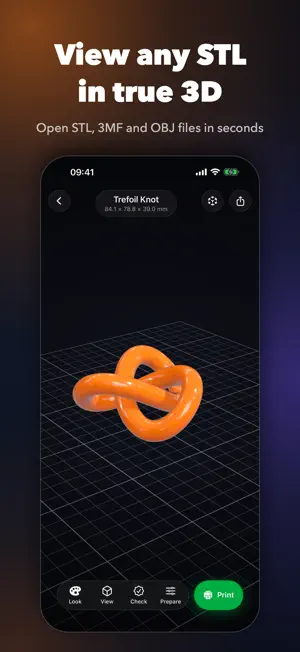


About Makerlens: STL & 3MF Viewer
The STL viewer for iPhone and iPad. Someone sent you an STL? Downloaded a 3D model? Open it and look at it properly: spin it with a finger, zoom into the details, measure it, cut it open and stand it on your desk in AR. Makerlens opens STL, 3MF and OBJ files. It is for anyone who needs to see what is in one: designers, engineers, students, hobbyists and makers. No account, no ads, and your files stay on your device unless you share them. VIEW • Fast, smooth 3D viewer that handles models with a million triangles • Orbit, pinch to zoom, two-finger pan, double-tap to fit • Front, back, left, right, top, bottom and perspective views, plus auto-rotate • Twenty colours with matte, satin, glossy and metal finishes • Four studio backgrounds, a millimetre grid and smooth shading MEASURE AND INSPECT • Width, depth and height shown right on the model • Tap two points to measure any distance • A cross-section slider along height, width or depth to look inside • Volume, surface area, triangle count and a watertight check SEE IT IN AR • Place the model on a table or the floor at its real size • Drag to move it, use two fingers to turn it RESIZE AND ORIENT • Type an exact width, depth or height, or a percentage • Keep proportions, or stretch each axis on its own • One tap converts a model that was saved in inches • Turn in 90° steps and mirror on any axis • Your original file is never changed SHARE • Share a picture of the current view • Export a 3MF or STL with the size and orientation you set, or share the untouched original IF YOU 3D PRINT • Add your printer: nearly sixty presets, with every Bambu Lab printer and models from Prusa, Creality, Anycubic, Elegoo, QIDI, Sovol and Voron, or enter your own build volume • See the build volume drawn around the model, and by how many millimetres it misses when it does not fit. One tap resizes it to fit • Overhangs past 45° painted on the model, so you can pick the orientation that needs the fewest supports • Weight, filament length and cost for seven materials at your infill • Send the 3MF to Bambu Studio, OrcaSlicer, PrusaSlicer or Cura FITS HOW YOU WORK • Opens files straight from the Files app, AirDrop, Mail and other apps • A library with thumbnails, search and sorting • iPhone and iPad, portrait and landscape • Works offline. No account, no ads, no tracking, no data collected Good to know: Makerlens is a viewer. It does not edit the shape of a model, and it does not slice: printing goes through a slicer on a computer. The print estimate is a guide, and printer sizes are the makers' published build volumes. The AR preview needs a device that supports ARKit.
App privacy
The developer, Bojan Jakus, reported these privacy practices to Apple.
Data Not Collected
The developer does not collect any data from this app.
Alternatives to Makerlens: STL & 3MF Viewer
Looking for apps like Makerlens: STL & 3MF Viewer? Here are 6 similar apps on the App Store. The highest rated is PictureTimer (5.0/5), and all 6 are free to download.
-
 ShapePeek: STL & STEP Viewer
-
 STL & 3D Viewer - MeshPeek
-
 MeshView: STL, 3MF, GLB Viewer
-
 Pocket 3D: STL Viewer
-
 PictureTimer
5.0
-
 STEP Reviewer Pro
| App | Rating | Price | Last updated | Compare |
|---|---|---|---|---|
| Makerlens: STL & 3MF Viewer | – | Free | November 15, 2026 | |
| ShapePeek: STL & STEP Viewer | – | Free | Nov 28, 2026 | Compare |
| STL & 3D Viewer - MeshPeek | – | Free | Oct 20, 2026 | Compare |
| MeshView: STL, 3MF, GLB Viewer | – | Free | Nov 12, 2026 | Compare |
| Pocket 3D: STL Viewer | – | Free | Nov 20, 2026 | Compare |
| PictureTimer | 5.0 / 5 (1) | Free | Sep 20, 2026 | Compare |
| STEP Reviewer Pro | – | Free | Oct 18, 2026 | Compare |