

Carvia - Car M3U IPTV Player
UNION COMMUNICATIONS AGENCY LIMITED Entertainment iPhoneiPadiPod touch
Carvia - Car M3U IPTV Player is a free Entertainment app for iPhone and iPad by UNION COMMUNICATIONS AGENCY LIMITED. Requires iOS 17.0.
- Price
- Free
- on the App Store
- Size
- 14 MB
- Age 17+
- Updated
- Oct 29
- 2026 · v1.2.2
Screenshots



About Carvia - Car M3U IPTV Player
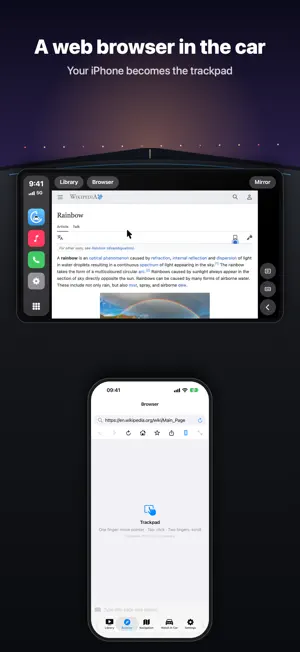
Carvia brings your own M3U / M3U8 playlists to the car. Add a playlist link once, then watch your live channels and videos on your iPhone — and, when the car is parked, right on the CarPlay screen. ON THE CAR SCREEN • Opens in every CarPlay car, including cars without CarPlay video support. • Library, Browser and Mirror sit in a top bar on the car display, just like the tabs on your iPhone. • Your playlists appear as folders and your channels as a list with logos. Favorites are always at the top. • Tap a channel and it plays on the car screen in a clean player: previous, play/pause, next and a channel list button. The picture fits the screen and the buttons never cover it. • Web browser on the car screen: open your favorite sites; your iPhone becomes a trackpad. Move the pointer with one finger, tap to click, scroll with two fingers, and type with the iPhone keyboard. • Videos in the browser go fullscreen on the car display. • Screen mirroring: show your whole iPhone screen — any app — on the car display, in portrait or landscape. ON YOUR IPHONE • M3U, M3U8, HLS and HTTP streams • Reads group-title and tvg-logo; sorts channels into groups • Playlists as folders: refresh, rename, delete • Favorites, search across all lists, resume where you left off • Import video files from your device and play them offline • Add playlists by pasting a link or scanning a QR code • Turn-by-turn navigation built on Apple Maps, with spoken guidance and automatic rerouting • 21 languages PREMIUM Go ad-free with a weekly, monthly or yearly subscription, or a one-time lifetime purchase. Subscriptions renew automatically at the end of each period unless cancelled at least 24 hours before; manage or cancel anytime in your App Store account settings. PRIVACY Everything you add stays on your iPhone. No account needed. SAFETY Video, browser and mirroring on the car screen are for passengers and parked vehicles only. Never watch video or use the browser while driving, and always follow local traffic laws. Carvia is a player only. It does not provide, host or recommend any content. You supply your own playlists and are responsible for having the right to use them. Terms of Use: https://www.apple.com/legal/internet-services/itunes/dev/stdeula/ Privacy Policy: https://ucomagency.com/carvia-privacy-policy/
What’s new
Version 1.2.2 · Updated October 29, 2026
• Add an Xtream account: live channels, movies and series with your server address, username and password. • New library: Live TV, Movies and Series, with your provider's categories as folders. • Movies and series in poster view; series episodes grouped by season. • Tidier CarPlay lists with channel logos and posters. • Much faster loading and browsing for large playlists, plus bug fixes.
App privacy
The developer, UNION COMMUNICATIONS AGENCY LIMITED, reported these privacy practices to Apple.
Data Used to Track You
The following data may be used to track you across apps and websites owned by other companies:
- Identifiers: Device ID
- Usage Data: Product Interaction, Advertising Data
Data Not Linked to You
The following data, which may be collected but is not linked to your identity, may be used for the following purposes:
- Identifiers: Device ID
- Usage Data: Product Interaction, Advertising Data
- Purchases: Purchase History
- Diagnostics: Crash Data, Performance Data, Other Diagnostic Data
Used for: Third-Party Advertising, Analytics, App Functionality
Alternatives to Carvia - Car M3U IPTV Player
Looking for apps like Carvia - Car M3U IPTV Player? Here are 6 similar apps on the App Store. The highest rated is DashTV: Car Video & Mirroring (5.0/5), and all 6 are free to download.
-
 DashTV: Car Video & Mirroring
5.0
-
 AutoPlay: Car TV & Video
-
 MyCarPlay
-
 CarPlayer: Video & TV for Car
-
 CarCast - Video on Car Display
-
 AutoTV: IPTV Player
| App | Rating | Price | Last updated | Compare |
|---|---|---|---|---|
| Carvia - Car M3U IPTV Player | – | Free | October 29, 2026 | |
| DashTV: Car Video & Mirroring | 5.0 / 5 (1) | Free | Oct 31, 2026 | Compare |
| AutoPlay: Car TV & Video | – | Free | Oct 30, 2026 | Compare |
| MyCarPlay | – | Free | Oct 16, 2026 | Compare |
| CarPlayer: Video & TV for Car | – | Free | Oct 23, 2026 | Compare |
| CarCast - Video on Car Display | – | Free | Oct 22, 2026 | Compare |
| AutoTV: IPTV Player | – | Free | Oct 17, 2026 | Compare |