

AutoPlay: Car Screen Video
Seyhmus Gumus Entertainment iPhoneiPadiPod touch
AutoPlay: Car Screen Video is a free Entertainment app for iPhone and iPad by Seyhmus Gumus. Requires iOS 17.0. Updated October 22, 2026.
- Price
- Free
- on the App Store
- Size
- 6 MB
- Age 4+
- Updated
- Oct 22
- 2026 · v1.0
Screenshots

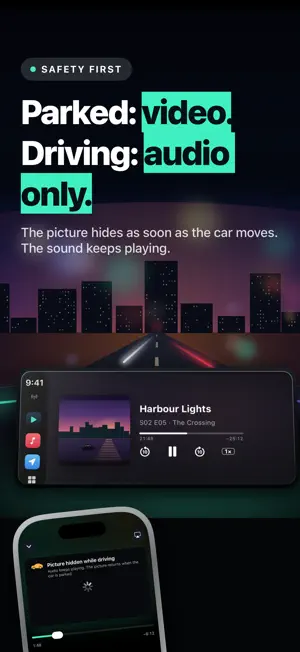


About AutoPlay: Car Screen Video
AutoPlay brings your own films, series and live TV into the car. Browse your playlists on the car display, keep listening while you drive, and watch while you're parked. VIDEO WHILE PARKED, SOUND WHILE DRIVING AutoPlay works with Apple CarPlay. Sound plays through the car everywhere. In cars that support video in CarPlay, the picture shows on the car display while you're parked. The picture is never shown while the car is moving: as soon as you drive off, it hides and only the sound keeps playing. If the car's speed can't be confirmed, the picture stays hidden. Never watch while driving. YOUR LIBRARY IN THE CAR • Continue watching, Movies, Series, Live TV, Files and Favourites right on the car display • Big playlists open by group, so thousands of channels stay easy to browse • Now Playing with back 10 s, forward 10 s, scrubbing and playback speed • Previous and next channel for live TV; the next episode starts on its own CHARGING BREAK Waiting at a charger, at the airport or for the kids? Pick a break of 15 to 60 minutes. AutoPlay suggests titles that fit: the rest of what you started, the next episode, or something new that fills the time. The countdown shows as a Live Activity on the Lock Screen, in the Dynamic Island and on the CarPlay Dashboard. YOUR PLAYLISTS • Add M3U playlist links, Xtream Codes logins or scan a playlist QR code • Import video files from your iPhone; they play offline • Channel logos and posters from your playlist • Favourites, recently played and resume points DASHBOARD ON YOUR IPHONE Mount your iPhone and turn it into a calm full-screen display of time, date and speed. 10 animated faces, 2 of them free. Swipe to switch. THE PLAYER • Full-screen phone player with fit and fill, playback speed, audio tracks and subtitles • AirPlay to a TV or to cars that support video • HLS (.m3u8), MP4 and MOV streams A PLAYER, NOT A CONTENT SERVICE AutoPlay does not provide any channels, movies, playlists or subscriptions. You add sources you already have the right to use. PRIVACY Location is used only to tell whether the car is parked and to show your speed on the dashboard. It stays on your iPhone. Your sources and logins are stored on the device, in the Keychain. PREMIUM The free version includes 2 dashboard faces and a one-time 10 minutes of CarPlay playback. AutoPlay Premium unlocks unlimited CarPlay playback and every dashboard face. • Premium Weekly and Premium Yearly are auto-renewing subscriptions. Premium Lifetime is a one-time purchase. • Payment is charged to your Apple ID when you confirm the purchase. A subscription renews automatically unless it is cancelled at least 24 hours before the end of the current period; renewal is charged within the 24 hours before the period ends. Manage or cancel subscriptions in your App Store account settings. Terms of Use (EULA): https://rotenbergsofts.de/autoplay/eula.html Privacy Policy: https://rotenbergsofts.de/autoplay/privacy.html
App privacy
The developer, Seyhmus Gumus, reported these privacy practices to Apple.
Data Used to Track You
The following data may be used to track you across apps and websites owned by other companies:
- Purchases: Purchase History
- Location: Coarse Location
- Identifiers: Device ID
- Usage Data: Product Interaction, Advertising Data
Data Linked to You
The following data, which may be collected and linked to your identity, may be used for the following purposes:
- Purchases: Purchase History
- Identifiers: Device ID
- Usage Data: Product Interaction
Used for: Third-Party Advertising, Analytics, App Functionality
Data Not Linked to You
The following data, which may be collected but is not linked to your identity, may be used for the following purposes:
- Location: Coarse Location
- Usage Data: Advertising Data
- Diagnostics: Crash Data, Performance Data
Used for: Third-Party Advertising, App Functionality
Alternatives to AutoPlay: Car Screen Video
Looking for apps like AutoPlay: Car Screen Video? Here are 6 similar apps on the App Store. The highest rated is OmniLog: Media Time Tracker (5.0/5), and all 6 are free to download.
-
 CarPlayer: Video & TV for Car
-
 OmniLog: Media Time Tracker
5.0
OmniLog: Media Time Tracker
5.0
-
 Presto! IPTV Player
-
 DashTV: Car Video & Mirroring
5.0
DashTV: Car Video & Mirroring
5.0
-
 Channelize
-
 Wavr Stream
| App | Rating | Price | Last updated | Compare |
|---|---|---|---|---|
| AutoPlay: Car Screen Video | – | Free | October 22, 2026 | |
| CarPlayer: Video & TV for Car | – | Free | Oct 23, 2026 | Compare |
| OmniLog: Media Time Tracker | 5.0 / 5 (1) | Free | Oct 13, 2026 | Compare |
| Presto! IPTV Player | – | Free | Oct 23, 2026 | Compare |
| DashTV: Car Video & Mirroring | 5.0 / 5 (1) | Free | Oct 29, 2026 | Compare |
| Channelize | – | Free | Aug 21, 2026 | Compare |
| Wavr Stream | – | Free | Jun 24, 2026 | Compare |