

Photo Print Size: Exact Inches
凡 魏 Utilities iPhoneiPadiPod touch
Photo Print Size: Exact Inches is a free Utilities app for iPhone and iPad by 凡 魏. Requires iOS 17.0. Updated October 20, 2026.
- Price
- Free
- on the App Store
- Size
- 3 MB
- Age 4+
- Updated
- Oct 20
- 2026 · v1.2
Screenshots


About Photo Print Size: Exact Inches
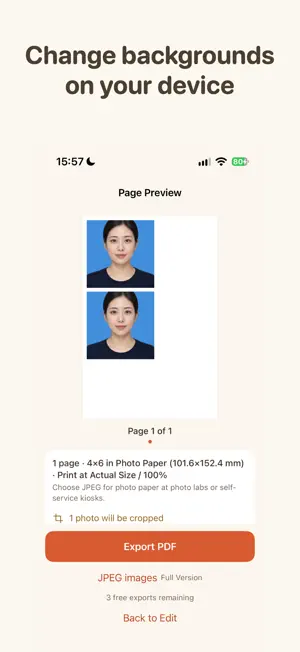
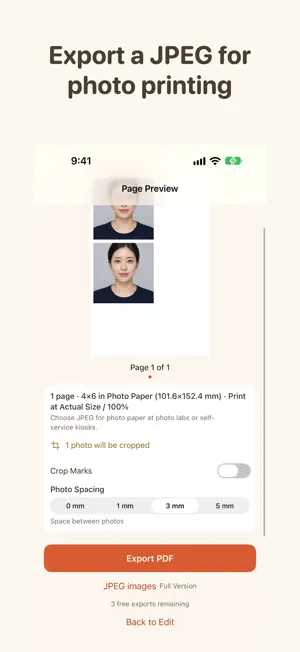
Arrange selected photos by finished dimensions and copy count, then preview and export a PDF for your chosen paper size. 2L paper is also available. The full version adds per-page JPEG export and on-device background replacement. Photos and layout drafts are processed and stored on your device. The app does not upload your photos to our servers. Export a PDF and check it with the included 100 mm test ruler. Add photos from your library, the Files app, or the clipboard. Set dimensions and quantities Choose photos, set dimensions for the group, and adjust individual dimensions, orientation, and copy count when needed. Use automatic, portrait, or landscape frames. The frame can change orientation; the photo itself is not stretched. The app supports up to 50 selected photos. Choose Fit or Fill Fit keeps the full image inside the frame and may leave blank space. Fill covers the frame and crops the image; you can adjust the crop position. Face-based crop suggestions, when available, are generated on-device. Your manual crop remains in place unless you ask for a new suggestion. ID photo sheet Choose a use, paper, and background to arrange multiple small prints from one photo on a page. This is a layout tool; it does not determine whether a photo meets an agency's requirements. JPEG and background replacement The full version exports one JPEG image per page. 2L paper is also available. Person recognition and background replacement run on your device. Photos are not uploaded. Saving a JPEG to Photos requests add-only access. Preview and print Review the pages before exporting. Print on the selected paper size using “Actual Size” or “100%” and turn off “Fit to Page.” The separate test-ruler PDF follows the selected paper size in the app. Its vertical line is 100 mm. The horizontal line is 100 mm on A4, Letter, A5, and 5×7; 90 mm on 4×6; and 70 mm on L size (Japan). Each nominal line length is printed on the page. Use the marked lengths to check each print workflow with a physical ruler; printer, driver, and PDF app settings can affect output. Print at home or use a print shop that accepts PDFs. Check that the service supports your PDF and selected paper size before printing. Local photo handling Photos and layout drafts stay on your device and are not uploaded to our servers. Clearing drafts removes the app’s local draft and photo copies, not the originals in your photo library. If you share an exported PDF, you choose the destination through the system share interface. Opening a website link visits the linked website in your browser. One-time unlock PDF export for up to three different layouts remains free; the free-use rules are unchanged. Exporting the same layout again does not use another free layout. JPEG export and on-device background replacement are full-version features. One purchase provides permanent access and does not renew automatically. Apple processes purchases and restore requests through StoreKit. The price shown in the app applies. This app helps prepare everyday photo prints. It does not check whether an ID photo meets an agency’s requirements. Printer output dimensions can vary; measure the test ruler on the printed page.
What’s new
Version 1.2 · Updated October 20, 2026
Export one JPEG per page and choose 2L paper. Replace photo backgrounds on your device. After changing the background, refine edges manually to erase remaining background. Arrange multiple ID photo prints from one photo on a page. The first three different layouts remain available as free PDF exports. The full version is a one-time purchase with no automatic renewal.
App privacy
The developer, 凡 魏, reported these privacy practices to Apple.
Data Not Collected
The developer does not collect any data from this app.
Alternatives to Photo Print Size: Exact Inches
Looking for apps like Photo Print Size: Exact Inches? Here are 6 similar apps on the App Store.


| App | Rating | Price | Last updated | Compare |
|---|---|---|---|---|
| Photo Print Size: Exact Inches | – | Free | October 20, 2026 | |
| PicSheet | – | Free | Sep 16, 2026 | Compare |
| A4排版助手 | – | Free | Jun 25, 2026 | Compare |
| Print2Size | – | Free | Aug 21, 2026 | Compare |
| Desk Clock: Standby & Bedside | – | Free | Oct 28, 2026 | Compare |
| PhotoTrueSize | – | Free | Oct 8, 2026 | Compare |
| PrintHub: Printer & Scanner | – | Free | Oct 30, 2026 | Compare |