

PhotoTrueSize
Nephritesoft Utilities iPhoneiPadiPod touch
PhotoTrueSize is a free Utilities app for iPhone and iPad by Nephritesoft. Requires iOS 15.0. Updated October 8, 2026.
- Price
- Free
- on the App Store
- Size
- 23 MB
- Age 4+
- Updated
- Oct 8
- 2026 · v1.1
Screenshots

About PhotoTrueSize
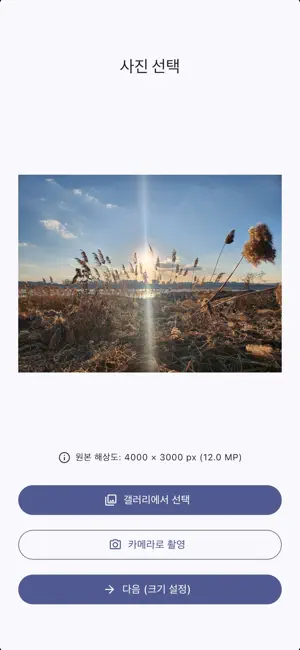
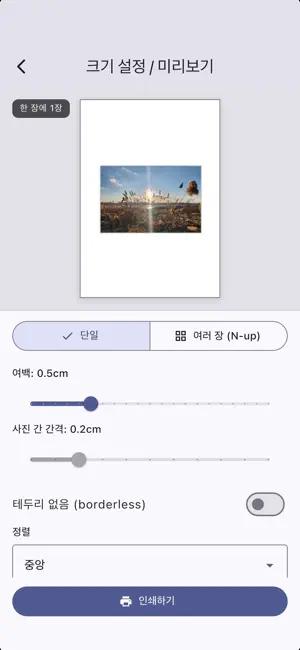
PhotoTrueSize lets you print and save photos at the exact physical size you want — down to the millimeter. Tired of photos that print stretched to fill an A4 page, or at some random size you can't control? PhotoTrueSize puts you in charge. Choose a standard photo size or enter your own dimensions, and the app lays your photo out at precisely that size, ready to print or save. KEY FEATURES • Exact physical sizing — Set the output size in mm, cm, or inches. What you set is what you get. • Standard presets — 4×6, 5×7, 3×5, 8×10, ID/passport photos, and more. • Custom sizes — Enter any width and height for full control. • Fit multiple photos per page — Place several copies on a single A4 sheet to save paper and print cost. • Choose your paper — A4, A5, A3, Letter, and photo paper sizes. • Margins & borderless — Adjust margins or go edge-to-edge. • Live preview — See exactly how your photo sits on the page before printing. • Resolution warning — The app warns you when a photo is too low-resolution for the size you chose, so you avoid blurry prints. • Print or save — Send straight to any AirPrint printer, save as PDF, or export as a high-resolution JPG/PNG image (with print DPI embedded). PRIVACY FIRST Your photos never leave your device. PhotoTrueSize processes everything locally — no uploads, no accounts, no servers. NOTE ON PRINT ACCURACY The app generates output at accurate physical dimensions. Final printed size may vary slightly depending on your printer, paper, and print settings. For best results, choose "Actual size" / "100%" when printing and turn off auto-fit. PhotoTrueSize is free, supported by ads.
What’s new
Version 1.1 · Updated October 8, 2026
What's New • Adjustable print area — When your photo and print size have different aspect ratios, you can now choose exactly which part gets printed. Tap "Print Area" on the preview, drag to reposition, and pinch to zoom. • New default layout — One photo per page by default. Choose "Multiple (N-up)" in Layout to fit more on a single sheet. • Smarter resolution warning — Zooming into a print area now updates the DPI warning based on the actual printed quality.
App privacy
The developer, Nephritesoft, reported these privacy practices to Apple.
Data Used to Track You
The following data may be used to track you across apps and websites owned by other companies:
- Identifiers: Device ID
Data Not Linked to You
The following data, which may be collected but is not linked to your identity, may be used for the following purposes:
- Identifiers: Device ID
Used for: Third-Party Advertising
Alternatives to PhotoTrueSize
Looking for apps like PhotoTrueSize? Here are 6 similar apps on the App Store. The highest rated is Crop and Print (5.0/5), and 4 of the 6 are free to download.
-
 Scale and Print
-
 MRZ Scanner PRO
-
 NightWalk Depth Scanner
-
 Crop and Print
5.0
Crop and Print
5.0
-
 Invisiweb: Cybersecurity & VPN
5.0
Invisiweb: Cybersecurity & VPN
5.0
-
 Teralab: AI Soil Analysis
| App | Rating | Price | Last updated | Compare |
|---|---|---|---|---|
| PhotoTrueSize | – | Free | October 8, 2026 | |
| Scale and Print | – | 0.99 USD | Oct 15, 2026 | Compare |
| MRZ Scanner PRO | – | 5.99 USD | Dec 15, 2025 | Compare |
| NightWalk Depth Scanner | – | Free | Feb 23, 2026 | Compare |
| Crop and Print | 5.0 / 5 (1) | Free | Dec 2, 2025 | Compare |
| Invisiweb: Cybersecurity & VPN | 5.0 / 5 (1) | Free | Oct 6, 2026 | Compare |
| Teralab: AI Soil Analysis | – | Free | Feb 21, 2026 | Compare |
Compare PhotoTrueSize with the top alternatives: ratings, updates, ASO score and keyword gaps →