

PrintHub: Printer & Scanner
Aleksandr Chanchikov Utilities iPhoneiPadiPod touch
PrintHub: Printer & Scanner is a free Utilities app for iPhone and iPad by Aleksandr Chanchikov. Requires iOS 17.6. Updated October 26, 2026.
- Price
- Free
- on the App Store
- Size
- 176 MB
- Age 4+
- Updated
- Oct 26
- 2026 · v2.6
Screenshots

About PrintHub: Printer & Scanner
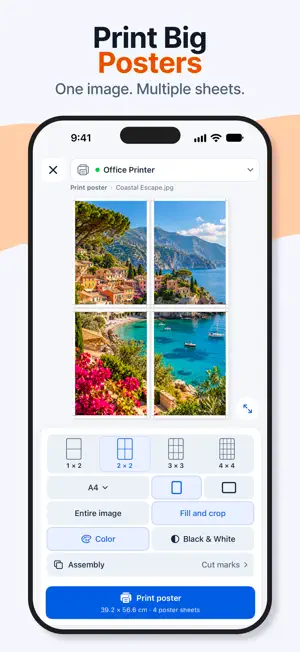
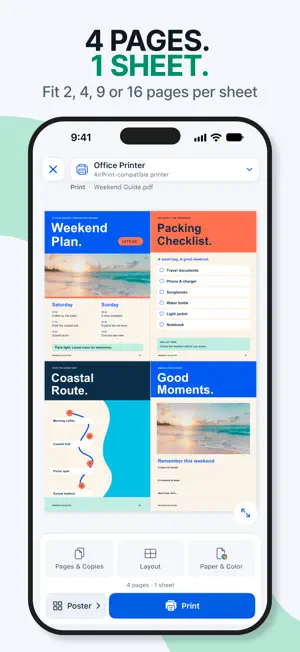
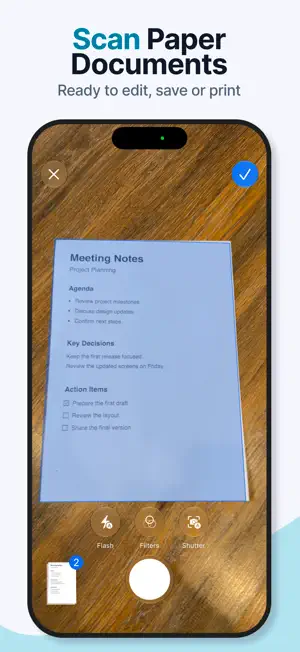
Print PDFs, photos and scanned documents from your iPhone or iPad without a computer. Use an AirPrint-compatible printer, preview each page and add a signature before printing. PRINT THE WAY YOU NEED • Choose the paper size, orientation, page range and number of copies. • Select color or black-and-white output. • Place multiple pages on one sheet. • Print on both sides when supported by your printer. TURN AN IMAGE INTO A POSTER Split a photo or image across multiple sheets to create a larger poster. Preview the layout before printing. SCAN AND IMPORT • Scan multi-page paper documents with the camera. • Import photos, PDF, Word, Excel, PowerPoint, Keynote, Numbers, RTF and plain-text files. • Send PDFs from Files and images from Photos to PrintHub using the Share menu. • Create documents from supported clipboard content and web links. EDIT, SIGN AND ORGANIZE • Crop, rotate, adjust brightness and contrast, or use Auto Enhance. • Add text, hand-drawn signatures, shapes, drawings and blur annotations. • Reorder pages and keep prepared documents in your local library. • Reopen, rename or delete saved documents. SAVE AS PDF Export a multi-page document as a PDF to save or share a digital copy. PRINTER COMPATIBILITY Printing requires an AirPrint-compatible printer accessible on the same local network as your iPhone or iPad. Available paper sizes and print options depend on the printer. PrintHub Pro unlocks unlimited printing and PDF export. Subscription access lasts while the subscription is active, and subscriptions renew automatically. Available purchase options, prices and any eligible trial are shown before purchase. Manage or cancel subscriptions through your Apple Account and restore purchases in PrintHub. Terms of Use: https://chematiks.github.io/printhub-legal/terms.html Privacy Policy: https://chematiks.github.io/printhub-legal/privacy.html
What’s new
Version 2.6 · Updated October 26, 2026
Happy Halloween from PrintHub! We’re celebrating with pumpkins, friendly ghosts, and new ways to bring your text back to life. This update adds OCR and Markdown to the Halloween fun. Turn pages into editable text. Use OCR to recognize text in scans, photos, and PDFs. Compare the result with the original, make corrections, and create a new document ready to print. Put your Markdown on paper. Open Markdown files or paste Markdown text to create formatted documents with headings, lists, bold text, and tables. Adjust text size, margins, and spacing in the preview. Fit now works with formatted text, too, helping you fit text onto one page while keeping its structure. Keep the Halloween fun going. Explore free coloring pages and Halloween designs, assemble a large poster from several sheets, and decorate your pages with pumpkin, ghost, cobweb, and skeleton stamps. The seasonal app icon and warm autumn colors are still here for the celebration. You bring the paper. We’ll bring the Halloween spirit.
App privacy
The developer, Aleksandr Chanchikov, reported these privacy practices to Apple.
Data Linked to You
The following data, which may be collected and linked to your identity, may be used for the following purposes:
- Purchases: Purchase History
- Location: Coarse Location
- Identifiers: Device ID
- Usage Data: Product Interaction, Other Usage Data
Used for: Analytics, App Functionality
Data Not Linked to You
The following data, which may be collected but is not linked to your identity, may be used for the following purposes:
- Diagnostics: Other Diagnostic Data, Crash Data
Used for: Analytics, App Functionality
Alternatives to PrintHub: Printer & Scanner
Looking for apps like PrintHub: Printer & Scanner? Here are 6 similar apps on the App Store. The highest rated is 手动双面打印 (1.0/5), and all 6 are free to download.


| App | Rating | Price | Last updated | Compare |
|---|---|---|---|---|
| PrintHub: Printer & Scanner | – | Free | October 26, 2026 | |
| 违章视频裁剪器 | – | Free | Oct 9, 2026 | Compare |
| Photo Print Size: Exact Inches | – | Free | Oct 20, 2026 | Compare |
| PicSheet | – | Free | Sep 16, 2026 | Compare |
| 手动双面打印 | 1.0 / 5 (1) | Free | Mar 14, 2026 | Compare |
| A4排版助手 | – | Free | Jun 25, 2026 | Compare |
| UnitFlow - Unit Converter | – | Free | Feb 23, 2026 | Compare |