

Derly: Voice to Notes
Gabriel Espirito Santo Productivity iPhoneiPadiPod touchMacApple Watch
Derly: Voice to Notes is a free Productivity app for iPhone and iPad by Gabriel Espirito Santo. Requires iOS 26.0. Updated October 9, 2026.
- Price
- Free
- on the App Store
- Size
- 223 MB
- Age 4+
- Updated
- Oct 9
- 2026 · v1.3
Screenshots


About Derly: Voice to Notes
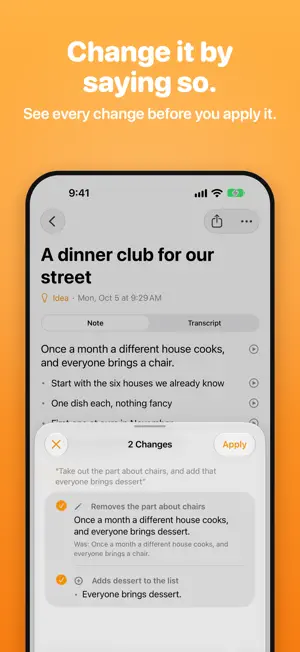
Say what's on your mind. Derly writes it down. Tap the mascot and talk. When you stop, you get a clear note: a title, the gist in your own words, the points behind it, and any to-dos, with dates when you said them. Everything happens on your iPhone, iPad or Mac. Your voice is never sent to us or anyone else. CHANGE IT BY SAYING SO Open a note and say "drop the part about pricing and add that I'll try it Friday." You see each change before and after, and apply them one at a time or all at once. Every recording is kept. YOURS, AS FILES Every thought is a folder in the Files app: the note as Markdown, the recording, and every edit you spoke. Open them in any app. Nothing is locked in. ALWAYS AT HAND Record from the Action button, Control Center, the Lock Screen, a widget or Siri. A Live Activity shows the time, with pause and stop. SIRI, SHORTCUTS AND SPOTLIGHT Ask Siri to make a note, add to one or read one back. Find any word you said in Spotlight. Build your own flows in Shortcuts, like turning voice memos into notes. TO-DOS WHERE YOU NEED THEM Send to-dos to Reminders with a tap, or have them go there on their own. MAKE IT YOURS Pick the app's color and your mascot's shape and glass, and put them on the app icon too. Tell it your languages, how notes should read, and the names and words it should know. MORE THAN ONE LANGUAGE Talk in the languages you use, even in the same thought. PLANS Free: record as much as you like. Everyday transcripts, notes, to-dos and editing by voice. Plus: Precise transcripts, the most accurate, even with names, jargon and more than one language. Fast transcripts: an hour's meeting in a minute or two. Every color, shape and glass. Your notes on your iPhone, iPad and Mac, through iCloud. Monthly or yearly, with a free week to try it. Prices are shown in the app. Notes are written with Apple Intelligence on devices that support it. On other devices you still get the recording and the transcript. Plus renews automatically unless canceled at least 24 hours before the end of the period. Manage or cancel it in your Apple Account settings. Terms of Use: https://www.apple.com/legal/internet-services/itunes/dev/stdeula/ Privacy Policy: https://usefriendly.app/products/derly/privacy/
What’s new
Version 1.3 · Updated October 9, 2026
Derly now transcribes with Whisper, right on your device. It hears names and quiet voices better, and no longer misses whole recordings or changes you say out loud. It downloads once, on Wi-Fi, and the bubble at the top shows how far along it is. New in Plus: Fast, nearly as accurate as Precise and an hour's meeting in a minute or two, in English, German, Spanish, French, Italian and Portuguese. Each note shows which model made its transcript, and you can make it again with another. Your older transcripts are made again, newest first. Notes you didn't change are written again; notes you changed keep your words. Better and Best are now called Everyday and Precise. Long transcripts scroll smoothly on iPad. Recording starts faster and works with AirPods and other Bluetooth headsets.
App privacy
The developer, Gabriel Espirito Santo, reported these privacy practices to Apple.
Data Not Collected
The developer does not collect any data from this app.
Alternatives to Derly: Voice to Notes
Looking for apps like Derly: Voice to Notes? Here are 6 similar apps on the App Store.
-
 ThusNote
-
 Ashiato - One-Tap Lifelog
-
 WatchMinutes
-
 Stilo Markdown Editor
-
 Silica: Location History
-
 koedesk
| App | Rating | Price | Last updated | Compare |
|---|---|---|---|---|
| Derly: Voice to Notes | – | Free | October 9, 2026 | |
| ThusNote | – | Free | Sep 22, 2026 | Compare |
| Ashiato - One-Tap Lifelog | – | Free | Sep 2, 2026 | Compare |
| WatchMinutes | – | Free | Oct 23, 2026 | Compare |
| Stilo Markdown Editor | – | Free | Oct 25, 2026 | Compare |
| Silica: Location History | – | Free | Oct 23, 2026 | Compare |
| koedesk | – | Free | Aug 19, 2026 | Compare |