

koedesk
guide.inc Productivity iPhoneiPadiPod touch
koedesk is a free Productivity app for iPhone and iPad by guide.inc. Requires iOS 17.0. Updated August 19, 2026.
- Price
- Free
- on the App Store
- Size
- 7 MB
- Age 4+
- Updated
- Aug 19
- 2026 · v1.3.5
Screenshots


About koedesk
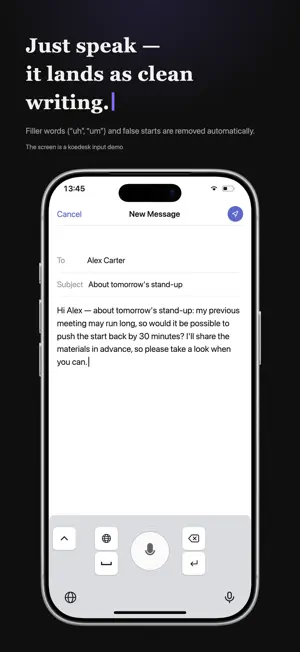
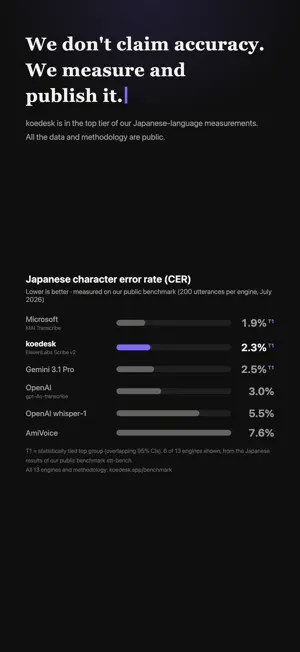
koedesk turns your iPhone keyboard into a voice-powered text input. Tap the mic, speak, tap again — your words appear instantly in any app — Claude, ChatGPT, Gemini, Slack, Mail, Notes, anywhere you can type. KEY FEATURES • Universal keyboard Replace the system keyboard. Works in every iOS app — chat with AI agents, draft emails, jot ideas, search the web. No copy-paste needed. • World-class accuracy Powered by ElevenLabs Scribe v2 — ranked #2 of all models on the third-party AA-WER English benchmark (2.2% WER). Accuracy measured and published across 12 languages at koedesk.app/en/benchmark/. • 36 languages, auto-detected Japanese, English, Spanish, French, German, Italian, Portuguese, Vietnamese, and more. The keyboard reads your locale settings — no language switching needed. • Built for AI agents Optimized for natural conversation with Claude, ChatGPT, and Gemini. Keyterms support lets you feed product names, codebases, and proper nouns for even higher accuracy. Filler words (um, uh) are auto-cleaned. • Custom dictionary Add specialized terms, project names, jargon — koedesk learns and adapts. PRICING • Free — 5 minutes per day, full Scribe v2 quality, no credit card required. • Pro — Unlimited transcription, cancel anytime. PRIVACY FIRST Your audio is processed transiently. We never store voice recordings. Account deletion is one tap away — Settings → Account → Delete Account. WHO IS IT FOR • Developers using AI agents in their workflow • Writers drafting on iPhone • Anyone tired of pecking at the on-screen keyboard • Bilingual users tired of switching between language keyboards Get started free — no credit card, no commitment. Terms of Use — https://koedesk.app/terms/ Privacy Policy — https://koedesk.app/privacy/
What’s new
Version 1.3.5 · Updated August 19, 2026
The home screen is now a composer: one draft you can speak into, type into, and edit in place. Speech lands at the cursor, so you can dictate into the middle of a sentence you already started. Permissions are asked for when you first use the feature that needs them, instead of all at once up front. The record control stays in the same place whether you are recording or not, and the keyboard, the floating bubble and the app no longer interrupt each other's recordings.
App privacy
The developer, guide.inc, reported these privacy practices to Apple.
Data Linked to You
The following data, which may be collected and linked to your identity, may be used for the following purposes:
- Contact Info: Email Address
- User Content: Audio Data, Other User Content
- Identifiers: User ID
Used for: App Functionality
Data Not Linked to You
The following data, which may be collected but is not linked to your identity, may be used for the following purposes:
- Identifiers: Device ID
- Usage Data: Product Interaction
- Diagnostics: Other Diagnostic Data, Crash Data
Used for: Analytics, App Functionality
Alternatives to koedesk
Looking for apps like koedesk? Here are 6 similar apps on the App Store. The highest rated is Lumin - Talk to your email (4.9/5), and all 6 are free to download.
-
 Perspective Transcribe
4.4
-
 Lumin - Talk to your email
4.9
-
 Perspective Intelligence
4.5
-
 Emvi.ai
3.6
-
 Sonarpad
4.5
-
 ScribeMe
3.9
| App | Rating | Price | Last updated | Compare |
|---|---|---|---|---|
| koedesk | – | Free | August 19, 2026 | |
| Perspective Transcribe | 4.4 / 5 (9) | Free | Oct 20, 2026 | Compare |
| Lumin - Talk to your email | 4.9 / 5 (66) | Free | Oct 19, 2026 | Compare |
| Perspective Intelligence | 4.5 / 5 (20) | Free | Aug 26, 2026 | Compare |
| Emvi.ai | 3.6 / 5 (7) | Free | Oct 16, 2026 | Compare |
| Sonarpad | 4.5 / 5 (2) | Free | Oct 17, 2026 | Compare |
| ScribeMe | 3.9 / 5 (15) | Free | Oct 23, 2026 | Compare |
Compare koedesk with the top alternatives: ratings, updates, ASO score and keyword gaps →