

Stilo Markdown Editor
Sohshi Sasao Productivity iPhoneiPadiPod touch
Stilo Markdown Editor is a free Productivity app for iPhone and iPad by Sohshi Sasao. Requires iOS 17.0. Updated October 25, 2026.
- Price
- Free
- on the App Store
- Size
- 3 MB
- Age 4+
- Updated
- Oct 25
- 2026 · v1.3
Screenshots


About Stilo Markdown Editor
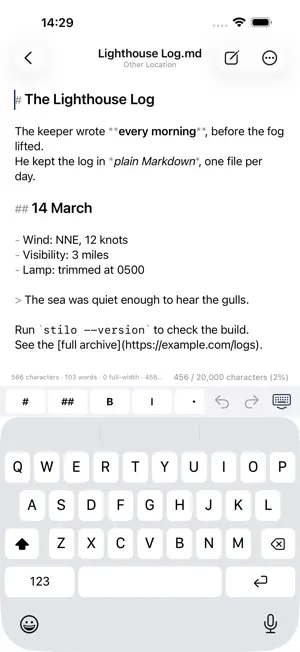
What you write stays a file. Stilo is a Markdown editor for iPhone and iPad. It keeps no library of its own. It opens the .md files already sitting in Files and iCloud Drive, and saves them right back. The same file still opens on your Mac and in every other app. WHAT IT DOES Your files stay yours. Edit Markdown on this iPhone, in iCloud Drive or on another cloud service. Nothing to import, nothing to export. The name and location of the open file sit at the top of the screen, and you can rename the file without leaving the editor. EAST ASIAN TYPOGRAPHY - Vertical text preview. Read your work in vertical columns, just as it appears in print - Ruby annotation. Write |北海道《ほっかいどう》 and it renders as ruby text above the base characters: furigana, zhuyin, pinyin or Korean readings - Tate-chu-yoko. Two-digit numbers stay upright inside vertical text - Page counts. Count in 400-character manuscript sheets, Taiwanese gaozhi, Korean wongoji or 250 words per page, or set your own grid - Writing goals, with progress on the status line A SCREEN THAT STAYS OUT OF THE WAY - Markdown syntax is drawn in a lighter colour so the text itself stays readable - A tag toolbar above the keyboard inserts headings, bold, quotes and ruby with one tap. Reorder it, add to it, or cut it down - Find and replace, with a match count, previous and next, and a Match Case switch - Characters, characters excluding spaces, the full-width and half-width split, lines and words EXPORT HTML export is free. PDF export keeps the vertical layout and the ruby exactly as you see them. Choose A4, Letter, Legal and other paper sizes. PRIVACY Stilo collects no personal information. There are no analytics SDKs and no advertising. The developer runs no servers, so the only place your writing goes is the cloud you chose yourself. ABOUT STILO PRO Editing, preview, find and replace, reading and writing files, character and word counts, and HTML export are free. Vertical text preview, ruby conversion, page counts and goals, PDF export, and themes with font import come with Stilo Pro. It is a one-time purchase, not a subscription. Buy it once and it works on every iPhone and iPad signed in with the same Apple ID. If the free version covers what you need, keep using it. Stilo Pro isn't required for writing; it's for reading and publishing your work in typeset form. ABOUT REPOSITORY ACCESS (sold separately, one-time purchase) Open the Markdown files in your GitHub repositories as they are, edit them, and save with a commit message. If a file changed elsewhere first, Stilo tells you instead of overwriting it. This is not a Git client: no branching, merging, history or diffs. It is focused on writing the manuscripts that live in your repository. Repository Access is independent of Stilo Pro; you can buy either one on its own. Your GitHub access token is stored only on your device.
What’s new
Version 1.3 · Updated October 25, 2026
Stilo now has a read-only mode. - Turn on Read-Only in the More menu of the editor to read a document without changing it. No need to switch to the preview - You can still select, copy and search text while it is on - It applies only while the document is open and turns off when you close it Also in this version: - Fixed an issue where files in read-only locations could still be changed from the toolbar or with Replace
App privacy
The developer, Sohshi Sasao, reported these privacy practices to Apple.
Data Not Collected
The developer does not collect any data from this app.
Alternatives to Stilo Markdown Editor
Looking for apps like Stilo Markdown Editor? Here are 6 similar apps on the App Store.


| App | Rating | Price | Last updated | Compare |
|---|---|---|---|---|
| Stilo Markdown Editor | – | Free | October 25, 2026 | |
| One: Goal Tracker | – | Free | Oct 12, 2026 | Compare |
| 原稿ペース - 締切から逆算する執筆量 | – | Free | Sep 15, 2026 | Compare |
| ThusNote | – | Free | Sep 22, 2026 | Compare |
| Ashiato - One-Tap Lifelog | – | Free | Sep 2, 2026 | Compare |
| Derly: Voice to Notes | – | Free | Oct 9, 2026 | Compare |
| 綴箱 | – | Free | Oct 27, 2026 | Compare |