

FormGoat: PDF Editor & AI Fill
Pavel Kanakhistov Productivity iPhoneiPadiPod touch
FormGoat: PDF Editor & AI Fill is a free Productivity app for iPhone and iPad by Pavel Kanakhistov. Requires iOS 15.0. Updated November 1, 2026.
- Price
- Free
- on the App Store
- Size
- 49 MB
- Age 17+
- Updated
- Nov 1
- 2026 · v1.0.1
Screenshots
Save to Pinterest


About FormGoat: PDF Editor & AI Fill
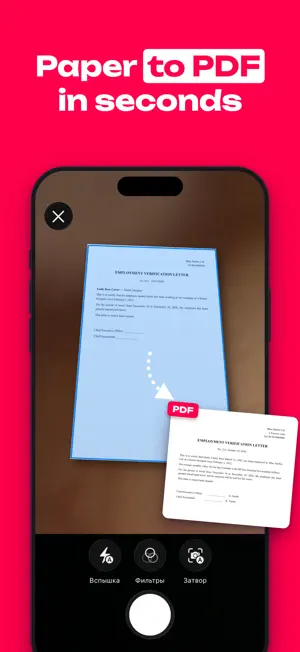
FormGoat is a free PDF reader and editor for iPhone: open PDFs from the Files app, sign them, add text and annotations, scan paper documents, and organize pages. Fill out forms and documents with AI: take a photo of your passport or a form, add a blank form in PDF, Word, or Excel, and AI will find the right data and fill in the fields for you. In a minute or two, your completed file is ready. PDF READER AND EDITOR • Text search, table of contents, page thumbnails, and dark pages for reading at night • Opens password-protected PDFs • Pen, highlighter, and eraser, plus text, images, and sticky notes right on the page • Text markup: highlight, underline, or strike through a line • Sign with your finger: draw your signature once and reuse it in other documents • Pages: reorder, rotate, crop, and delete; insert blank pages or pages from another PDF • Undo and redo step by step • Folders, favorites, and a trash that keeps deleted files for 30 days PDF TOOLS • Document scanner: the camera detects page edges and straightens each page; scan several pages into one PDF • Photos to PDF and PDF to JPG • Merge, split, and compress PDFs to fit email and upload limits HOW AI FILL WORKS 1. Add documents with your details: take photos with your camera, scan them, or pick photos and files on your phone. 2. Choose the form you need to fill out: PDF, Word, or Excel. 3. Tap “Fill”: AI reads your documents and fills out the form. 4. Open the completed document, review it, and share it with any app: AI is fast, but you have the final say. Opened a PDF form in FormGoat? Tap “Fill” right in the document. FORMS FORMGOAT CAN FILL • Fillable PDF forms: text, dates, checkboxes, multiple choice • Flat (non-fillable) PDF forms: lines, blank spaces, and boxes to tick • Questionnaires and applications in Word (.docx) • Forms and tables in Excel (.xlsx) WHERE THE DATA COMES FROM Passport, ID card, residence permit, driver’s license, certificates, bank statements, contracts, invoices: any document with the information you need. Photos (JPG, PNG, HEIC), PDF, Word, Excel, CSV, and text files are supported, up to 10 files per form. AI recognizes text in photos and scans (OCR). USE CASES • Visa applications and immigration forms: visas, residence permits, renewals, citizenship • Tax returns and bank, insurance, and medical questionnaires • Contracts and applications to sign and send from your phone WHY FORMGOAT • AI understands what a field means, not just its label: “Last name,” “Apellido,” and “Nachname” are the same thing to it. • Your documents and the form can be in different languages. • It checks the right boxes and picks answer options, not just types text. • Unlike autofill, the data comes straight from your documents: nothing to save in advance. PRIVACY • PDFs you read, edit, and scan stay on your phone: only what you send for filling goes to the server. • The app doesn’t ask for access to your whole photo gallery, only to the photos and files you choose. • Source files are deleted from the server right after processing; the completed document is deleted after 14 days. • Data is encrypted in transit. We don’t sell your data. PRICING The PDF reader, editor, and PDF tools are free, with no ads. Your first AI-filled form is free too, no card required. After that, choose a monthly subscription with as many forms as you need. The subscription is paid through your Apple Account and renews every month. To stop renewal, cancel it at least 24 hours before the current period ends in your Apple Account settings. Terms of Service: https://formgoat.ai/terms Privacy Policy: https://formgoat.ai/privacy SIGN-IN AND LANGUAGES Sign in with Apple, Google, or a one-time code sent to your email, no passwords. The app is available in 69 languages. Questions and suggestions: [email protected]
What’s new
Version 1.0.1 · Updated November 1, 2026
Stability and performance improvements.
App privacy
The developer, Pavel Kanakhistov, reported these privacy practices to Apple.
Data Used to Track You
The following data may be used to track you across apps and websites owned by other companies:
- Usage Data: Other Usage Data
Data Linked to You
The following data, which may be collected and linked to your identity, may be used for the following purposes:
- Contact Info: Email Address, Name
Used for: Developer’s Advertising or Marketing, Analytics, Product Personalization, App Functionality
Data Not Linked to You
The following data, which may be collected but is not linked to your identity, may be used for the following purposes:
- Usage Data: Other Usage Data, Product Interaction
- Diagnostics: Other Diagnostic Data, Crash Data, Performance Data
- Identifiers: User ID
- User Content: Photos or Videos, Other User Content
- Purchases: Purchase History
Used for: Developer’s Advertising or Marketing, Analytics, Product Personalization, App Functionality, Other Purposes
Alternatives to FormGoat: PDF Editor & AI Fill
Looking for apps like FormGoat: PDF Editor & AI Fill? Here are 6 similar apps on the App Store. The highest rated is Read Daily (4.0/5), and 5 of the 6 are free to download.
-
 MegaPDF
-
 Formwise: AI PDF Form Filler
-
 Read Daily
4.0
-
 PDF On
-
 Plume - AI Keyboard
-
 Foldline: eSign & PDF Scanner
| App | Rating | Price | Last updated | Compare |
|---|---|---|---|---|
| FormGoat: PDF Editor & AI Fill | – | Free | November 1, 2026 | |
| MegaPDF | – | Free | Nov 17, 2026 | Compare |
| Formwise: AI PDF Form Filler | – | Free | Nov 26, 2026 | Compare |
| Read Daily | 4.0 / 5 (6) | 0.99 USD | May 18, 2024 | Compare |
| PDF On | – | Free | Sep 28, 2026 | Compare |
| Plume - AI Keyboard | – | Free | Aug 21, 2026 | Compare |
| Foldline: eSign & PDF Scanner | – | Free | Nov 25, 2026 | Compare |