

Foldline: PDF Editor & Scanner
ANDREI RUSTI Productivity iPhoneiPadiPod touch
Foldline: PDF Editor & Scanner is a free Productivity app for iPhone and iPad by ANDREI RUSTI. Requires iOS 18.0. Updated October 17, 2026.
- Price
- Free
- on the App Store
- Size
- 7 MB
- Age 4+
- Updated
- Oct 17
- 2026 · v2.0
Screenshots


About Foldline: PDF Editor & Scanner
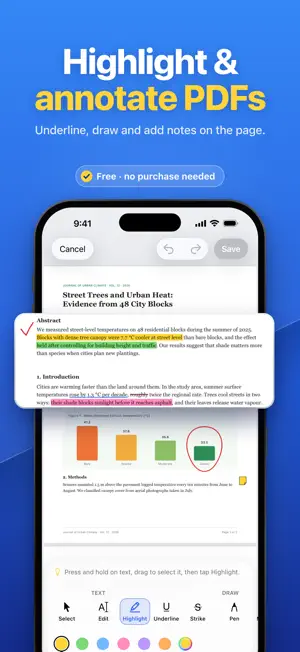
Paper in. Searchable PDF out. Foldline is a PDF editor and scanner for iPhone and iPad. Scan paper into PDFs, change the text on a page, fill in and sign forms, mark up pages, and merge, split, compress, redact or convert files. Everything happens on your device: no account, no uploads, no internet connection needed. FREE, AND PRO FOR LIFE • Free: scan to PDF, images to PDF, fill and sign forms, highlight and mark up, reorder and rotate pages, and search and share your PDFs. • Foldline Pro, a one-time purchase, unlocks the rest: editing a page’s text, text recognition (OCR), merge, split and extract, compression, redaction, password protection, watermarks, and PDF to images or text. • Try every Pro tool except Merge on one PDF for free before you buy. • No subscription: buy once, use it on all your devices with your Apple Account. SCAN PAPER TO PDF • Scan receipts, letters, contracts and forms. The camera finds each page’s edges and straightens it. • Capture many pages into one PDF, then crop, rotate, reorder or retake any of them. EDIT THE TEXT ON THE PAGE (PRO) • Double-tap a paragraph or a table cell and type. Fix a date, a name or a price in seconds. • Choose the font, size, bold, italic, underline, alignment and color. • The old words are removed from the page, not hidden, so they can’t be found or copied later. • On a scanned page the words are part of the picture, so they’re covered with the page’s color instead. FIND ANY WORD, EVEN IN SCANS (PRO) • Text recognition (OCR) makes scanned pages searchable, here and in other apps, so you can find, select and copy their words. • Reads English, Spanish, French, German, Italian, Portuguese, Chinese, Japanese, Korean and more. FILL & SIGN • Type into PDF form fields, check boxes and choose options. • On scanned or flat forms, add text and check marks wherever you need them. • Draw your signature once and reuse it, with the date beside it if you like. HIGHLIGHT & MARK UP • Highlight, underline and strike through text. • Draw with a pen or marker, and erase strokes you don’t want. • Add text, sticky notes, links, and shapes such as arrows, stars and check marks. • Your original stays untouched until you tap Save. ORGANIZE PAGES • Reorder, rotate, duplicate and delete pages in a thumbnail grid. • Pro: merge PDFs into one, in the order you choose. • Pro: split a PDF by page ranges, or extract chosen pages into a new file. COMPRESS & CONVERT • Pro: compress a PDF so it’s easy to email or upload. Only photos and scans shrink; text, links and form fields stay as they are. • Images to PDF: combine JPEG, PNG and HEIC images into one document. • Pro: PDF to images, as PNG or JPEG at screen, standard or high resolution. • Pro: PDF to text, as a .txt file. Scanned pages are recognized first. REDACT & PROTECT (PRO) • Redact names, account numbers and signatures: find every match, select text, draw a box or mark a whole page. • What’s under the boxes is removed from the new PDF, not just covered, so it can’t be searched, copied or uncovered. • Password-protect a PDF, and limit printing, copying and changes. • Stamp a text or image watermark, such as CONFIDENTIAL or your logo, on the pages you choose. PRIVATE BY DESIGN • Your documents stay on your device. Nothing is uploaded, not even for text recognition. • No account, no ads, no tracking, no subscription. • A file leaves the app only when you share or export it. THE DETAILS • Open PDFs from Mail, Files and other apps with the Share button. • If the app closes mid-edit, your unsaved changes are kept. • Supports Dark Mode and larger text sizes. GOOD TO KNOW • Your signature is a handwritten mark on the page, not a certificate-based digital signature. • Edited text is set in one of six common fonts, matched as closely as possible to the original. • If a drawing runs under a redaction box, that page is saved as a picture of the page, without selectable text. Questions or ideas? Email [email protected].
What’s new
Version 2.0 · Updated October 17, 2026
Foldline now speaks German, French, Spanish, Italian and Brazilian Portuguese. Every screen, tool and message is translated. Also new • VoiceOver: selected text and added items now have Move Up, Move Down, Move Left and Move Right actions. • Your PDFs, drafts and saved signature now get stronger iOS file protection while your device is locked. Fixes • On iOS 27, a password-protected PDF now opens as soon as you enter its password. • On iOS 27, Make Searchable (OCR) now keeps your notes, markup and signatures. • Text can no longer be dropped on other text, and text that overlaps other text can’t be moved, changed or deleted, so the other text isn’t damaged. Updating from 1.0? Version 1.1 added Redact and Compress PDF to Foldline Pro.
App privacy
The developer, ANDREI RUSTI, reported these privacy practices to Apple.
Data Not Collected
The developer does not collect any data from this app.
Alternatives to Foldline: PDF Editor & Scanner
Looking for apps like Foldline: PDF Editor & Scanner? Here are 6 similar apps on the App Store. The highest rated is Seekree (5.0/5), and 5 of the 6 are free to download.
-
 Voisto
-
 AddToPDF
-
 Seekree
5.0
Seekree
5.0
-
 Stactra: Book Tracker
-
 PDF Genius: AI PDF Text Editor
5.0
PDF Genius: AI PDF Text Editor
5.0
-
 SketchDXF: AI DXF Converter
| App | Rating | Price | Last updated | Compare |
|---|---|---|---|---|
| Foldline: PDF Editor & Scanner | – | Free | October 17, 2026 | |
| Voisto | – | Free | Sep 18, 2026 | Compare |
| AddToPDF | – | 2.99 USD | Aug 5, 2026 | Compare |
| Seekree | 5.0 / 5 (2) | Free | Jun 11, 2026 | Compare |
| Stactra: Book Tracker | – | Free | Oct 19, 2026 | Compare |
| PDF Genius: AI PDF Text Editor | 5.0 / 5 (1) | Free | Oct 14, 2026 | Compare |
| SketchDXF: AI DXF Converter | – | Free | Aug 6, 2026 | Compare |