

SketchDXF: AI DXF Converter
Varun Chawla Productivity iPhoneiPadiPod touch
SketchDXF: AI DXF Converter is a free Productivity app for iPhone and iPad by Varun Chawla. Requires iOS 15.1. Updated August 6, 2026.
- Price
- Free
- on the App Store
- Size
- 41 MB
- Age 4+
- Updated
- Aug 6
- 2026 · v1.0.6
Screenshots

About SketchDXF: AI DXF Converter
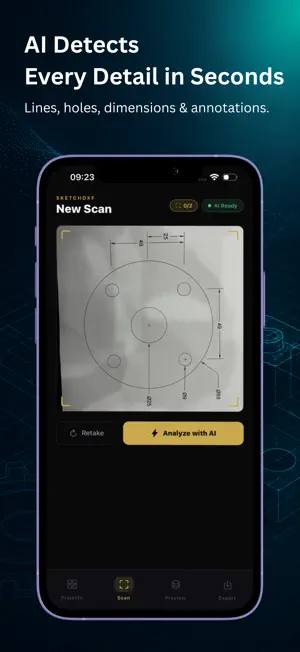
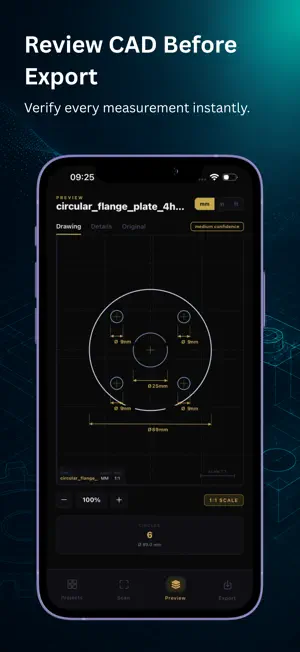
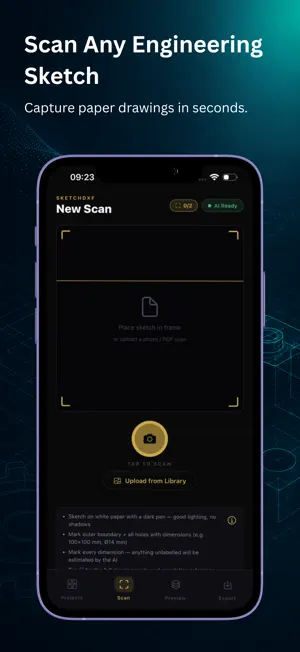
Convert any engineering sketch to a CAD-ready DXF file - in seconds. SketchDXF: AI-Powered CAD Converter The fastest way from paper sketch to machining. No CAD software. No training. Just snap a photo. Built for the Workshop, Not the Design Studio • Convert hand-drawn parts into CAD-ready DXF files • Create DXF files without CAD software • Perfect for CNC, laser cutting, and fabrication workflows How It Works Step 1 - Sketch It Draw your part on white paper. Add dimensions such as width, height, diameter, radius (R), hole positions, slots, and bend lines. Step 2 - Scan It Take a photo or upload your drawing. SketchDXF detects geometry, dimensions, and engineering annotations. Step 3 - Download DXF Receive a CAD-compatible DXF file in seconds, ready for CAD software or CNC workflows. Supported Drawing Types SketchDXF converts 2D engineering drawings into CAD-ready DXF files. Supported inputs: • Hand-drawn 2D engineering sketches • PDF engineering drawings • Technical 2D drawings of flat sheet metal parts Important SketchDXF is designed for 2D engineering drawings only. It does not convert: • Photos of real-world objects • 3D parts or assemblies • Machines or equipment • Furniture or products • Random shop floor photographs If you upload a photograph of a physical object, the AI cannot generate an accurate DXF because it is trained to interpret 2D engineering drawings, not 3D objects. What the AI Understands • Circles, holes, arcs, slots, rectangles, polygons and ellipses • Corner radii, chamfers and rotation angles • Fold/bend lines and bend angles • Countersinks (CSK), counterbores (CBORE) and thread specs (M6x1.0) • Bolt circle patterns • Tolerances and GD&T annotations Professional DXF Output • CAD-compatible DXF • Layers: CUT, HOLES, FOLD, CHAMFER and DETAIL • Optional dimension annotations • 1:1 scale output In-App CAD Preview • Preview generated drawings • Zoom and inspect details • Switch between Drawing, Details and Original Sketch Human Review (Starter & Pro) If the AI cannot generate the correct DXF, request a Human Review directly in the app. • Manual DXF creation by our design team • Receive the corrected DXF back in the app • Available with Starter and Pro only • Not available on the Free plan Cloud Sync & History • Secure scan history • Access scans from any device • View original sketch and DXF together Free to Start • Free - 2 AI scans/month • Starter - 10 scans/month or 120/year • Pro - 25 scans/month or 300/year Subscriptions are managed through your App Store account. Who Uses SketchDXF? Sheet Metal Fabricators • CNC & Laser Cutting Operators • Mechanical Engineers • Product Designers • Manufacturing Teams • Engineering Students • Toolmakers Stop redrawing. Start scanning. Download SketchDXF and convert your first engineering drawing in under 60 seconds. Terms of Use (EULA): https://sketch-to-cad.onrender.com/terms Privacy Policy: https://sketch-to-cad.onrender.com/privacy
What’s new
Version 1.0.6 · Updated August 6, 2026
What's New • Added Human Review for Starter & Pro subscribers. • Better DXF generation for supported engineering drawings. • General improvements and bug fixes.
App privacy
The developer, Varun Chawla, reported these privacy practices to Apple.
Data Linked to You
The following data, which may be collected and linked to your identity, may be used for the following purposes:
- Contact Info: Email Address, Name
- User Content: Other User Content
- Identifiers: User ID, Device ID
Used for: App Functionality
Data Not Linked to You
The following data, which may be collected but is not linked to your identity, may be used for the following purposes:
- User Content: Photos or Videos
Used for: App Functionality
Alternatives to SketchDXF: AI DXF Converter
Looking for apps like SketchDXF: AI DXF Converter? Here are 6 similar apps on the App Store. The highest rated is PDF to DWG CAD Converter (4.7/5), and 5 of the 6 are free to download.
-
 PDF to DWG CAD Converter
4.7
PDF to DWG CAD Converter
4.7
-
 Foldline: PDF Editor & Scanner
-
 CSV Reader & Editor: Smart CSV
-
 LocalNotes - Local&Encrypted
1.0
LocalNotes - Local&Encrypted
1.0
-
 Asbran
-
 Arbeitszeitenrechner
| App | Rating | Price | Last updated | Compare |
|---|---|---|---|---|
| SketchDXF: AI DXF Converter | – | Free | August 6, 2026 | |
| PDF to DWG CAD Converter | 4.7 / 5 (3) | Free | Sep 11, 2026 | Compare |
| Foldline: PDF Editor & Scanner | – | Free | Oct 17, 2026 | Compare |
| CSV Reader & Editor: Smart CSV | – | Free | Sep 24, 2026 | Compare |
| LocalNotes - Local&Encrypted | 1.0 / 5 (1) | 0.99 USD | Apr 19, 2026 | Compare |
| Asbran | – | Free | Aug 6, 2026 | Compare |
| Arbeitszeitenrechner | – | Free | Mar 1, 2026 | Compare |