

Stash Findr: AI Home Inventory
Misha Babets Productivity iPhoneiPadiPod touch
Stash Findr: AI Home Inventory is a free Productivity app for iPhone and iPad by Misha Babets. Requires iOS 16.4. Updated November 28, 2026.
- Price
- Free
- on the App Store
- Size
- 87 MB
- Age 12+
- Updated
- Nov 28
- 2026 · v1.0.8
Screenshots
Save to Pinterest

About Stash Findr: AI Home Inventory
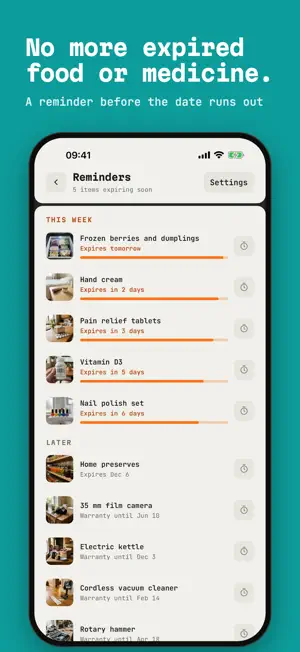
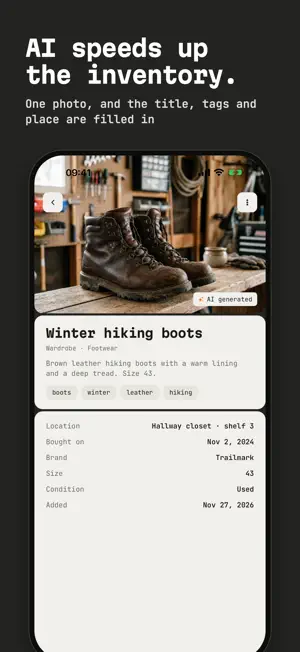
Where did I put it? Stash Findr knows. A home inventory that fills itself in. Add 1–4 photos of an item and AI writes the card: title, description, tags, category and the right catalog. Note where it lives (“Garage, box 3”) and find it again in seconds. MOVING? KNOW WHAT'S IN EVERY BOX • A catalog for every box, and the boxes inside rooms • Ask “where's the tent?” and Findr shows the box it's in • The same for the attic, basement, garage or a storage unit HOME INVENTORY FOR INSURANCE • Photo, purchase date, price, serial number and warranty on every card • A PDF list of everything you own, with photos and the total value, ready for your insurer • Make it before anything happens: after a fire, flood or burglary it's far harder to prove what you had • The PDF list is free PANTRY, FREEZER AND MEDICINE BEFORE THEY EXPIRE • Give food, medicine, cosmetics or warranties an expiry date • Get a reminder 30 days, 7 days and 1 day before • Snooze a reminder or turn it off for one item ADD A PHOTO, AI MAKES THE CARD • 1–4 photos per card, from the camera or your gallery • AI writes the title, tags and category and picks a catalog • Scan a barcode, then scan it again later to find the item • Add the fields you need: quantity, price, brand, warranty, serial number and more ASK FINDR IN YOUR OWN WORDS • “Where are my green boots?” “Nail polish that expires soon” • Type it or say it, no tags to remember • Findr looks through titles, tags, catalogs, notes and locations A CATALOG FOR EVERY ROOM AND BOX • Closet, shoes, garage, tools, books: group cards by room, box, shelf or purpose, with catalogs inside catalogs • A color and an icon for each catalog • Decluttering? Catalogs like Keep, Sell and Donate show where everything goes, and what stays is listed with its place • Home screen widgets: a new card or search in one tap; with Pro, everything that needs attention: dates and what runs low YOUR PHOTOS, STORED YOUR WAY • On this iPhone, in a folder in Files, in iCloud or in your Google Drive • Your stash works offline • Lock the app with a PIN and Face ID or Touch ID • Export everything to a ZIP archive at any time RUNNING LOW? IT'S ON THE SHOPPING LIST • Set a minimum for coffee, detergent or batteries: when it runs low, it lands on the shopping list by itself • Add any card, a whole catalog or just “bread” • Mark it bought and the quantity on the card goes up • Send the list as text or PDF, or keep it together with your family (Pro) SHARE WITH YOUR FAMILY (PRO) • Share a catalog with a link and edit it together • Choose who can edit and who can only view FREE AND PRO Free: 50 cards by hand and more with AI, 3 catalogs and 5 AI tokens to start. Pro is a one-time purchase with no subscription: unlimited cards and catalogs, 24 catalog skins, sync between your devices, shared catalogs, photos in your folder or cloud, widgets with what needs attention, ZIP import, no ads, 30 bonus AI tokens and 30% more tokens in every pack. More AI tokens come in packs. One token makes one AI card or pays for 10 AI searches, and tokens never expire. Moving house, insuring your home, the pantry and freezer, the first-aid kit, winter clothes and shoes, the garage: add a photo once and always know where it is. Looking for “Stash Finder”? You’ve found it: it’s spelled Stash Findr. Privacy policy: https://stash-findr.app/privacy Terms of use: https://stash-findr.app/terms
What’s new
Version 1.0.8 · Updated November 28, 2026
• Catalogs are now folders: give them a colour, an icon on a tag, or one of 24 Pro skins — pink fur, denim, Christmas sweater, bubble wrap, crochet and more • See your catalogs as a grid of big folders or as a list • A tidier Profile, grouped into sections • Faster syncing and bug fixes
App privacy
The developer, Misha Babets, reported these privacy practices to Apple.
Data Used to Track You
The following data may be used to track you across apps and websites owned by other companies:
- Location: Coarse Location
- Identifiers: Device ID
- Usage Data: Advertising Data
Data Linked to You
The following data, which may be collected and linked to your identity, may be used for the following purposes:
- Identifiers: Device ID, User ID
- Usage Data: Advertising Data, Product Interaction
- Purchases: Purchase History
- Contact Info: Email Address, Name
- User Content: Photos or Videos, Other User Content
- Diagnostics: Crash Data, Other Diagnostic Data
Used for: Third-Party Advertising, Analytics, App Functionality
Data Not Linked to You
The following data, which may be collected but is not linked to your identity, may be used for the following purposes:
- Location: Coarse Location
- Purchases: Purchase History
- Usage Data: Advertising Data
Used for: Third-Party Advertising, Analytics
Alternatives to Stash Findr: AI Home Inventory
Looking for apps like Stash Findr: AI Home Inventory? Here are 6 similar apps on the App Store. The highest rated is Local AI Chat - SmartFruit (5.0/5), and all 6 are free to download.
-
 Time Blocking Planner: Datvi
-
 Plan4U: AI Calendar Planner
-
 Local AI Chat - SmartFruit
5.0
-
 Kooperativ
-
 OpenWhispr: Voice to Text
3.6
-
 Trendsee - Trends & Analytics
5.0
| App | Rating | Price | Last updated | Compare |
|---|---|---|---|---|
| Stash Findr: AI Home Inventory | – | Free | November 28, 2026 | |
| Time Blocking Planner: Datvi | – | Free | Nov 23, 2026 | Compare |
| Plan4U: AI Calendar Planner | – | Free | Nov 25, 2026 | Compare |
| Local AI Chat - SmartFruit | 5.0 / 5 (2) | Free | Jun 5, 2026 | Compare |
| Kooperativ | – | Free | Nov 24, 2026 | Compare |
| OpenWhispr: Voice to Text | 3.6 / 5 (17) | Free | Nov 27, 2026 | Compare |
| Trendsee - Trends & Analytics | 5.0 / 5 (7) | Free | Oct 21, 2026 | Compare |