

OpenWhispr: Voice to Text
Gizmo Labs Inc. Productivity iPhoneiPadiPod touch
OpenWhispr: Voice to Text is a free Productivity app for iPhone and iPad by Gizmo Labs Inc. Rated 3.5/5 from 13 ratings. Requires iOS 17.0.
- Rating
- 3.5
- 13 ratings
- Price
- Free
- on the App Store
- Size
- 65 MB
- Age 4+
- Updated
- Oct 23
- 2026 · v1.2.4
Screenshots
About OpenWhispr: Voice to Text
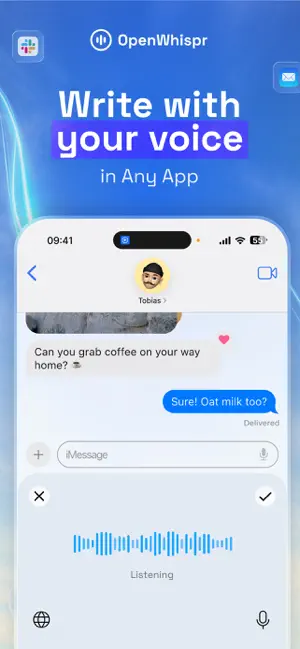
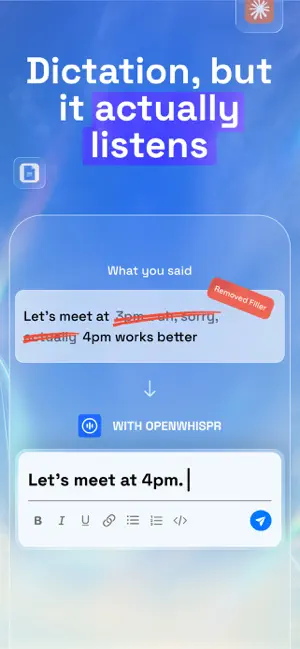
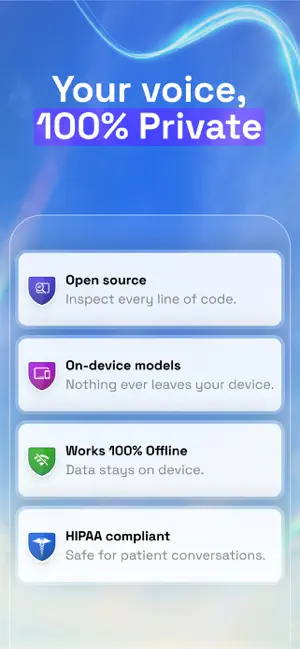
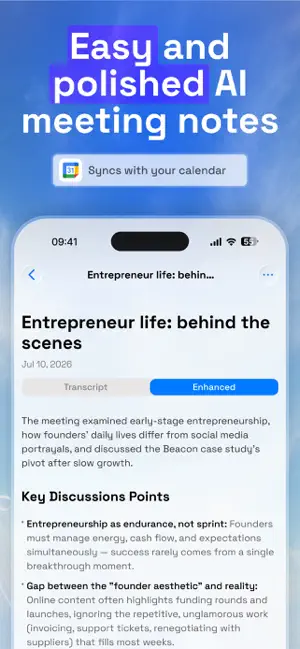
Speak naturally. Turn your voice into clear text, useful notes, and meeting takeaways. OpenWhispr combines an AI voice keyboard, notepad, and meeting recorder for iPhone and iPad. Dictate in apps that support third-party keyboards, capture conversations with speaker-aware transcripts, and choose on-device processing, OpenWhispr Cloud, or your own AI provider. DICTATE ANYWHERE • Use the OpenWhispr keyboard in Mail, Messages, Slack, WhatsApp, and other supported apps • Clean up filler words, punctuation, and formatting with AI • Choose a casual or professional tone for keyboard dictation • Add names, acronyms, and specialist terms to your custom dictionary • Transcribe in over 100 languages, depending on your selected model • Set up a hardware-keyboard shortcut on iPad to start and stop dictation, then paste the result CAPTURE YOUR MEETINGS • Record in-person meetings and conversations with your device’s microphone • Follow speaker-labeled transcripts and teach OpenWhispr your voice from an on-device meeting • Link meeting notes to your Google Calendar • Track and stop meeting recordings from a Live Activity on your Lock Screen TURN RECORDINGS INTO USEFUL NOTES • Edit AI-generated notes and view the original transcript separately • Ask questions about your meeting with quick suggestions in note chat • Organize Markdown notes with folders, search, and formatted tables • Share cloud-synced notes through links or email invitations, with viewer and editor permissions • Export Markdown or plain text, including offline • Sync notes with the OpenWhispr desktop app CHOOSE YOUR AI • Configure dictation, uploads, text cleanup, note formatting, and chat separately • Use OpenWhispr Cloud, available on-device models, or your own provider • Connect OpenAI, Groq, OpenRouter for text, or an OpenAI-compatible server • Personal provider use requires no OpenWhispr subscription; provider charges may apply • On-device text cleanup requires iOS 26 or later and Apple Intelligence enabled on a supported device PRIVATE BY DESIGN • On-device transcription processes audio locally after a one-time model download • Cloud and personal-provider workflows send content to the selected service for processing • Provider keys are stored securely on your device and are not synced • Voice profiles stay on your device and can be deleted • Sharing a private note requires an explicit cloud-sync choice • Open source, with optional usage analytics you can disable • We never sell your data WHAT’S FREE • 2,000 words per week of cloud transcription • 5 hours of meeting recording per month • Unlimited on-device transcription without an account or subscription • Custom dictionary and personal-provider setup OPENWHISPR PRO • Unlimited cloud transcription • 20 hours of meeting recording per month • Sync across your devices • Cloud backup and sharing for personal notes Pro is optional. On-device transcription stays free and unlimited. Cloud sharing requires an account and cloud sync; available sharing options may depend on your workspace’s policies. OpenWhispr Pro is an auto-renewing subscription. Payment is charged to your Apple Account at confirmation of purchase. Your subscription renews automatically unless cancelled at least 24 hours before the end of the current period. Manage or cancel in Settings > Apple Account > Subscriptions. SUPPORT Questions or feedback: [email protected] Terms of Use: https://openwhispr.com/terms Privacy Policy: https://openwhispr.com/privacy
Ratings & reviews
3.5
13 ratings
What’s new
Version 1.2.4 · Updated October 23, 2026
Fixes a crash that stopped the app from opening on iOS 27. The OpenWhispr keyboard has a refreshed layout that matches iOS 26, with better automatic capitalization.
App privacy
The developer, Gizmo Labs Inc., reported these privacy practices to Apple.
Data Used to Track You
The following data may be used to track you across apps and websites owned by other companies:
- Identifiers: Device ID
- Usage Data: Product Interaction
Data Linked to You
The following data, which may be collected and linked to your identity, may be used for the following purposes:
- Identifiers: Device ID
- Usage Data: Product Interaction
- Contact Info: Email Address, Name
- Purchases: Purchase History
Used for: Third-Party Advertising, Developer’s Advertising or Marketing, Analytics, App Functionality
Alternatives to OpenWhispr: Voice to Text
Looking for apps like OpenWhispr: Voice to Text? Here are 6 similar apps on the App Store. The highest rated is Notico - AI Note Taker (5.0/5), and all 6 are free to download.
-
 Spokenly: Audio to Text AI app
4.4
Spokenly: Audio to Text AI app
4.4
-
 Notico - AI Note Taker
5.0
Notico - AI Note Taker
5.0
-
 Diction: Speech to Text
4.9
Diction: Speech to Text
4.9
-
 Quickmind: Voice to AI Notes
4.7
Quickmind: Voice to AI Notes
4.7
-
 Minine Transcribe: AI Recorder
4.7
Minine Transcribe: AI Recorder
4.7
-
 VivaDicta - Speech to Text
4.6
VivaDicta - Speech to Text
4.6
| App | Rating | Price | Last updated | Compare |
|---|---|---|---|---|
| OpenWhispr: Voice to Text | 3.5 / 5 (13 ratings) | Free | October 23, 2026 | |
| Spokenly: Audio to Text AI app | 4.4 / 5 (66) | Free | Oct 28, 2026 | Compare |
| Notico - AI Note Taker | 5.0 / 5 (5) | Free | Sep 9, 2026 | Compare |
| Diction: Speech to Text | 4.9 / 5 (21) | Free | Oct 3, 2026 | Compare |
| Quickmind: Voice to AI Notes | 4.7 / 5 (61) | Free | Oct 11, 2026 | Compare |
| Minine Transcribe: AI Recorder | 4.7 / 5 (14) | Free | Oct 28, 2026 | Compare |
| VivaDicta - Speech to Text | 4.6 / 5 (23) | Free | Oct 24, 2026 | Compare |