

AccuScribe - Audio to Text
CHAO CHIN TING Productivity iPhoneiPadiPod touch
AccuScribe - Audio to Text is a free Productivity app for iPhone and iPad by CHAO CHIN TING. Requires iOS 17.0. Updated November 10, 2026.
- Price
- Free
- on the App Store
- Size
- 2 MB
- Age 4+
- Updated
- Nov 10
- 2026 · v1.4
Screenshots
Save to Pinterest
About AccuScribe - Audio to Text
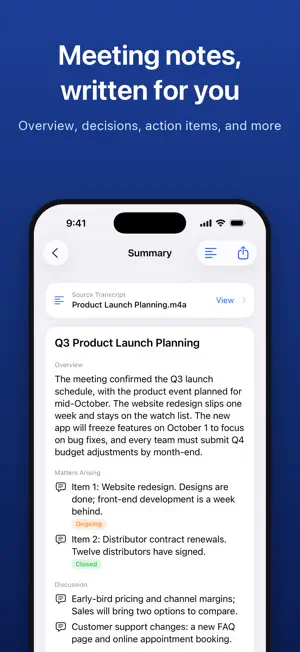
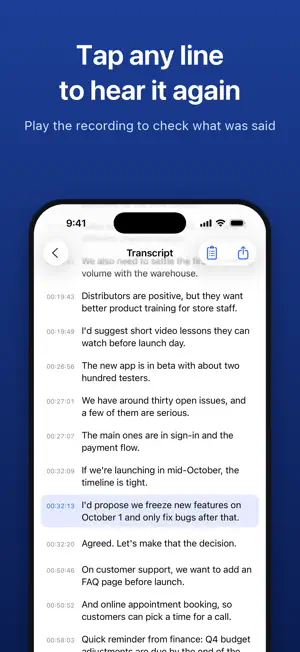
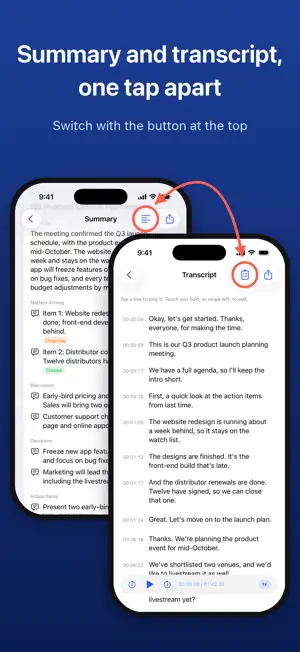
AccuScribe turns recordings into accurate English transcripts and meeting summaries. No sign-up or login needed; new users get 60 credits. Every transcript comes with an automatic meeting summary at no extra charge. Pick a recording from Files, or share one straight from Voice Memos. AccuScribe uses private cloud speech recognition and proofreading to turn meetings, interviews, lectures, talks, and personal notes into a transcript with a timestamp on every line. Tap any line to jump to that moment in the recording and hear it again. Every transcript comes with a free meeting summary, made in the same step with the sections you pick: Overview, Matters Arising, Reports, Discussion, Decisions, Other Business, Action Items, and Timeline. Tap any point in the timeline to jump back to the transcript and the recording. [KEY FEATURES] • No subscription Pay only for transcripts; summaries are free. 1 credit covers 1 minute of audio, with a minimum of 1 credit per recording. If processing fails, you are not charged, or the credits are refunded automatically. • Transcript and summary in one tap Tap Create Transcript & Summary. When it's done, the summary opens first, one tap away from the transcript. • Accurate English transcripts Speech recognition plus proofreading, with punctuation and capitalization. • American and British English Recognizes both American and British English with high accuracy, and keeps each speaker's spelling, so colour stays colour and color stays color. • Works with your recordings Supports m4a, mp3, wav, aac, and caf files up to 5 hours long. • Share from Voice Memos In Voice Memos, tap Share and choose AccuScribe. • Tap any line to hear it again Every line has a timestamp. Tap any line to play the recording from that point and check what was said. • Edit the transcript Correct any line. Exports use your edited text. • Vocabulary Add names, companies, products, and acronyms so they are spelled correctly. • Pick your summary sections Choose Overview, Matters Arising (marked Ongoing or Closed), Reports, Discussion, Decisions, Other Business, Action Items (with owners and deadlines), and Timeline, picked before you start. All are selected by default, and your choice is saved for next time. • Jump from summary to transcript Tap a timeline point to open the transcript at that moment. • Know exactly what you need Short on credits? The app shows how many more you need and preselects the smallest pack that covers the whole recording. • Find transcripts by date The calendar marks every day that has a transcript. • Export Transcripts: plain text, Markdown, Word, PDF, or SRT subtitles. Summaries: plain text, Markdown, Word, or PDF. • No account needed No name, email, or password. An anonymous account keeps your credits and jobs. Delete items one by one, or use Delete Account and All Data. Speech recognition, proofreading, and summaries run on private cloud services. Before first use, AccuScribe explains how your data is processed and asks for your consent. Transcript quality depends on the recording: clarity, background noise, distance from the microphone, volume, and people talking over each other all matter. Clear recordings give the best results. Transcripts and summaries can still contain mistakes, so please check names, numbers, decisions, and action items against the recording. Terms of Use (EULA): https://www.apple.com/legal/internet-services/itunes/dev/stdeula/
What’s new
Version 1.4 · Updated November 10, 2026
• Improved transcript accuracy and meeting summary quality.
App privacy
The developer, CHAO CHIN TING, reported these privacy practices to Apple.
Data Not Collected
The developer does not collect any data from this app.
Alternatives to AccuScribe - Audio to Text
Looking for apps like AccuScribe - Audio to Text? Here are 6 similar apps on the App Store. The highest rated is AccuNote: AI Voice to Text (5.0/5), and all 6 are free to download.
-
 Furmily: Your Focus Buddy
-
 AccuNote: AI Voice to Text
5.0
-
 Sagt: Transcribe Audio to Text
-
 AtanNote - AI Note Taker
5.0
-
 EaseNote: AI Note Taker
5.0
-
 CalKeyboard
3.4
| App | Rating | Price | Last updated | Compare |
|---|---|---|---|---|
| AccuScribe - Audio to Text | – | Free | November 10, 2026 | |
| Furmily: Your Focus Buddy | – | Free | Oct 15, 2026 | Compare |
| AccuNote: AI Voice to Text | 5.0 / 5 (1) | Free | Nov 20, 2026 | Compare |
| Sagt: Transcribe Audio to Text | – | Free | Nov 21, 2026 | Compare |
| AtanNote - AI Note Taker | 5.0 / 5 (2) | Free | Nov 12, 2026 | Compare |
| EaseNote: AI Note Taker | 5.0 / 5 (1) | Free | Aug 21, 2026 | Compare |
| CalKeyboard | 3.4 / 5 (5) | Free | Dec 16, 2025 | Compare |