

AccuNote: AI Voice to Text
SEIWA Inc. Productivity iPhoneiPadiPod touch
AccuNote: AI Voice to Text is a free Productivity app for iPhone and iPad by SEIWA Inc. Rated 5.0/5 from 1 ratings. Requires iOS 16.2.
- Rating
- 5.0
- 1 ratings
- Price
- Free
- on the App Store
- Size
- 39 MB
- Age 17+
- Updated
- Nov 20
- 2026 · v1.2.2
Screenshots
Save to Pinterest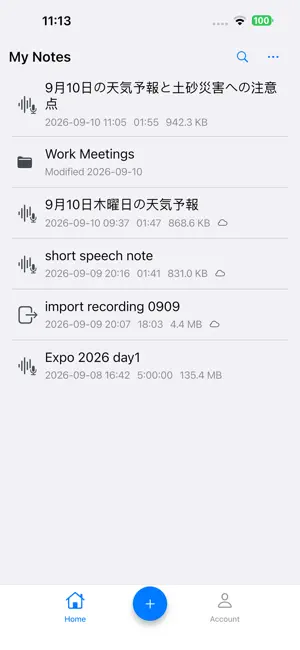
About AccuNote: AI Voice to Text
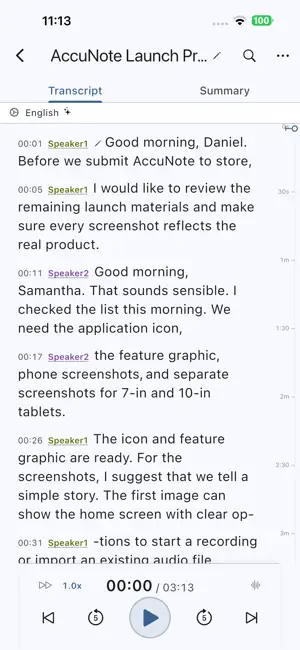
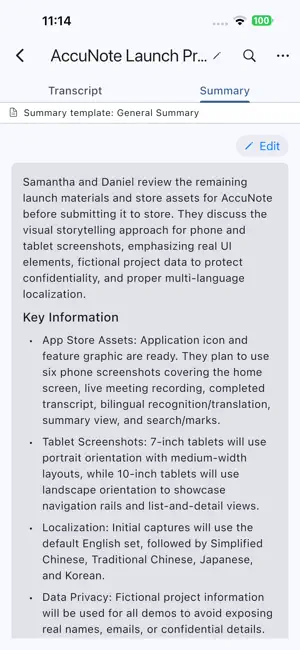
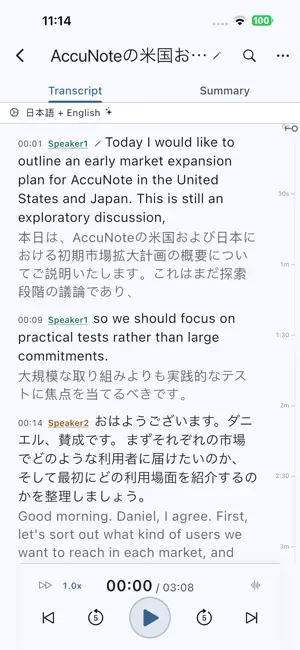
AccuNote turns what you hear into text you can use. Record a meeting, a lecture or an interview and watch the transcript appear while you speak — then let the cloud run a second, higher-accuracy pass with speaker labels, an AI summary and translation. RECORD OR IMPORT • Live recording with real-time transcription on screen • Import audio and video files you already have (MP3, M4A, WAV, FLAC, MP4, MOV and more) and transcribe them • Record with no network at all — upload and recognition pick up by themselves once you are back online • If the connection drops or the app closes, what you've already recorded is kept, and uploading and recognition resume where they stopped UNDERSTAND THE CONVERSATION • Automatic speaker separation, with speaker names you can rewrite • AI summaries from built-in templates, or from a prompt you write yourself • Custom vocabulary for names, products and technical terms, so they come out spelled right • Edit any sentence or speaker name; your edits are kept and synced to your other devices ACROSS LANGUAGES • 60 languages and regional variants for recognition and translation • Live translation into one target language, shown beside the original • Bilingual recognition: two languages in one session, each sentence detected and interpreted into the other • Edit a sentence and its translation is refreshed with it REPLAY, ORGANIZE, TAKE IT WITH YOU • Marks with a note or a photo pinned to the exact second, added while recording or during playback • Playback with speed control and noise reduction • Folders, search, and a trash that keeps deleted items for 30 days • Share a transcript or summary as text, export subtitles (SRT / WebVTT) or the audio (MP3 / M4A / OGG) (paid plans) • Have the finished transcript and summary emailed to your own account address, automatically or on request PLANS Start as a guest with no email address and try transcription, AI summaries, live translation and bilingual recognition a few times each month. Register a free account for larger monthly allowances, custom vocabulary and your own summary templates. Paid plans raise the allowances further and unlock text sharing and subtitle/audio export; higher tiers add more live translation and bilingual sessions each month. AUTO-RENEWABLE SUBSCRIPTIONS - Payment is charged to your Apple ID account at confirmation of purchase. - Subscriptions renew automatically unless auto-renew is turned off at least 24 hours before the end of the current period. Your account is charged for renewal within 24 hours prior to the end of the current period. - You can manage or cancel subscriptions in your App Store account settings after purchase. Terms of Use (EULA): https://www.apple.com/legal/internet-services/itunes/dev/stdeula/ AccuNote Terms of Service: https://www.accunote.ai/terms-en Privacy Policy: https://www.accunote.ai/privacy-en
What’s new
Version 1.2.2 · Updated November 20, 2026
• Improved sign-in screen layout: see AccuNote's key features at a glance, with larger, easier-to-tap Apple, Google and Microsoft sign-in buttons. Works better on small screens, with large text and with VoiceOver. • Guests can now add an email or upgrade their plan without stopping a recording. • Better search: full-width and accented characters now match, and deleted recordings no longer appear in results. • Smoother loading on the Account and Subscription screens. • Fixed an issue where "Start recording" sometimes did nothing for guests, along with other bug fixes.
App privacy
The developer, SEIWA Inc., reported these privacy practices to Apple.
Data Linked to You
The following data, which may be collected and linked to your identity, may be used for the following purposes:
- User Content: Customer Support, Photos or Videos, Audio Data, Other User Content
- Usage Data: Product Interaction
- Diagnostics: Other Diagnostic Data
- Purchases: Purchase History
- Contact Info: Email Address, Name
- Identifiers: User ID, Device ID
Used for: Analytics, App Functionality
Alternatives to AccuNote: AI Voice to Text
Looking for apps like AccuNote: AI Voice to Text? Here are 6 similar apps on the App Store. The highest rated is VoiceNote - AI Voice to Text (5.0/5), and all 6 are free to download.
-
 AccuScribe - Audio to Text
-
 Doby - Tasks & Routines
-
 VoiceNote - AI Voice to Text
5.0
-
 MindNote AI: Meeting Recorder
-
 Simply Transcribe
5.0
-
 KeepScribe: Transcribe Audio
| App | Rating | Price | Last updated | Compare |
|---|---|---|---|---|
| AccuNote: AI Voice to Text | 5.0 / 5 (1 rating) | Free | November 20, 2026 | |
| AccuScribe - Audio to Text | – | Free | Nov 10, 2026 | Compare |
| Doby - Tasks & Routines | – | Free | Nov 13, 2026 | Compare |
| VoiceNote - AI Voice to Text | 5.0 / 5 (4) | Free | Nov 6, 2026 | Compare |
| MindNote AI: Meeting Recorder | – | Free | Nov 11, 2026 | Compare |
| Simply Transcribe | 5.0 / 5 (1) | Free | Oct 29, 2026 | Compare |
| KeepScribe: Transcribe Audio | – | Free | Nov 21, 2026 | Compare |