

DateMap - Calendar & Countdown
涛 王 Productivity iPhoneiPadiPod touch
DateMap - Calendar & Countdown is a free Productivity app for iPhone and iPad by 涛 王. Requires iOS 17.0. Updated October 13, 2026.
- Price
- Free
- on the App Store
- Size
- 5 MB
- Age 4+
- Updated
- Oct 13
- 2026 · v1.22
Screenshots



About DateMap - Calendar & Countdown
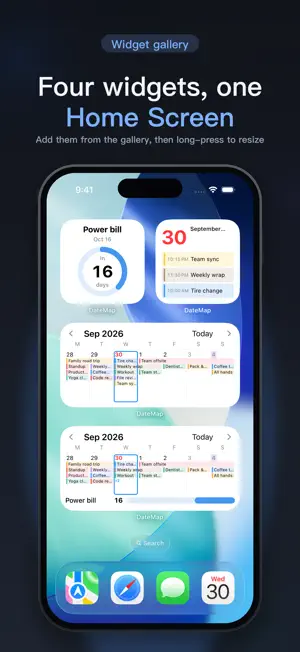
DateMap puts the whole month on your Home Screen — every day's events at a glance, with multi-day plans on one continuous bar, instead of only the next appointment. When the system language is Chinese, the Home Screen icon name is 月览日历. HOME SCREEN WIDGETS • 月览日历 (month calendar): small shows today, medium shows the week, large shows the whole month • 倒数日1 / 倒数日2 / 倒数日3: three countdown styles — ring, triple cells, and progress bars • 组合1 (Combo 1): yesterday through the day after tomorrow, plus one countdown • 组合2 (Combo 2): the week at a glance with a countdown progress bar • Lock Screen 月历 (month): the current month on your Lock Screen with event dots Widget text stays in Chinese by design; the app itself works fully in English. DATEMAP PRO — ONE-TIME PURCHASE Unlocks the Combo 1 & Combo 2 widgets and the Lock Screen month calendar, countdown photo backgrounds and custom colors, monthly and yearly lunar countdowns, and lunar event repeats. If you bought the old Combo widget, you already have Pro. TWO-WAY CALENDAR SYNC Read and edit your system Calendar events directly. Changes made here sync back to Calendar, and changes in Calendar show up here. MADE FOR THE CHINESE CALENDAR The month grid shows lunar dates, traditional festivals, solar terms, and public holiday rest/work days. Weeks can start on Sunday or Monday. GET THINGS DONE • Create events with natural language • Repeats: daily, weekly, weekdays, and lunar (lunar monthly is Pro) • Place search and current location • Local reminders and countdown day-before reminders • Countdown share cards: save or share as an image • Color intensity: adjust event color depth in the app and widgets • Search events, places, notes, and countdowns • Undo and trash recovery after deleting • Siri and Shortcuts PRIVACY FIRST No account, no ads. Calendar and countdown data never leaves your device — there is no developer server. Calendar, notification, and location permissions are used only for their features; location is requested only when you tap. DateMap works on iPhone. The app interface supports 简体中文, 繁體中文, and English.
What’s new
Version 1.22 · Updated October 13, 2026
· The bottom tab bar now stays fixed while scrolling · Fixed the day list not scrolling to the last event when there are many events
App privacy
The developer, 涛 王, reported these privacy practices to Apple.
Data Not Collected
The developer does not collect any data from this app.
Alternatives to DateMap - Calendar & Countdown
Looking for apps like DateMap - Calendar & Countdown? Here are 6 similar apps on the App Store. The highest rated is OneDay: Focus on today’s todo (4.0/5), and all 6 are free to download.
-
 TaskVibePilot
-
 Lumipath 明路 - Knowledge Notes
-
 OneDay: Focus on today’s todo
4.0
OneDay: Focus on today’s todo
4.0
-
 PiecePlan: AI Daily Planner
-
 DayCard·Countdown·Day Counter
-
 Checkly: Get Things Right
| App | Rating | Price | Last updated | Compare |
|---|---|---|---|---|
| DateMap - Calendar & Countdown | – | Free | October 13, 2026 | |
| TaskVibePilot | – | Free | Dec 19, 2025 | Compare |
| Lumipath 明路 - Knowledge Notes | – | Free | Jul 24, 2026 | Compare |
| OneDay: Focus on today’s todo | 4.0 / 5 (1) | Free | Oct 21, 2026 | Compare |
| PiecePlan: AI Daily Planner | – | Free | Oct 15, 2026 | Compare |
| DayCard·Countdown·Day Counter | – | Free | Oct 2, 2026 | Compare |
| Checkly: Get Things Right | – | Free | Apr 7, 2025 | Compare |