

OneDay: Focus on today’s todo
悠然 廖 Productivity iPhoneiPadiPod touchMac
OneDay: Focus on today’s todo is a free Productivity app for iPhone and iPad by 悠然 廖. Requires iOS 18.0. Updated October 16, 2026.
- Price
- Free
- on the App Store
- Size
- 4 MB
- Age 4+
- Updated
- Oct 16
- 2026 · v1.4.0
Screenshots


About OneDay: Focus on today’s todo
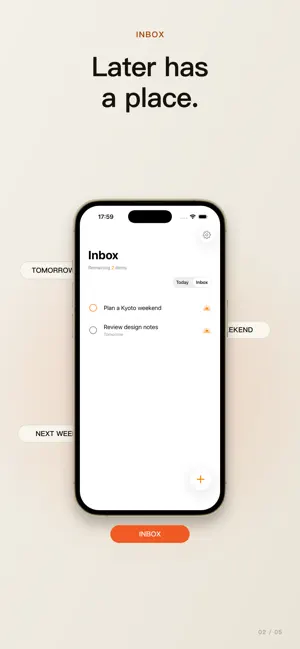
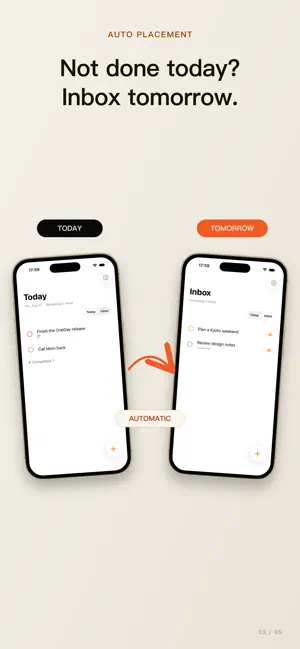
OneDay is an app that focuses only on today's to-do list. What deserves your attention today? OneDay gives every task one of two clear places. What belongs to the present stays in Today. What is undecided or belongs to the future waits in Inbox. Not more management. A clearer today. Key Features • Today See tasks planned for today together with anything overdue. Open OneDay and immediately know what needs your attention now. • Inbox Keep tasks with no Planned Date or with a date in the future. Capture them now and decide when they belong later. • Planned Dates Choose today, tomorrow, or another calendar day. A Planned Date represents when you intend to work on something—not another artificial deadline. • Date Recognition Write a clear date in a title, such as “Submit release notes tomorrow,” and OneDay can recognize its Planned Date when the meaning is unambiguous. An explicitly selected date always takes priority, and recognized date text can be removed from the title automatically. • Automatic Placement Tasks planned for today or earlier appear in Today. Tasks without a date or planned for the future appear in Inbox. There are no complicated projects or lists to maintain. • Priorities Assign High, Medium, Low, or No Priority so the work that matters most naturally rises to the top. • Notes Add context, ideas, or next steps inside a task without forcing everything into its title. • Complete and Restore Complete a task with a tap. Finished tasks are collected into a separate section where they can be reviewed or restored at any time. • Daily Task Reminder Receive one concise summary at a time you choose. OneDay prioritizes the number of overdue tasks; when nothing is overdue, it reports what is still waiting in Inbox. • iCloud Sync Keep tasks consistent across Apple devices running OneDay through your private iCloud database. No separate OneDay account is required. • Optional Notifications Notification permission is requested only when you enable Daily Task Reminder. Every other feature remains available without notifications.
What’s new
Version 1.4.0 · Updated October 16, 2026
- Support adding recurring TODOs (daily, weekly, etc.) - Fix some issues in the APP
App privacy
The developer, 悠然 廖, reported these privacy practices to Apple.
Data Not Collected
The developer does not collect any data from this app.
Alternatives to OneDay: Focus on today’s todo
Looking for apps like OneDay: Focus on today’s todo? Here are 6 similar apps on the App Store.


| App | Rating | Price | Last updated | Compare |
|---|---|---|---|---|
| OneDay: Focus on today’s todo | – | Free | October 16, 2026 | |
| Sticky Notea | – | Free | Oct 17, 2026 | Compare |
| ShiftFlow: Rotation Calendar | – | Free | Oct 18, 2026 | Compare |
| MediFamily: Health Organizer | – | Free | Sep 29, 2026 | Compare |
| 1Lens | – | Free | Oct 19, 2026 | Compare |
| 返航 | – | Free | Jul 23, 2026 | Compare |
| Plot Spark | – | Free | Aug 24, 2026 | Compare |