

PiecePlan: AI Daily Planner
海超 张 Productivity iPhoneiPadiPod touch
PiecePlan: AI Daily Planner is a free Productivity app for iPhone and iPad by 海超 张. Requires iOS 17.0. Updated October 24, 2026.
- Price
- Free
- on the App Store
- Size
- 107 MB
- Age 4+
- Updated
- Oct 24
- 2026 · v2.0.1
Screenshots

About PiecePlan: AI Daily Planner
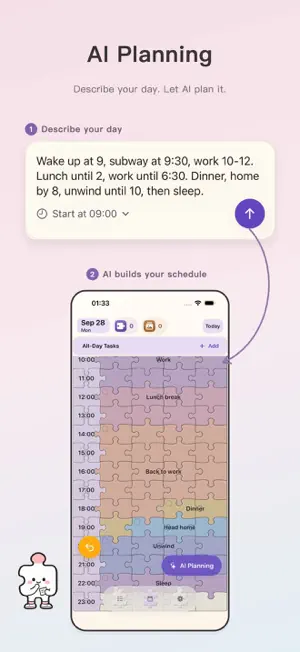
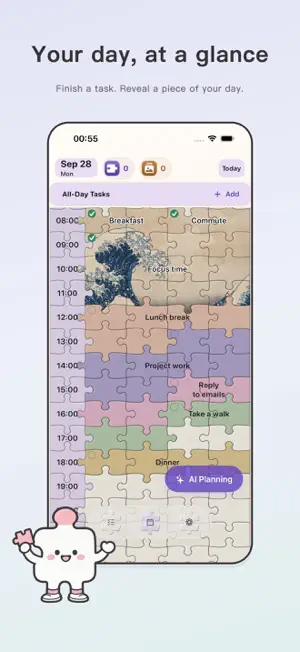
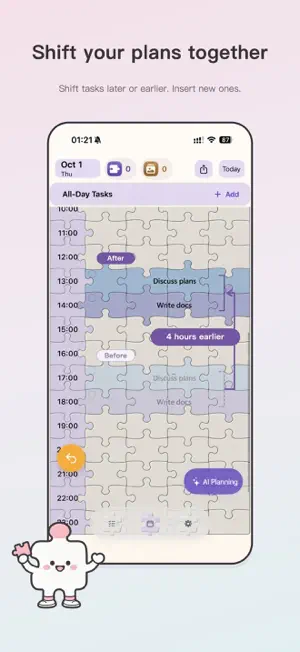
Plan your day with AI, give your tasks a place on your schedule, and adjust when plans change. Complete tasks to reveal a picture, piece by piece. PiecePlan brings a daily planner, a to-do list, and visual progress together. Capture what you need to do, make time for it, and see what you have finished. DESCRIBE YOUR DAY Type your plans in everyday language: “Work from 9 AM to noon, study for an hour at 2 PM, and exercise at 7 PM.” Let AI organize them into a schedule. MAKE TIME WITH TIME BLOCKING Give work, study, and everyday tasks their own time blocks. Move tasks, resize their duration, or swap their positions directly on your schedule. ADJUST MULTIPLE TASKS TOGETHER Make room for an unexpected task, or move affected tasks earlier or later. Use Insert, Delay, and Advance to adjust your schedule, preview the changes, and apply them when you are ready. FINISH A TASK. REVEAL MORE OF THE PICTURE. Mark tasks as complete to flip their puzzle pieces. As you work through your day, the artwork gradually appears. SEE YOUR PLANS YOUR WAY Switch between year, month, and day views to browse your calendar and daily plans. View your day as a timeline or a chronological list, and copy your daily plan. Choose a classic artwork or use random selection; your choice is saved. CAPTURE NOW, SCHEDULE LATER Save tasks before you know when to do them. When you are ready to plan, add them to your schedule. LEARN FROM YOUR COMPLETED TASKS Use AI to analyze scheduled tasks and compare similar completed tasks. Review the history behind a duration suggestion, exclude a reference, and preview changes before saving your schedule. COMPARE YOUR PLAN AND YOUR DAY Start recording to preserve your original plan. See completed tasks and partial effort together, keep unknown time separate, and correct your daily records. FOCUS ON THE CURRENT TIME BLOCK Start a focus session for the current part of your schedule, pause or resume, and save your result. Follow the countdown on the Lock Screen or Dynamic Island on supported iPhones. Start with one task today and see what you can piece together. FREE FEATURES & PLUS SUBSCRIPTION Recording to-dos is free, and a limited free AI planning allowance is included. PiecePlan Plus unlocks scheduling existing to-dos and all-day tasks, recurring tasks, Apple Calendar import, batch schedule adjustments, manual task colors, task pinning, schedule image export, all 13 color palettes, and additional AI usage. The first 6 color palettes are available without a subscription. Monthly and annual auto-renewable plans are available. Manage or cancel your subscription in your Apple Account settings. Privacy Policy: https://hayden-chang.github.io/support/privacy-policies/daymosaic/privacy-policy.html Terms of Use: https://hayden-chang.github.io/support/terms-of-service/daymosaic/terms-of-service.html Terms of Use (EULA): https://www.apple.com/legal/internet-services/itunes/dev/stdeula/
What’s new
Version 2.0.1 · Updated October 24, 2026
Plan with your history, compare your day, and focus on what is happening now. • Daily statistics: Start recording from the day view menu to keep your original plan. Compare planned time with completed tasks and partial effort, then correct your records when needed. • Historical duration analysis: Analyze scheduled tasks with AI and compare similar completed tasks. Review the supporting history, exclude a reference, and preview suggested schedule changes before saving. Your first analysis asks for consent; later visits reuse valid results or resume the saved analysis. • Focus on the current time block: Start from today's calendar navigation button. Pause or resume, keep track from the Lock Screen on supported iPhones, and save your focus result without automatically completing the task. • One overdue task: Edit and complete the original task from Todo while keeping its past schedule, without creating another copy. • Touch trails: An optional setting makes taps easier to follow in screen recordings.
App privacy
The developer, 海超 张, reported these privacy practices to Apple.
Data Linked to You
The following data, which may be collected and linked to your identity, may be used for the following purposes:
- Usage Data: Product Interaction, Other Usage Data
- Diagnostics: Performance Data
- Purchases: Purchase History
- Identifiers: Device ID
Used for: Analytics, App Functionality
Alternatives to PiecePlan: AI Daily Planner
Looking for apps like PiecePlan: AI Daily Planner? Here are 6 similar apps on the App Store. The highest rated is Superior 15: Time Tracker (5.0/5), and all 6 are free to download.
-
 Revebit - Habit Tracker
-
 deciso
-
 Daily Planner: AI To Do List
-
 拼愿|目标管理神器
-
 Superior 15: Time Tracker
5.0
Superior 15: Time Tracker
5.0
-
 streakr - One Task
| App | Rating | Price | Last updated | Compare |
|---|---|---|---|---|
| PiecePlan: AI Daily Planner | – | Free | October 24, 2026 | |
| Revebit - Habit Tracker | – | Free | Sep 29, 2026 | Compare |
| deciso | – | Free | Jun 10, 2026 | Compare |
| Daily Planner: AI To Do List | – | Free | Oct 8, 2026 | Compare |
| 拼愿|目标管理神器 | – | Free | Jun 16, 2026 | Compare |
| Superior 15: Time Tracker | 5.0 / 5 (3) | Free | May 23, 2026 | Compare |
| streakr - One Task | – | Free | Jun 27, 2025 | Compare |