

Toll: Habit Photos Unlock Apps
Sandra Kahi Health & Fitness iPhoneiPadiPod touch
Toll: Habit Photos Unlock Apps is a free Health & Fitness app for iPhone and iPad by Sandra Kahi. Requires iOS 26.1. Updated October 20, 2026.
- Price
- Free
- on the App Store
- Size
- 52 MB
- Age 12+
- Updated
- Oct 20
- 2026 · v1.7.2
Screenshots



About Toll: Habit Photos Unlock Apps
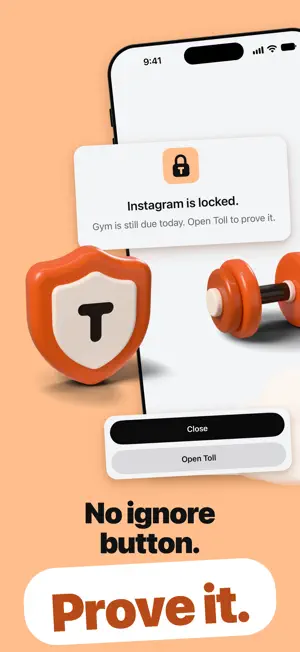
Toll locks the apps you scroll too much until you prove your habit with the camera: a workout, your desk, a book, a walk. Most screen time limits have an ignore button. Toll doesn't: prove today's habit with the camera and your apps unlock for the rest of the day. Schedules, daily limits and focus sessions you set still apply. 7 days free, then $29.99 a year. Or $5.99 a month, or $79.99 once. You pick the apps and the habit. Miss a day, and the next day starts with those apps locked until you prove it. YOUR RULES - You pick the apps. Everything else stays open: calls, Messages, your work apps. An Always open list keeps any app open, even inside a category you locked. - You pick the habits and the days. Two rest days a month keep your streak. - Need a few minutes? Up to two short breaks a day, 5 to 15 minutes each. - Delete Toll, or turn off its Screen Time access, and every lock lifts. The only exception is Strict mode, if you turn it on. WHAT MAKES IT DIFFERENT - Live camera only. No photos from your library, no box to tick. - Checked on your iPhone and never stored. Nothing is uploaded, and there is no account. - Proving today's habit lifts its lock for the rest of the day. No coins to earn, no minutes counting down. WHY I BUILT IT I kept skipping the gym and struggled to stick to eating well, so I built Toll for myself first. Charbel, the developer HOW IT WORKS - Toll locks the apps you pick with Apple's Screen Time; they stay on your Home Screen. - Pick your habits: the gym, study, reading, a run, a walk with the dog, meals, yoga, or your own. - Prove it with the live camera. By default the gym takes two photos, a check-in and a check-out at least 30 minutes apart; meals take one photo per meal. - Or skip the photo: Toll counts your time at a place you pick, like your gym, or your steps from Apple Health. - Want your apps locked every morning until that day's proof, not only after a missed day? That's one setting. - Add schedules and daily limits: work hours from 9 to 5, nights from 10 PM to 7 AM, or 45 minutes a day before the apps lock until midnight. They open by themselves. - Focus sessions from 15 minutes to 3 hours. WHAT KEEPS YOU AT IT - Day streaks, a monthly history and badges earned from what you did. - A score out of 100: the share of your habits kept over the last 7 days. STRICT WHEN YOU WANT IT Both are off until you turn them on. - PIN lock: a PIN before anything that loosens the rules, like removing apps or ending a session early. Never to prove a habit. A forgotten PIN lifts after 24 hours. - Strict mode: while your apps are locked, iOS blocks deleting Toll and your apps and keeps the date and time automatic. It ends the moment they unlock. PRIVATE - Photos are checked on your iPhone and never stored or uploaded. - No account. Your habits live on your iPhone and in your own iCloud. - No ads. Toll counts only anonymous usage, never who you are. TOLL PRO Toll needs Toll Pro. It includes everything above. - Yearly: $29.99 a year, after 7 days free. - Monthly: $5.99 a month. - Lifetime: $79.99 once, no subscription. One free week per Apple Account, on the yearly plan. Toll reminds you 2 days before the first charge. When Toll Pro ends, your Pro rules pause (up to 3 days later if your iPhone is offline) and your habits are kept. On the free plan from before version 1.2? You keep it, with its one habit. Payment is charged to your Apple Account at confirmation of purchase. Subscriptions renew automatically unless cancelled at least 24 hours before the end of the current period, and your account is charged for renewal within 24 hours before the period ends. Manage or cancel in your Apple Account settings (Settings > your name > Subscriptions). Any unused part of a free trial ends when you buy a subscription. Terms of Use: https://www.apple.com/legal/internet-services/itunes/dev/stdeula/ Privacy Policy: https://tollapp.github.io/privacy/ Requires iOS 26.1 or later and Screen Time access.
What’s new
Version 1.7.2 · Updated October 20, 2026
Small improvements and fixes.
App privacy
The developer, Sandra Kahi, reported these privacy practices to Apple.
Data Not Linked to You
The following data, which may be collected but is not linked to your identity, may be used for the following purposes:
- Purchases: Purchase History
- Usage Data: Product Interaction
- Identifiers: Device ID
- Other Data: Other Data Types
- Diagnostics: Crash Data
Used for: Developer’s Advertising or Marketing, Analytics, App Functionality
Alternatives to Toll: Habit Photos Unlock Apps
Looking for apps like Toll: Habit Photos Unlock Apps? Here are 6 similar apps on the App Store. The highest rated is Gryper: Workout & Muscle Log (5.0/5), and all 6 are free to download.
-
 Air Quality (Mx)
-
 Gryper: Workout & Muscle Log
5.0
Gryper: Workout & Muscle Log
5.0
-
 Block Apps: BlockMind
-
 Pakt: Habit Challenge
-
 PeakRoutine: Health Insights
5.0
PeakRoutine: Health Insights
5.0
-
 R-Chief Research
5.0
R-Chief Research
5.0
| App | Rating | Price | Last updated | Compare |
|---|---|---|---|---|
| Toll: Habit Photos Unlock Apps | – | Free | October 20, 2026 | |
| Air Quality (Mx) | – | Free | Oct 11, 2026 | Compare |
| Gryper: Workout & Muscle Log | 5.0 / 5 (1) | Free | Oct 17, 2026 | Compare |
| Block Apps: BlockMind | – | Free | Aug 31, 2026 | Compare |
| Pakt: Habit Challenge | – | Free | Sep 7, 2026 | Compare |
| PeakRoutine: Health Insights | 5.0 / 5 (3) | Free | Oct 20, 2026 | Compare |
| R-Chief Research | 5.0 / 5 (1) | Free | Oct 4, 2026 | Compare |