

Blur Photo - Face Blur
Armagan Gok Photo & Video iPhoneiPadiPod touch
Blur Photo - Face Blur is a free Photo & Video app for iPhone and iPad by Armagan Gok. Requires iOS 17.0. Updated September 26, 2026.
- Price
- Free
- on the App Store
- Size
- 11 MB
- Age 4+
- Updated
- Sep 26
- 2026 · v1.0
Screenshots



About Blur Photo - Face Blur
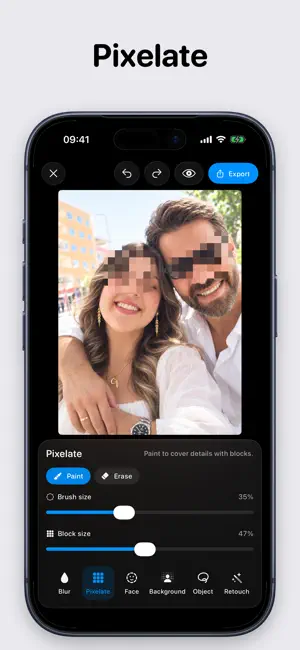
Protect private details before you post, send or save a photo. Blur Photo gives you precise controls for hiding faces, license plates, addresses, account details and anything else that should stay private. BLUR WITH PRECISION Paint directly over any part of a photo with an adjustable brush. Zoom and pan for small details, adjust the strength, erase corrections, and use undo or redo whenever you need it. FIND FACES AUTOMATICALLY Detect faces on your device, cover them together, then tap individual faces to include or exclude them. It is a fast way to anonymize group photos while keeping control over the final result. CREATE A CLEAN BACKGROUND BLUR Keep the main subject sharp while softening the background. Refine the detected area manually when the photo needs a more precise edge. CHOOSE THE RIGHT CONCEALMENT Use a soft blur, block-style pixelation or mosaic treatment. The Object tool lets you conceal a specific area by hand, while Retouch provides a gentler softening brush. PRIVATE BY DESIGN Photo editing and detection happen on your device. Your photos are not uploaded for processing, no account is required, and the original image is never modified. Blur Photo creates a separate edited copy when you export. EXPORT WITH CONTROL Save or share in JPEG or PNG. Choose standard, high or original resolution with Premium. Location metadata is removed automatically on free exports, while Premium gives you control over the setting. USE BLUR PHOTO TO: • Hide faces before posting group or family photos • Cover a license plate in a vehicle listing • Conceal names, addresses and account details in documents • Pixelate private information in screenshots • Soften a distracting background • Prepare privacy-conscious photos for sharing PREMIUM Unlock automatic face masking, background masking, mosaic styling, high and original-resolution export, unlimited exports and metadata controls. Available plans and any introductory offer are shown in the app using current App Store pricing. Privacy Policy: https://armagangok.github.io/blur-photo/privacy.html Terms of Use: https://armagangok.github.io/blur-photo/terms.html
App privacy
The developer, Armagan Gok, reported these privacy practices to Apple.
Data Not Collected
The developer does not collect any data from this app.
Alternatives to Blur Photo - Face Blur
Looking for apps like Blur Photo - Face Blur? Here are 6 similar apps on the App Store. The highest rated is Superblur: Mosaic & Blur Faces (5.0/5), and all 6 are free to download.
-
 PliumPic: Trip Photo Sharing
-
 Blurify Faces
-
 Superblur: Mosaic & Blur Faces
5.0
Superblur: Mosaic & Blur Faces
5.0
-
 Kakusu — Photo & Video Privacy
-
 FaceAway
-
 MosaCam
| App | Rating | Price | Last updated | Compare |
|---|---|---|---|---|
| Blur Photo - Face Blur | – | Free | September 26, 2026 | |
| PliumPic: Trip Photo Sharing | – | Free | Oct 5, 2026 | Compare |
| Blurify Faces | – | Free | Oct 8, 2026 | Compare |
| Superblur: Mosaic & Blur Faces | 5.0 / 5 (1) | Free | Oct 20, 2026 | Compare |
| Kakusu — Photo & Video Privacy | – | Free | Oct 20, 2026 | Compare |
| FaceAway | – | Free | Mar 15, 2026 | Compare |
| MosaCam | – | Free | Sep 18, 2026 | Compare |