

FaceAway
Soyoung Baek Photo & Video iPhoneiPadiPod touch
FaceAway is a free Photo & Video app for iPhone and iPad by Soyoung Baek. Requires iOS 13.0. Updated March 15, 2026.
- Price
- Free
- on the App Store
- Size
- 53 MB
- Age 4+
- Updated
- Mar 15
- 2026 · v1.0
Screenshots


About FaceAway
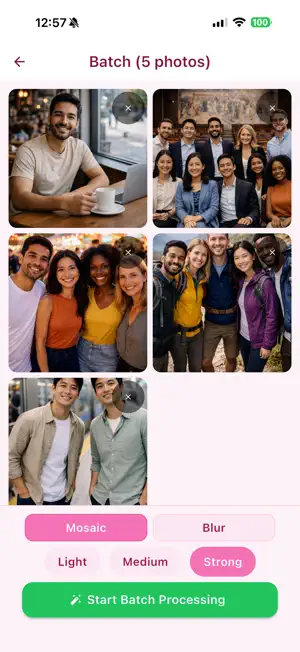
FaceAway is a privacy app that automatically detects faces in photos on your device and quickly applies a mosaic effect. There are no complicated editing tools—just choose a photo, tap or drag over the areas you want to cover, and save. Key Features - Automatic face detection - Toggle mosaic on/off with a single tap - Manually select missed areas - Supports both pixel mosaic and blur effects - 3 levels of intensity control - Batch processing for multiple photos - Save after removing location metadata Why FaceAway? - Use it right away with no sign-in. - All photo processing happens on your device. - Edit quickly without sending photos to a server. - A simple workflow focused on masking, without the complexity of full editing apps. Useful When - You want to hide faces captured in the background of marketplace photos - You want to cover some faces before sharing family or group photos - You want to directly select and hide license plates in vehicle photos or sensitive areas in document photos
App privacy
The developer, Soyoung Baek, reported these privacy practices to Apple.
Data Not Collected
The developer does not collect any data from this app.
Alternatives to FaceAway
Looking for apps like FaceAway? Here are 6 similar apps on the App Store.
-
 Blurify Faces
-
 Kakusu — Photo & Video Privacy
-
 Privacy Blur: Pixveil
-
 mosaiccy
-
 Emoji Mask Maker
-
 Make It Blurry
| App | Rating | Price | Last updated | Compare |
|---|---|---|---|---|
| FaceAway | – | Free | March 15, 2026 | |
| Blurify Faces | – | Free | Oct 8, 2026 | Compare |
| Kakusu — Photo & Video Privacy | – | Free | Oct 20, 2026 | Compare |
| Privacy Blur: Pixveil | – | Free | Jun 28, 2026 | Compare |
| mosaiccy | – | Free | Oct 15, 2026 | Compare |
| Emoji Mask Maker | – | Free | Jun 10, 2026 | Compare |
| Make It Blurry | – | Free | Jul 9, 2026 | Compare |
Compare FaceAway with the top alternatives: ratings, updates, ASO score and keyword gaps →