

Superblur: Mosaic & Blur Faces
System Operator LLC Photo & Video iPhoneiPadiPod touch
Superblur: Mosaic & Blur Faces is a free Photo & Video app for iPhone and iPad by System Operator LLC. Rated 5.0/5 from 1 ratings. Requires iOS 27.0.
- Rating
- 5.0
- 1 ratings
- Price
- Free
- on the App Store
- Size
- 17 MB
- Age 4+
- Updated
- Oct 20
- 2026 · v1.5
Screenshots
About Superblur: Mosaic & Blur Faces
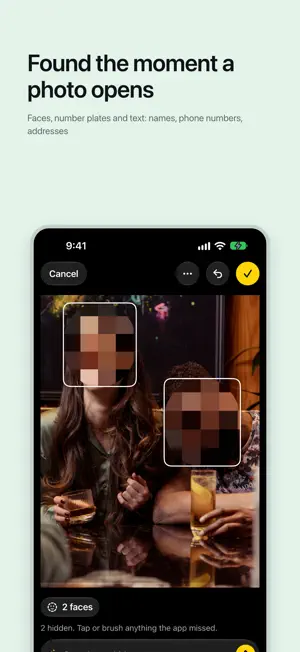
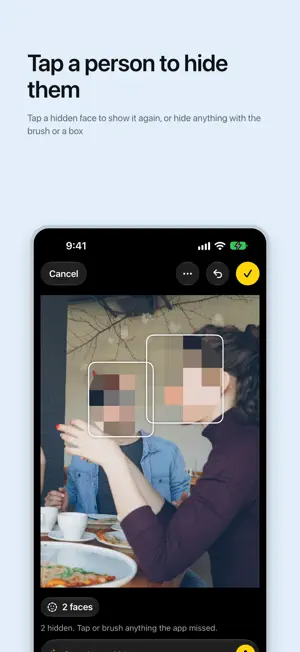
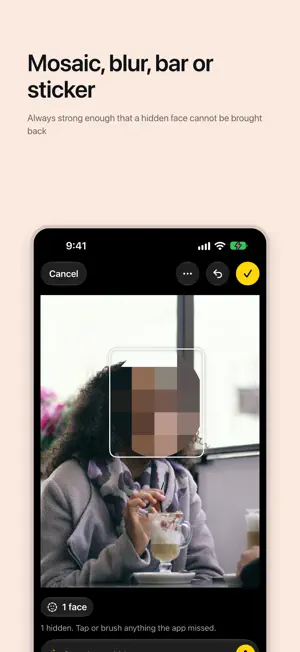
Superblur hides faces, number plates, names and addresses in your photos and videos before you share them. It finds them by itself, you tap to change its mind, and your photos never leave your iPhone. - faces, number plates and text (names, phone numbers, addresses) are found the moment a photo opens - tap a person to hide them, tap a hidden face to show it again, or hide anything with the brush or a box - mosaic, blur, bar or sticker, always strong enough that a hidden face cannot be brought back - save a copy with the location removed, or replace the original as an edit Photos can revert - videos: one row per person, shown or hidden for the whole clip - batches of up to 10 photos, with the uncertain ones marked Check - from Photos' own Edit menu, the share sheet (one photo, up to ten, or a video), Control Center, Shortcuts and Siri, Visual Intelligence, Messages and an App Clip - no account, no upload, no watermark, no ads and no limit Superblur Pro is one purchase, no subscription. It adds the people you keep (faces grouped into people on your iPhone: the ones you keep stay visible, everyone else is hidden), say what to hide in your own words, posting to a shared album, long videos by scene, and batches over 10 photos. Everything runs on your iPhone. Superblur has no account and never uploads a photo, a face, a name or a place.
What’s new
Version 1.5 · Updated October 20, 2026
The first screen hands you a photo to try: its faces are already hidden, and one tap brings a face back. Then pick one of your own. Eyes is a new style: a black bar across the eyes of every face, turned with the head. A switch covers the mouth too. With Superblur Pro, long-press a person and choose Hide Everything Around Them: the background, other people and signs are hidden, and that person stays clear.
App privacy
The developer, System Operator LLC, reported these privacy practices to Apple.
Data Linked to You
The following data, which may be collected and linked to your identity, may be used for the following purposes:
- Contact Info: Email Address
- User Content: Customer Support
Used for: App Functionality
Data Not Linked to You
The following data, which may be collected but is not linked to your identity, may be used for the following purposes:
- Usage Data: Product Interaction, Advertising Data
- Diagnostics: Other Diagnostic Data, Crash Data, Performance Data
Used for: Analytics, App Functionality
Alternatives to Superblur: Mosaic & Blur Faces
Looking for apps like Superblur: Mosaic & Blur Faces? Here are 6 similar apps on the App Store.
-
 Sajin: AI Darkroom
-
 TapMask
-
 Blur Photo - Face Blur
-
 Blur Video · Blurro
-
 かんたんAI顔モザイク - プライバシー保護をもっと簡単に
-
 mosaiccy
| App | Rating | Price | Last updated | Compare |
|---|---|---|---|---|
| Superblur: Mosaic & Blur Faces | 5.0 / 5 (1 rating) | Free | October 20, 2026 | |
| Sajin: AI Darkroom | – | Free | Oct 2, 2026 | Compare |
| TapMask | – | Free | Jul 28, 2026 | Compare |
| Blur Photo - Face Blur | – | Free | Sep 26, 2026 | Compare |
| Blur Video · Blurro | – | Free | Oct 15, 2026 | Compare |
| かんたんAI顔モザイク - プライバシー保護をもっと簡単に | – | Free | Oct 4, 2025 | Compare |
| mosaiccy | – | Free | Oct 15, 2026 | Compare |