

ScanChat PDF
Chirag Gohil Productivity iPhoneiPadiPod touch
ScanChat PDF is a free Productivity app for iPhone and iPad by Chirag Gohil. Requires iOS 16.0. Updated October 14, 2026.
- Price
- Free
- on the App Store
- Size
- 14 MB
- Age 4+
- Updated
- Oct 14
- 2026 · v1.3
Screenshots


About ScanChat PDF
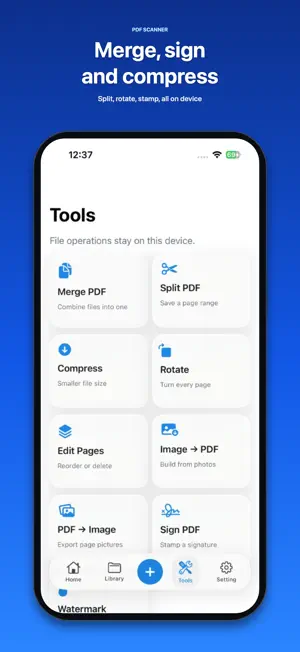
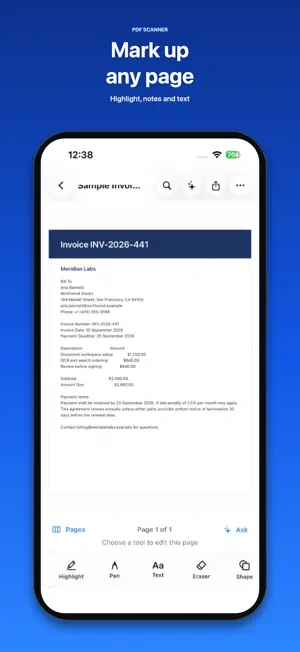
ScanChat PDF is a scanner, PDF editor and on-device AI reader. Scan a page, open a file, ask a question, sign it, or stamp a watermark — without creating an account. SCAN & SEARCH • Scan documents with the camera and turn pages into searchable PDFs • Import PDFs from Files, or build a PDF from photos • Search file names and text inside your library • OCR runs on this device when a page has little text CHAT WITH ANY PDF • Ask a question and jump to the page • Summarize, extract names, dates, amounts and invoice fields • Conversations stay with the document • The message box stays above the keyboard while you type • No cloud login for chat or search EDIT & MARKUP • Highlight, pen, text, eraser and shapes • Draw on any page, then share or export • Ask the PDF while you read PDF TOOLS ON THIS DEVICE • Merge two or more PDFs • Split a page range into a new file • Compress with a clear quality percent • Rotate pages one by one • Edit pages: reorder, delete, move • Image to PDF and PDF to image • Draw a signature, drag it into place, save • Watermark: large diagonal text, pick font and size PRIVATE BY DESIGN • Documents, OCR text, notes and chat stay on this iPhone or iPad • Camera is used only when you scan • Photos are used only when you import or export images • Ads may appear in the free version. Go Premium to remove them. Your documents stay on this device. Made for work, study and everyday paperwork — invoices, IDs, notes, contracts and scans — in one simple library. Terms of Use (EULA): https://www.apple.com/legal/internet-services/itunes/dev/stdeula/ Privacy Policy: https://gohilchirag.blogspot.com/2026/09/scanchat-pdf.html
What’s new
Version 1.3 · Updated October 14, 2026
This update makes everyday PDF work smoother. • The AI chat box now stays above the keyboard • Adding a file from the camera, Files, or Photos is cleaner • Fixes across reading, signing, and PDF tools
App privacy
The developer, Chirag Gohil, reported these privacy practices to Apple.
Data Used to Track You
The following data may be used to track you across apps and websites owned by other companies:
- Usage Data: Advertising Data
Data Not Linked to You
The following data, which may be collected but is not linked to your identity, may be used for the following purposes:
- Usage Data: Advertising Data
- Other Data: Other Data Types
Used for: Developer’s Advertising or Marketing, Other Purposes
Alternatives to ScanChat PDF
Looking for apps like ScanChat PDF? Here are 6 similar apps on the App Store. The highest rated is Remove PDF Pages : PDF Tools (5.0/5), and all 6 are free to download.
-
 Compress PDF: Smaller Files
-
 Color Scanner - Paletix
-
 PDF Reader Pro - Ebook Reader
-
 Remove PDF Pages : PDF Tools
5.0
Remove PDF Pages : PDF Tools
5.0
-
 PDF Scanner & Scan Document
4.0
PDF Scanner & Scan Document
4.0
-
 Scan & Sign PDF Scanner
| App | Rating | Price | Last updated | Compare |
|---|---|---|---|---|
| ScanChat PDF | – | Free | October 14, 2026 | |
| Compress PDF: Smaller Files | – | Free | Sep 29, 2026 | Compare |
| Color Scanner - Paletix | – | Free | Aug 27, 2026 | Compare |
| PDF Reader Pro - Ebook Reader | – | Free | Jul 17, 2024 | Compare |
| Remove PDF Pages : PDF Tools | 5.0 / 5 (3) | Free | May 5, 2026 | Compare |
| PDF Scanner & Scan Document | 4.0 / 5 (5) | Free | Oct 9, 2026 | Compare |
| Scan & Sign PDF Scanner | – | Free | Sep 3, 2026 | Compare |
Compare ScanChat PDF with the top alternatives: ratings, updates, ASO score and keyword gaps →