

Scan & Sign PDF Scanner
END ONLINE SLU Productivity iPhoneiPadiPod touch
Scan & Sign PDF Scanner is a free Productivity app for iPhone and iPad by END ONLINE SLU. Requires iOS 18.0. Updated September 3, 2026.
- Price
- Free
- on the App Store
- Size
- 8 MB
- Age 4+
- Updated
- Sep 3
- 2026 · v1.0.2
Screenshots
About Scan & Sign PDF Scanner
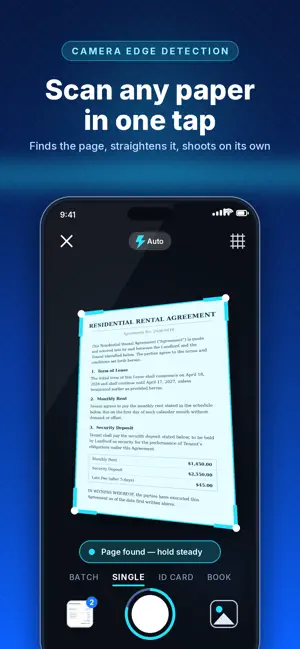
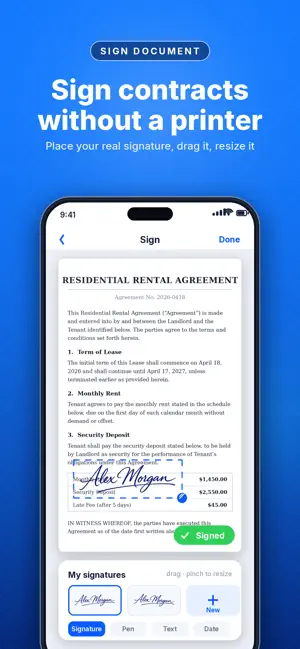
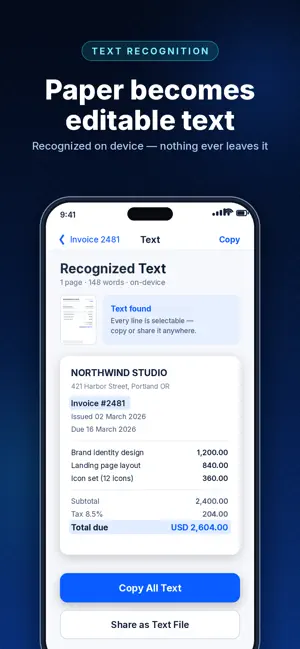
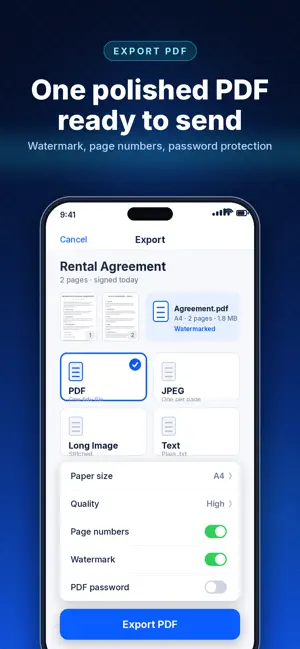
Scan & Sign turns your iPhone into a pocket scanner. Point the camera at any page - the edges are found automatically, the perspective is corrected, and you get a crisp, straight scan in seconds. Sign it, export it as a PDF, and keep everything organized. EVERYTHING STAYS ON YOUR DEVICE Capture, image processing and text recognition all run offline on your iPhone. Your documents are never uploaded to a server. FIVE CAPTURE MODES - Single: one clean page at a time - Batch: keep shooting and build a multi-page document - ID Card: front and back laid out on a single page - Book: facing pages split automatically - QR & Barcode: read, copy, open or share SHARP, READABLE SCANS Live edge detection with an auto-shutter that fires when the page is framed and steady. Fine-tune the four corners by hand, rotate, then pick a filter: Original, Magic Color, Grayscale or Black & White. Brightness and contrast sliders for the difficult pages. SIGN AND ANNOTATE Draw your signature once and reuse it forever. Drop it on any page, then drag and resize it exactly where it belongs. Or annotate freehand in three colors and three widths. TEXT RECOGNITION Pull the text out of any page with on-device OCR - copy it, share it, or search your whole library by the words inside your scans. EXPORT THE WAY YOU NEED - Multi-page PDF - One JPEG per page - A single stitched long image - Plain text file Choose paper size and quality, add page numbers, a diagonal watermark, or a password to protect the PDF. STAY ORGANIZED Folders, tags, starred documents, search, duplicate, merge and reorder pages. Grid or list view. A 30-day Trash so nothing disappears by accident. PERFECT FOR Contracts and agreements, receipts and invoices, IDs and passports, handwritten notes, whiteboards, homework, books and articles, and any form that needs a signature. SCAN & SIGN PRO Pro unlocks unlimited scanning, every capture mode, photo import, all export formats, text recognition, signing, page editing and organizing. - $9.99 per week with a 3-day free trial - Cancel anytime in your App Store settings Payment is charged to your Apple ID at the end of the free trial. The subscription renews automatically unless it is cancelled at least 24 hours before the end of the current period. You can manage or cancel it in your App Store account settings. https://www.apple.com/legal/internet-services/itunes/dev/stdeula/
What’s new
Version 1.0.2 · Updated September 3, 2026
bug solved
App privacy
The developer, END ONLINE SLU, reported these privacy practices to Apple.
Data Not Linked to You
The following data, which may be collected but is not linked to your identity, may be used for the following purposes:
- Purchases: Purchase History
- Identifiers: Device ID
- Usage Data: Product Interaction
Used for: Analytics, App Functionality
Alternatives to Scan & Sign PDF Scanner
Looking for apps like Scan & Sign PDF Scanner? Here are 6 similar apps on the App Store. The highest rated is PDF Scanner & Scan Document (4.0/5), and all 6 are free to download.
-
 PDF Scanner : Photo to PDF App
-
 Document Reader: PDF, DOC, PPT
-
 PDF Scanner & Scan Document
4.0
PDF Scanner & Scan Document
4.0
-
 Scanner • PDF Document Scanner
3.7
Scanner • PDF Document Scanner
3.7
-
 PDF Scanner: Doc & OCR
1.0
PDF Scanner: Doc & OCR
1.0
-
 VoicePDF: Scan and Record
| App | Rating | Price | Last updated | Compare |
|---|---|---|---|---|
| Scan & Sign PDF Scanner | – | Free | September 3, 2026 | |
| PDF Scanner : Photo to PDF App | – | Free | Oct 1, 2026 | Compare |
| Document Reader: PDF, DOC, PPT | – | Free | Mar 6, 2026 | Compare |
| PDF Scanner & Scan Document | 4.0 / 5 (5) | Free | Oct 9, 2026 | Compare |
| Scanner • PDF Document Scanner | 3.7 / 5 (3) | Free | Jan 26, 2026 | Compare |
| PDF Scanner: Doc & OCR | 1.0 / 5 (1) | Free | Sep 9, 2026 | Compare |
| VoicePDF: Scan and Record | – | Free | Jul 22, 2026 | Compare |